



Answered
Find Topic Doesn’t Work for Priorities
In the Topic List pod I want to Find Topics by priority but it doesn’t work. Here’s what I’m doing:
1. Ensure at least one topic has a priority of ‘1’.
2. Click on the Find Topic icon and select the Advanced tab.
3. Enter a string in the File Name Includes field (e.g., reports) that returns a set of Found Topics that include the topic I have set to priority ‘1’. At this stage, I can see in the Found Topics that it is actually priority ‘1’ (see first image below).
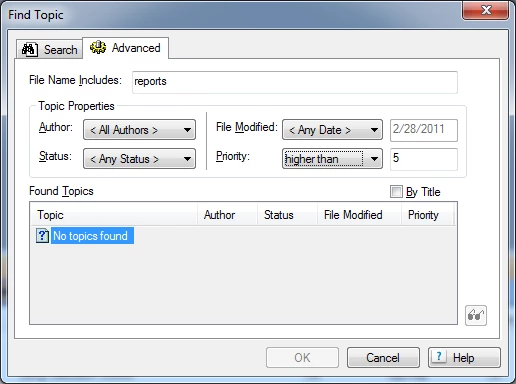
4. Change the priority dropdown to ‘higher than’ and leave the corresponding text field set to ‘5’.
The result is ‘No topics found’ (see second image below). 
I’m hoping someone can point me in the right direction. I’m using RoboHelp 9.0.0.228.

 AdChoices