

Has anyone used Tools | CSH | Open CSH Help successfully?
I'm talking about this
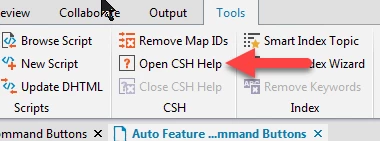
With this tool you can apparently have RH run your application and enjoy a more dynamic context mapping experience by accessing a dialog box directly in the app, pressing F1 and then mapping it within RH.
This is something we'd LOVE to use, but frustratingly so, for multiple versions, it never works.
We have:
RH 2015, latest patch
Windows 64-bit Computer
Our product we support is a C++ app
The topic "Dynamic editing of context-senstive topics" in RH's own help file is where this is discussed.
Under "Usage Scenarios", it says:
"Dynamic context-sensitive mapping of dialog boxes and topics eliminates the need for technical authors to manually keep track of map IDs. Instead, technical authors can open the application and associate the relevant Help topic dynamically with a dialog box."
The topic, "Map an application dialog box with a topic" explains how to do this:
1) Open the Help project for the application in RoboHelp.
2) Click Tools > CSH > Open CSH Help.
3) Browse and select the executable file (.exe) for the application. Click Open.
4) Once the application has launched, browse to an application dialog box with context-sensitive Help mapping. Press F1 or click the Help button.
Once the application has launched, browse to an application dialog box with context-sensitive Help mapping. Press F1 or click the Help button.
5) In the CSH Options dialog box in RoboHelp, select a map file from the Project Map File pop-up menu.
NOTE: The CSH Options dialog box appears only if you launched the application from within RoboHelp using Tools > CSH > Open CSH Help.
But for me it never works. I can get it to run the application, but nothing opens up in RoboHelp when I press F1, even though F1 clearly works and navigates to topics appropriately in our help.
The help doesn't give a lot of info on what to do to get this setup and working properly. Ideas?


 AdChoices