


Participating Frequently
March 17, 2021
Question

How many folders can you add to the Author>Contents panel?

  • March 17, 2021
  • 14 replies
  • 224 views

Have many Word documents that I'll be adding to a brand new project (RH2020.3.32). 

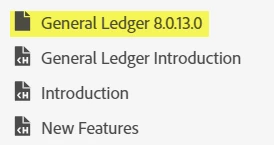
Added seven (7) folders for various company software modules. Ran into a problem when I added the 8th folder for a General Ledger Word document and started adding topics to that folder...the "folder" seemed to be a section. I could not view the the two topics I added from the Author>Contents panel. When I located the files in Explorer, I could view the General Ledger folder and the two topics that were added. Is the way RH is meant to work?

Any recommendations or workarounds?

Ideally, I'd like to keep everything organized as I'm also learning both RH again as well as the company software, and I'd like to have a folder for each Word document to stay organized. I may need 30 or more folders. Is that possible? 
 

[image added by moderator - please use image icon in web interface instead of attachments]

This topic has been closed for replies.

14 replies

Peter Grainge
Community Expert
Community Expert
March 25, 2021

Someone marked a post as a correct answer but it wasn't an answer. 🙂


Please mark whatever is regarded as the correct answer.

________________________________________________________
See www.grainge.org for free Authoring and RoboHelp Information

Use the menu (bottom right) to mark the Best Answer or Highlight particularly useful replies. Found the answer elsewhere? Share it here.
VeronicaJAuthor
Participating Frequently
March 17, 2021

Okay, thanks for your help! Still don't understand why this was created when I was adding a folder. I'm deleting that file now. Thanks so much!

VeronicaJAuthor
Participating Frequently
March 17, 2021

Properties for General Ledger


Peter Grainge
Community Expert
Community Expert
March 17, 2021

Finally found it. That icon shows when I have a DOTX file in the project.

________________________________________________________
See www.grainge.org for free Authoring and RoboHelp Information

Use the menu (bottom right) to mark the Best Answer or Highlight particularly useful replies. Found the answer elsewhere? Share it here.
Peter Grainge
Community Expert
Community Expert
March 17, 2021

Good spot Jeff, it's not a folder icon. 


@VeronicaJ If you click on it and look in Properties on the right, what information does that give you.

________________________________________________________
See www.grainge.org for free Authoring and RoboHelp Information

Use the menu (bottom right) to mark the Best Answer or Highlight particularly useful replies. Found the answer elsewhere? Share it here.
Jeff_Coatsworth
Community Expert
Community Expert
March 17, 2021

That's because it's not showing it as a folder - that icon has more of a "document" look to it, rather than "folder" - what are the Properties of it?

VeronicaJAuthor
Participating Frequently
March 17, 2021

Right click the "empty" folder and select Import > HTML Topic. Import the missing topics. Assuming that works, close and reopen the project to be sure it has stuck. If only that were an option (see menu below).


Peter Grainge
Community Expert
Community Expert
March 17, 2021

Has the project been closed and reopened while this has been ongoing? Worth a try if not but I doubt it will help.


Zip up the project in its present format so that if further investigation is needed, you have the project in its current format.


Right click the "empty" folder and select Import > HTML Topic. Import the missing topics. Assuming that works, close and reopen the project to be sure it has stuck.

________________________________________________________
See www.grainge.org for free Authoring and RoboHelp Information

Use the menu (bottom right) to mark the Best Answer or Highlight particularly useful replies. Found the answer elsewhere? Share it here.
VeronicaJAuthor
Participating Frequently
March 17, 2021

New test file

It seems everything is working well. What would be the next step?

Peter Grainge
Community Expert
Community Expert
March 17, 2021

This is something I have seen reported. I think the first step would be to create a new project and in that just create a handful of topics. That is to see if you are having a general issue or just in the project you are working on.


Post back and we can take it from there.

________________________________________________________
See www.grainge.org for free Authoring and RoboHelp Information

Use the menu (bottom right) to mark the Best Answer or Highlight particularly useful replies. Found the answer elsewhere? Share it here.