


Inspiring
April 18, 2023
Answered

How to import conditional tags from FrameMaker to RoboHelp?

  • April 18, 2023
  • 4 replies
  • 905 views

Is there a way to import conditional tags, when importing FrameMaker documents to RoboHelp?
For example, I have a lot of text in my FrameMaker document that has conditions applied to it. When I import the document, the text is there in RoboHelp, but it does not have any conditions on it, and it is indistinguishable from the regular content. I don't see any way to map FrameMaker conditions to RoboHelp conditions when I do the import.

I'm using RoboHelp 2022.2.22, and FrameMaker 2020 (though I could upgrade to 2022 if that will help the situation).  

If it is not possible to import the conditions, does anyone have any recommendations?  Here are my initial thoughts:

  1. In FramMaker, find all the conditional text and apply a new/different paragraph style to it.
  2. In Robohelp, create a corresponding paragraph style, that looks very different from regular text.
  3. When importing from Frame to RoboHelp, map the two styles to each other.
  4. In RoboHelp, find all text with the new style, apply the desired condition, and then apply the proper paragraph style to make the text blend with the other text. [but even this step seems difficult, as I don't see any way to search for a paragraph style in RoboHelp. ]


Which leads to my next question: the find/replace functionality seems very weak in RoboHelp. In Frame, you can search for text using a particluar paragraph tag, character tag, or condition... You can search for  cross references, unresolved cross refernces, specific markers (index, topic alias, etc), and the list goes on..  But in RoboHelp, I don't see any of that functionality.  It looks like the only thing you can search for is a text phrase??
    This topic has been closed for replies.
    Correct answer Lori280360615kh6

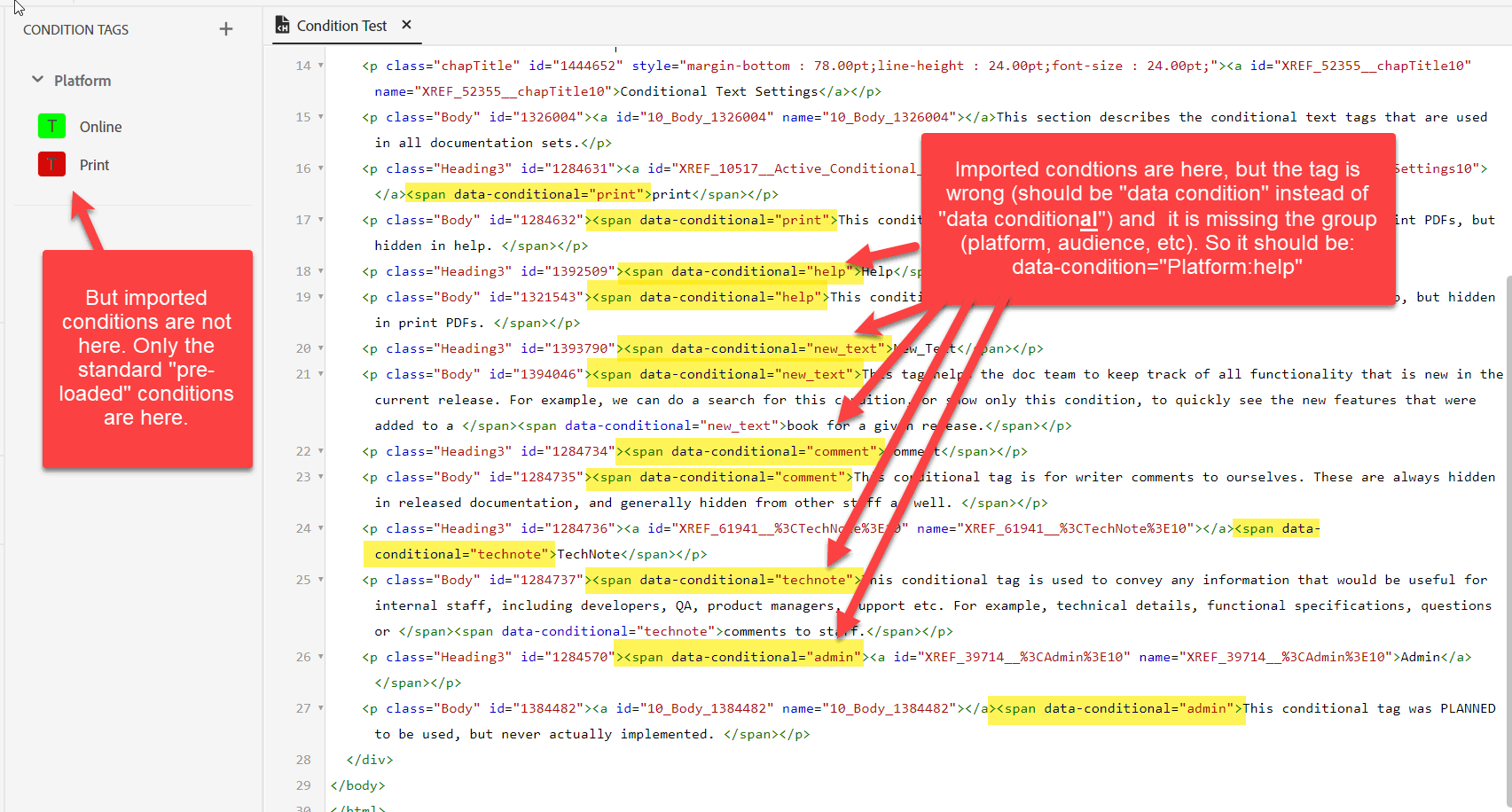
    Ok, I think I have found the problem. When it converts the FrameMaker document, it is not converting it properly. When I look at the HTML/Source view, there are conditions applied, but they are applied incorrectly. Here is an example of how it gets converted:
    <span data-conditional="technote">This conditional tag is used to convey any information that would be useful for internal staff. </span>

    There are three problems:

    1. "span data-conditional"  is supposed to be "span data-condition"
    2. There is no group such as "audience," "platform," in the statement, as in: <span data-condition="Audience: technote">. 
    3. The condition never gets created in the Conditinal Tags list in RH.

    So to fix this, I had to:

    1.  Manually create the "technote" condition myself as a condition under Conditional Tags.
    2. Find this: <span data-conditional="technote">
    3. And replace it with this: <span data-condition="Audience:technote"> 

    What should REALLY happen here, is you should create your conditions in RH first (assigning a Group to each one), then during the import, you should be able to map your Frame condtions (which won't have a group) to your RH conditions (which will have a group). And of course, they need to fix the "data-conditional" to "data-condition"

    4 replies

    Lori280360615kh6AuthorCorrect answer
    Inspiring
    April 19, 2023

    Ok, I think I have found the problem. When it converts the FrameMaker document, it is not converting it properly. When I look at the HTML/Source view, there are conditions applied, but they are applied incorrectly. Here is an example of how it gets converted:
    <span data-conditional="technote">This conditional tag is used to convey any information that would be useful for internal staff. </span>

    There are three problems:

    1. "span data-conditional"  is supposed to be "span data-condition"
    2. There is no group such as "audience," "platform," in the statement, as in: <span data-condition="Audience: technote">. 
    3. The condition never gets created in the Conditinal Tags list in RH.

    So to fix this, I had to:

    1.  Manually create the "technote" condition myself as a condition under Conditional Tags.
    2. Find this: <span data-conditional="technote">
    3. And replace it with this: <span data-condition="Audience:technote"> 

    What should REALLY happen here, is you should create your conditions in RH first (assigning a Group to each one), then during the import, you should be able to map your Frame condtions (which won't have a group) to your RH conditions (which will have a group). And of course, they need to fix the "data-conditional" to "data-condition"

    Inspiring
    April 19, 2023

    I forgot to say, that once I made all of these changes, the condition colors started showing up in Author view, and I could now show/hide various conditions, use conditional expressions, etc. Before I made the changes above, none of that was possible. 

    Jeff_Coatsworth
    Community Expert
    Community Expert
    April 19, 2023

    Just had a look at one of my FM to RH projects (back in RH11) - the HTML view shows this
    <?rh-cbt_start condition="HelpOnly" ?>
    as the tag that starts a conditional content tag coming from my FM content.

    Peter Grainge
    Community Expert
    Community Expert
    April 19, 2023

    On the Search issue, there is a Find in Source View setting. Is that not giving you what you want?

    ________________________________________________________

    My site www.grainge.org includes many free Authoring and RoboHelp resources that may be of help.


    Help others by clicking Correct Answer if the question is answered. Found the answer elsewhere? Share it here. "Upvote" is for useful posts.
    Inspiring
    April 19, 2023

    Hi Peter, 
    Thanks for pointing out the Search in Source View.  So yes, I see that you can search more discreetly in the Source View, but I think it would be a lot nicer to be able to search for things like paragarph styles, conditions, character styles, etc, in Author View...  Maybe it's just because I am new to RH, and spoiled by FrameMaker, but IMHO, sifting through HTML code is a lot more difficult and harder on the eyes. 

    Community Expert
    April 19, 2023

    Check under the View > Show menu to see if you have the condition tags formatting set to be displayed. It's configurable because sometimes all the extra formatting makes it hard to concentrate.

    Jeff_Coatsworth
    Community Expert
    Community Expert
    April 18, 2023

    Your conditions should come over from FM - just make sure that you haven't applied any Show/Hide settings to the content in FM before importing. You should see the conditional tags in the HTML view of topics. What you will have to do to use them is create Conditional expressions - the single CBTs of Classic imports don't apply anymore in the New UI.

    Inspiring
    April 18, 2023

    I confirmed that I have "Show All" set in the Frame document before I do the import...


    And yes, I do see the condition tags in the HTML/Source view of the topic. But they don't show up in the regular "Author" view, so how do I see what conditions are applied to which sections of text, without checking the HTML? 


    Also, the conditions themselves are not shown in the list of conditions under Author > Condition Tags. I tried creating the conditions under Author > Conditition, using the same names that I see in the HTML/Source view.  Then I created a conditional expression (Output > Conditional Expression), and used that expression when I generated the output, but it did not have any effect.