



Is Hide in output the same as elevator door close button
RH v 2022.3.93
I have an existing RH Project that has been migrated from numerous different versions of RH over the years and I'm now facing yet another migration nightmare around using Book vs Online TOC.
My desire is to have my RH Project produce a PDF that starts with a Cover page then has a Contact Us page then the TOC followed by the actual content. However I do not need or want the Contact Us page to appear in the TOC. For some reason no matter how hard or how many times I check the "Hide in output" checkbox for the Contact Us page it still appears in the TOC. Is that option more of an emotional support checkbox or something? I have even examined the xml of the TOC and saw processing-role="resource-only" for the specific page, but it still gets listed in the TOC. I even took a sample RH project (Two Cover Pages one) from a post by Peter Grainge, changed the TOC to Book, added the TOC to the Front Matter and it shows the CoverPage2 in the TOC. In the below example both CoverPage2 and First Topic are set to processing-role="resource-only" or "Hide in output" option from the UI.
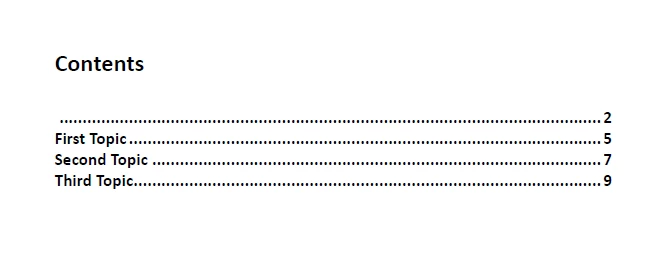
Seems like this is a bug to me, but is there any workaround to this? It also messes up the Auto Number Headings I want to apply to the output file, but one problem at a time.
Thanks,
Adam

 AdChoices