
Participant
October 27, 2022
Question

Managing multiple versions and adding them to navigation

  • October 27, 2022
  • 4 replies
  • 212 views

1. What is the best way to maintain documentation for multiple versions of products?
2. How can we make corresponding versions of the doc accessible to the user from the output?
Preferably by adding a dropdown listing all versions in the Top Nav (Header Links in the Frameless Skin). 
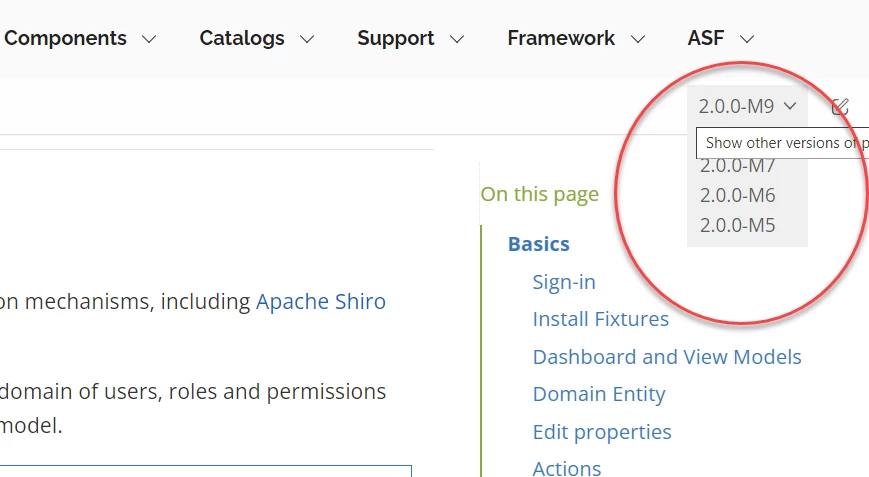
OR something like we see here.

    This topic has been closed for replies.

    4 replies

    Peter Grainge
    Community Expert
    Community Expert
    October 28, 2022

    Your link is to a site that has been designed in a very different tool requiring a knowledge of tools such as Dreamweaver. They allow those with the skills to create any website.


    RoboHelp simplifies that task and provides various features such as being able to create builds with different content, search functionality, browse sequences and so on. All things you would have to code yourself.


    Top Navigation offers a degree of dropdown but it doesn't work too well with big TOCs. Those dropdowns are functionally the same as the TOC I pointed you too. 

    ________________________________________________________

    My site www.grainge.org includes many free Authoring and RoboHelp resources that may be of help.


    Use the menu (bottom right) to mark the Best Answer or Highlight particularly useful replies. Found the answer elsewhere? Share it here.
    Peter Grainge
    Community Expert
    Community Expert
    October 28, 2022

    In terms of multiple versions, see RoboHelp Tour Introduction (grainge.org). That is effectively different versions. You could have a menu where they all sit under one heading and then have headings for other content.


    Like @Jeff_Coatsworth I don't get why you are mixing two tools to generate content.

    ________________________________________________________

    My site www.grainge.org includes many free Authoring and RoboHelp resources that may be of help.


    Use the menu (bottom right) to mark the Best Answer or Highlight particularly useful replies. Found the answer elsewhere? Share it here.
    Participant
    October 28, 2022

    Thank you @Jeff_Coatsworth and @Peter Grainge 
    I shall check this solution suggested by  @Peter Grainge  My present organization isn't using Antora. I was citing it to help you understand my exact requirement. Apologies if it has led to confusion. 

    Jeff_Coatsworth
    Community Expert
    Community Expert
    October 28, 2022

    I'm sorry, but are you already using Antorra to generate help content sites? Why would you be using RH in that case? Wouldn't all your content be authored in Markdown or ASCIIDoc or something more "docs-as-code"?

    Jeff_Coatsworth
    Community Expert
    Community Expert
    October 27, 2022

    Ok, so that page was built using Antorra - totally different toolset than RH. Maybe Dynamic Content Filtering or merged help might work - see https://www.grainge.org/pages/authoring/rh_tour/rh2022/outputs/dynamic_content.htm and https://www.grainge.org/pages/authoring/rh_tour/rh2022/authoring/merged_help.htm

    Participant
    October 28, 2022

    Hi Jeff,

    Thank you for your reply.

    We publish the output to a repo with a commit message, which changes with each version like v01, v02. Each time we push the changes to the repo it creates the corresponding folder structure in the IIS site's root directory so that users can change only the version name in the URL.

    In Antora also, based on the branch/ version we set in the antora.yml the output is generated in the respective directory. We have set our Azure DevOps pipeline as follows.

    Solution 1: I didn't understand how it could be used for my use case.

    Solution 2: Merged help. Doesn't it require that we maintain child projects for each version?
    How can we get separate TOC for child pages?