


Known Participant
November 16, 2021
Answered

Not accepting JavaScript && function

  • November 16, 2021
  • 2 replies
  • 748 views

I am customizing a topic in RH (2020.4.173 version) which requires typing in a JavaScript function that uses the operator &&, but the system will not allow me to use it because it says that & is an "invalid character". 

Is there another way of expressing the logical AND function in RoboHelp? BTW, this was not a problem with the same function and the same topic in RH2019. 

This is the function:

function threeShow(card01, card02, card03) {
var a = document.getElementById(card01);
var b = document.getElementById(card02);
var c = document.getElementById(card03);
if (a.style.display == "none" && b.style.display == "none" && c.style.display == "none") {
a.style.display = "block";
b.style.display = "block";
c.style.display = "block";
} else {
if (a.style.display == "block" && b.style.display == "block" && c.style.display == "block") {
a.style.display = "none";
b.style.display = "none";
c.style.display = "none";
}
}
}
    This topic has been closed for replies.
    Correct answer Stefan Gentz

    && is allowed in JavaScript, but not in HTML (as it opens an entity like in &) – therefore RoboHelp's HTML validator throws this error.

    You can hide your code from the HTML validator by wrapping it:


    /*<![CDATA[*/  (code)  /*]]>*/


    Like this:


    <script type="text/javascript">
      /*<![CDATA[*/
      function threeShow(card01, card02, card03) {
         var a = document.getElementById(card01);
         var b = document.getElementById(card02);
         var c = document.getElementById(card03);
         if (a.style.display == "none" && b.style.display == "none" && c.style.display == "none") {
            a.style.display = "block";
            b.style.display = "block";
            c.style.display = "block";
         } else {
            if (a.style.display == "block" && b.style.display == "block" && c.style.display == "block") {
               a.style.display = "none";
               b.style.display = "none";
               c.style.display = "none";
            }
         }
      }
      /*]]>*/
    </script>


    However, generally said, it's better to outsource the JavaScript into an external file, and than link it into the topic, just like you do it with CSS files as a best practice as well:


    <?xml version="1.0" encoding="UTF-8"?>
    <!DOCTYPE html>
    <html xmlns="http://www.w3.org/1999/xhtml">
       <head>
          <title>Link the JavaScript File instead of embedding it into the HTML document</title>
          <script src="../../assets/js/threeShow.js" type="text/javascript"></script>
       </head>
       <body>
          <div id="card01">foo</div>
          <div id="card02">foo</div>
          <div id="card03">foo</div>
       </body>
    </html>


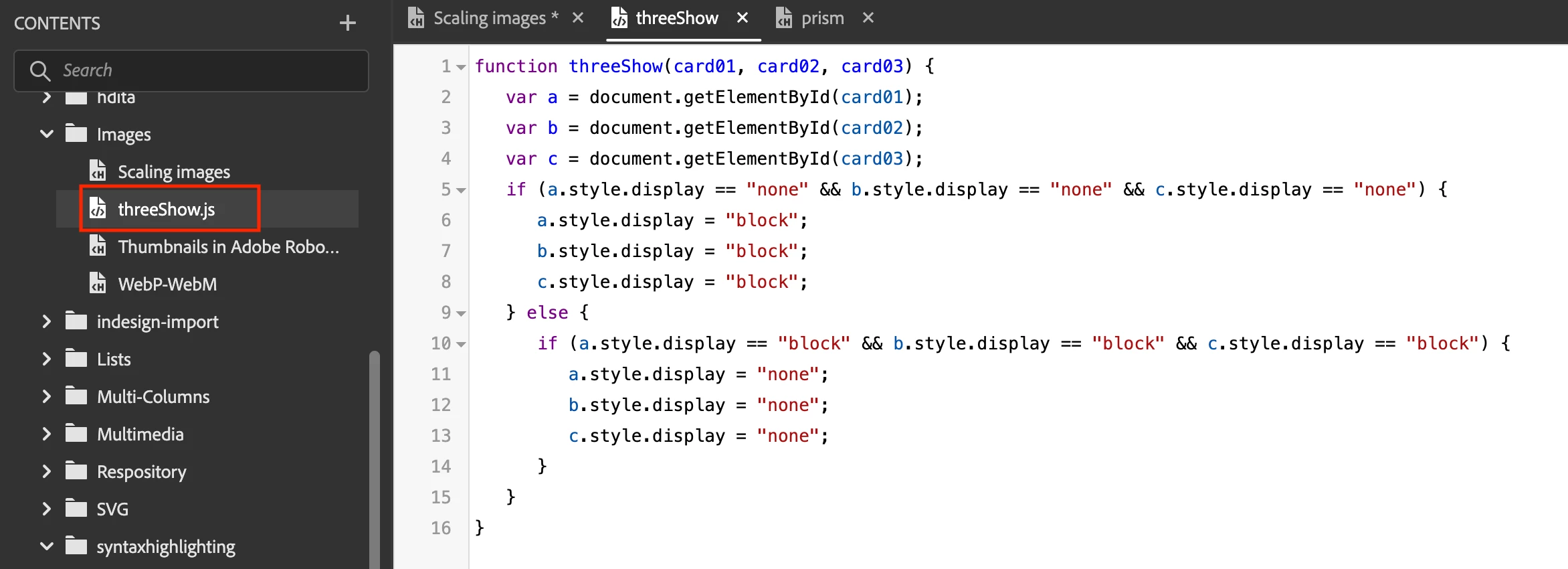
    Another advantage of this is also, that you can take advantage of RoboHelp's syntax-highlighting of Javascript&colon;


    2 replies

    Stefan GentzCommunity ManagerCorrect answer
    Community Manager
    November 16, 2021

    && is allowed in JavaScript, but not in HTML (as it opens an entity like in &amp;) – therefore RoboHelp's HTML validator throws this error.

    You can hide your code from the HTML validator by wrapping it:


    /*<![CDATA[*/  (code)  /*]]>*/


    Like this:


    <script type="text/javascript">
      /*<![CDATA[*/
      function threeShow(card01, card02, card03) {
         var a = document.getElementById(card01);
         var b = document.getElementById(card02);
         var c = document.getElementById(card03);
         if (a.style.display == "none" && b.style.display == "none" && c.style.display == "none") {
            a.style.display = "block";
            b.style.display = "block";
            c.style.display = "block";
         } else {
            if (a.style.display == "block" && b.style.display == "block" && c.style.display == "block") {
               a.style.display = "none";
               b.style.display = "none";
               c.style.display = "none";
            }
         }
      }
      /*]]>*/
    </script>


    However, generally said, it's better to outsource the JavaScript into an external file, and than link it into the topic, just like you do it with CSS files as a best practice as well:


    <?xml version="1.0" encoding="UTF-8"?>
    <!DOCTYPE html>
    <html xmlns="http://www.w3.org/1999/xhtml">
       <head>
          <title>Link the JavaScript File instead of embedding it into the HTML document</title>
          <script src="../../assets/js/threeShow.js" type="text/javascript"></script>
       </head>
       <body>
          <div id="card01">foo</div>
          <div id="card02">foo</div>
          <div id="card03">foo</div>
       </body>
    </html>


    Another advantage of this is also, that you can take advantage of RoboHelp's syntax-highlighting of Javascript&colon;


    mjgmAuthor
    Known Participant
    November 16, 2021

    Thank you so much for your guidance! Your explanation makes a lot of sense. I did have the function inside the <script></script> tags. Like I mentioned above, the problem disappeared on its own, I don't know why, but your advise on linking the JS instead makes more sense than what I have been doing, which is inserting JS directly in topics. It started small (only a few topics had added interactivity), but it's snowballed quickly: now every content-editor wants interactive features. 

    The 

     /*<![CDATA[*/

    workaround is outstanding! Keeping that on a sticky note on my monitor!

    Community Manager
    November 18, 2021

    By the way, you might want to look at the code itself as well. It's not very efficient and not scalable (e.g., if you add more cards, you need to add them hardcoded in the JavaScript.

    Here is what you could do:

    Add a checkbox on the page to show/hide the divs. On click on the checkbox (label) the divs show or hide depending on the state. Which divs to show / hide is pushed to the script as a parameter. The scipt then just loops through the element list.

    HTML:


    <?xml version="1.0" encoding="UTF-8"?>
    <!DOCTYPE html>
    <html xmlns="http://www.w3.org/1999/xhtml">
       <head>
          <title>Show / Hide divs with a checkbox</title>
          <script src="threeShow.js" type="text/javascript"></script>
       </head>
       <body>
          <p>
             <input id="ShowTheDivs" name="ShowTheDivs" onclick="threeShow2('#card01, #card02, #card03')" type="checkbox" value="hidden" />
             <label for="ShowTheDivs"> Show the DIVs</label>
          </p>
          <div id="card01" style="display:none">Card 1</div>
          <div id="card02" style="display:none">Card 2</div>
          <div id="card03" style="display:none">Card 3</div>
          <div id="card04" style="display:none">Card 4</div>
          <div id="card05" style="display:none">Card 5</div>
       </body>
    </html>


    NOTE: With the onclick="threeShow2('#card01, #card02, #card03')" you call the function in the external JavaScript ("threeShow2") and hand over the IDs of the cards you want to show or hide.


    Javascript&colon;


    function threeShow2(IDs, CheckBoxState) {
       const elements = document.querySelectorAll(IDs);
       if (document.getElementById('ShowTheDivs').checked) {
          for (let i = 0; i < elements.length; i++) {
             elements[i].style.display = "block";
          }
       } else {
          for (let i = 0; i < elements.length; i++) {
             elements[i].style.display = "none";
          }
       }
    }


    Note, that the JavaScript remains free of the element IDs, and you could reuse the code for other calls (e.g., elements or class names instead of IDs, etc.). The JavaScript just processes what comes in from the HTML file.

    Hope that helps.


    Jeff_Coatsworth
    Community Expert
    Community Expert
    November 16, 2021

    I'd first update your version to patch 6 & see if that changes anything. If it doesn't, then I think you need to contact the RH folks - see https://helpx.adobe.com/contact/enterprise-support.other.html#robohelp for your Adobe Support options. I'd recommend using the tcssup@adobe.com e-mail address as it reaches a team dedicated to Technical Communication Suite products including RoboHelp.

    Community Manager
    November 16, 2021

    Jeff, I hope you don't mind me unmarking your answer as correct. See my reply about the reason and how to solve the problem.