
Legend
August 2, 2019
Question

Problems with RH2019 HTML5 Output in IE11

  • August 2, 2019
  • 1 reply
  • 1110 views

Hi there,

I have a couple of problems with my HTML5 online help when I try to display it in IE11. I am using RH2019 version 14.0.8

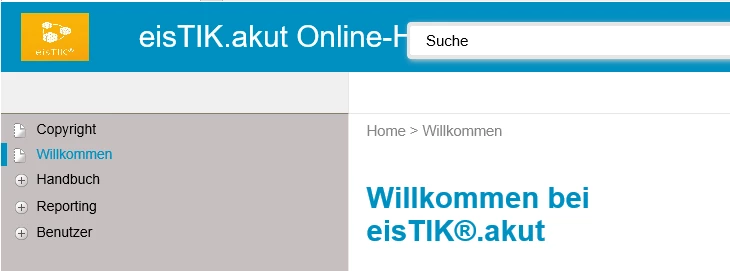
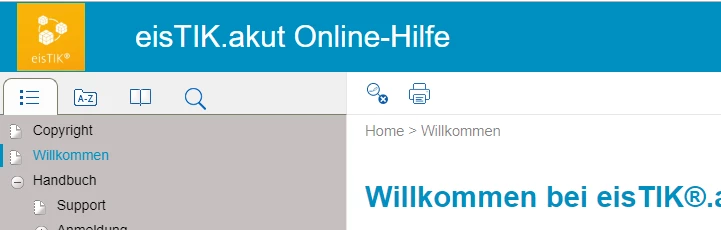
  • the icons for TOC, Index, Glossary and Search are not displayed
  • the buttons for "Remove highlighting" and "Print are not displayed
  • the search to the top right is displayed, but does not provide any results
  • my image in the header is displayed in a wrong resolution
  • when I open a file somewhere in the structure via context-sensitive help call, the TOC does not fold up to the correct location

Here's what I tried:

  • for the help to open, I added a mark of the web <!-- saved from url=(0016)http://localhost --> (for test purposes, only in the index.htm and one file, but will be added to all files)
  • I set the compatibility mode on and off with no effect
  • I tested with files both stored on my C-drive and hosted on a server

My help works fine in Edge and Chrome.

This is how the help looks in IE11:
This is how it looks in Chrome:
Any ideas what I can do to make my help also work in IE11?

Thanks in advance and kind regards

Karin

This topic has been closed for replies.

1 reply

Peter Grainge
Community Expert
Community Expert
August 2, 2019

Karin

Your skin is clearly customised. Does it work if you use the same base skin without any customisation? Which skin is it?


See www.grainge.org for free RoboHelp and Authoring information.

@petergrainge

Help others by clicking Correct Answer if the question is answered. Found the answer elsewhere? Share it here. "Upvote" is for useful posts.
Legend
August 2, 2019

Hi Peter,

yes, I used a customized skin based on Azure_Blue. I made my adjustments to the skin in RH, not in the file itself. I tested with the default Azure_Blue skin with the same problems. I also tested with Charcoal_Grey: here, all buttons are displayed, but the content of my files is not displayed. Only a white page is shown in the main window. With Coffee, clicking any of the TOC entries on the start page does not open the respective file in IE11.

The problem also occurs, if I create the output with the sample project Robohelp Reimagined using the default settings there.

Thanks for your help and kind regards
Karin

Legend
August 2, 2019

Together with a web developer, I think I found the cause of the problem. IE11 reacts on a syntax error that is no problem for Chrome or Edge. The Azure_Blue skin (and therefore also my customized skin) writes an empty parameter value in the usersettings.js (stored in the output directory - template -  Azure_Blue [skin name])

line 23

model.publish(rh.consts('KEY_IS_RESPONSIVE'), );

If you manually set this parameter to either true or false, the output works as expected (and is then either responsive or not)

model.publish(rh.consts('KEY_IS_RESPONSIVE'), true);