


Known Participant
July 20, 2023
Question

Restart Numbering does not work for a specific style inRH 2022.2.22

  • July 20, 2023
  • 3 replies
  • 960 views

I have a style that I've used for every ordered list in my system (Proc 1). I've just recently updated to RH2022 from RH2020 and today noticed that I'm unable to use the Restart Numbering from tool in the Properties pane. 

For example:

  1.  To create the two following examples, I clicked the Numbered List icon in the header bar and selected the far left option, and:
    •  For the first example, i applied no style 
    • For the second example, i applied style "Proc 1"
  2. I added the text for the first step of the procedure 
  3.  I pressed shift+enter
  4. I added the intermitted line of text
  5. I pressed enter again
  6. I repeated step 1
  7. I added the text for the second step of the procedure
  8. In the properties pane, I entered the number 2 in the Restart Numbering from field. 


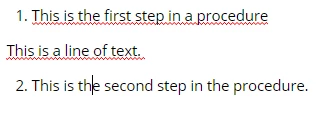
This is the resulting HTML from the an ordered list with no style applied to the list. 

<ol>
<li>This is the first step in a procedure</li>
</ol>
<p>This is a line of text. </p>
<ol>
<li style="" value="2">This is the second step in the procedure. </li>
</ol>

Here is a screenshot of how the text displays in the WYSIWYG editor:
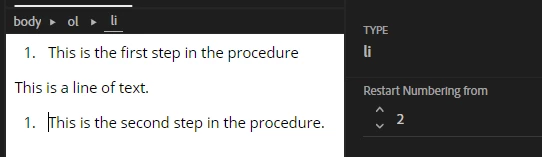
This is the resulting HTML from when I do the same procedure with the "Proc 1" style applied. 

<ol class="Proc1">
<li>This is the first step in the procedure</li>
</ol>
<p>This is a line of text. </p>
<ol class="Proc1">
<li style="counter-set: item1 1;">This is the second step in the procedure. </li>

Here is a screenshot of how this appears in the WYSIWYG editor:
Using the HTML to change the values in "counter-set: item 1 1;" does nothing. 


I have followed this exact same process dozens of times for this project and have never encountered this error before. Can someone please help me understand why my style is broken all of a sudden and how to fix it? 


    This topic has been closed for replies.

    3 replies

    Peter Grainge
    Community Expert
    Community Expert
    July 23, 2023

    The version numbering is the first thing to fix. 2022.2.22 should tell you that there are no updates so how you got an update is a mystery but it's worrying. I would uninstall RoboHelp and reboot before downloading a fresh installer from Download RoboHelp and RoboHelp Server (adobe.com).


    With 2022.2.22 showing again, create a new project and import your CSS file. Create a single topic that shows the error and send that to me. See the Contact page on my site and send the project as instructed there. Do make sure you include a link to this thread and please do not email the project direct.


    If 2022.2.22 does not show, then I suggest trying Adobe Support. See https://helpx.adobe.com/contact/enterprise-support.other.html#robohelp for your Adobe Support options. The email link tcssup@adobe.com is recommended as it reaches a team dedicated to Technical Communication Suite products including RoboHelp.


    ________________________________________________________

    My site www.grainge.org includes many free Authoring and RoboHelp resources that may be of help.


    Use menu (bottom right) to mark as Best Answer or to Highlight particularly useful replies. Found the answer elsewhere? Share it here.
    apgertzAuthor
    Known Participant
    July 24, 2023

    Hi Peter, 


    I emailed you per the instructions on your website. I uninstalled and reinstalled robohelp and the versioning issue seems to be remedied. 

    I created a sample project and imported my css (it was a very clumsy process. RH did not register there was a new CSS. The Styles pane would not update with the new styles until i saved the project, closed RH, and restarted). The numbering issue persisted.  


    Peter Grainge
    Community Expert
    Community Expert
    July 24, 2023

    I don't know why you had the problem with seeing your CSS. It should be as simple as importing it or adding it via Explorer to see it in the list of CSS files available. For your topics you should just go to Topic Properties and delete the CSS applied and select the new one.


    I will look at the list issue as soon as I can.

    ________________________________________________________

    My site www.grainge.org includes many free Authoring and RoboHelp resources that may be of help.


    Use menu (bottom right) to mark as Best Answer or to Highlight particularly useful replies. Found the answer elsewhere? Share it here.
    apgertzAuthor
    Known Participant
    July 20, 2023

    REVISION:

     Rather than use Shift+Enter to add the intermittent text, I use a full carriage return, remove the list style, apply a paragraph style and then continue the list. 

    Jeff_Coatsworth
    Community Expert
    Community Expert
    July 20, 2023

    Ah, got it - what version of RH2022 are you running? Current patch (July 2023) is Patch 2.

    apgertzAuthor
    Known Participant
    July 20, 2023

    I really, really thought this question would be simple to answer...

    Last night, when I posted this question, according to Help > About, I was using RH 2022.2.22 

    This morning, I checked for updates and installed the most recent patch. 

    However, when I check Help > About, it still says I am using RH 2022.2.22


    To further confuse things, when I check for updates, the Updater window says I am using 2022.2.0


    I'm waiting for someone to pop out from my closet and tell me I'm on a prank show. 


    Jeff_Coatsworth
    Community Expert
    Community Expert
    July 20, 2023

    I'm unsure of what's going on, but isn't an ol list supposed to just start with <ol> and end with one </ol> after the last <li></li> elements?

    apgertzAuthor
    Known Participant
    July 20, 2023

    If you have a line of text (or a table or an image) that interrupts the ol, the ol terminates.


    Jeff_Coatsworth
    Community Expert
    Community Expert
    July 20, 2023

    I thought that was the point of using a Shift-Enter soft return - doesn't that keep the text aligned and part of the numbered list?