



Jared Hess
Legend
November 16, 2021
Answered

RH 2017 - How to fix squished topic text in Adobe's responsive HTML5 layout?

  • November 16, 2021
  • 2 replies
  • 310 views

Hello my friends,


The Responsive HTML5 Layout that comes with RH 2017 has a bug that our customers are complaining about where the topic pane is quite squished at certain browser widths, but there's a good chunk of free white space to the right that is unused. Is there a way to make it so that the topic pane stretches to the right and fills that space?
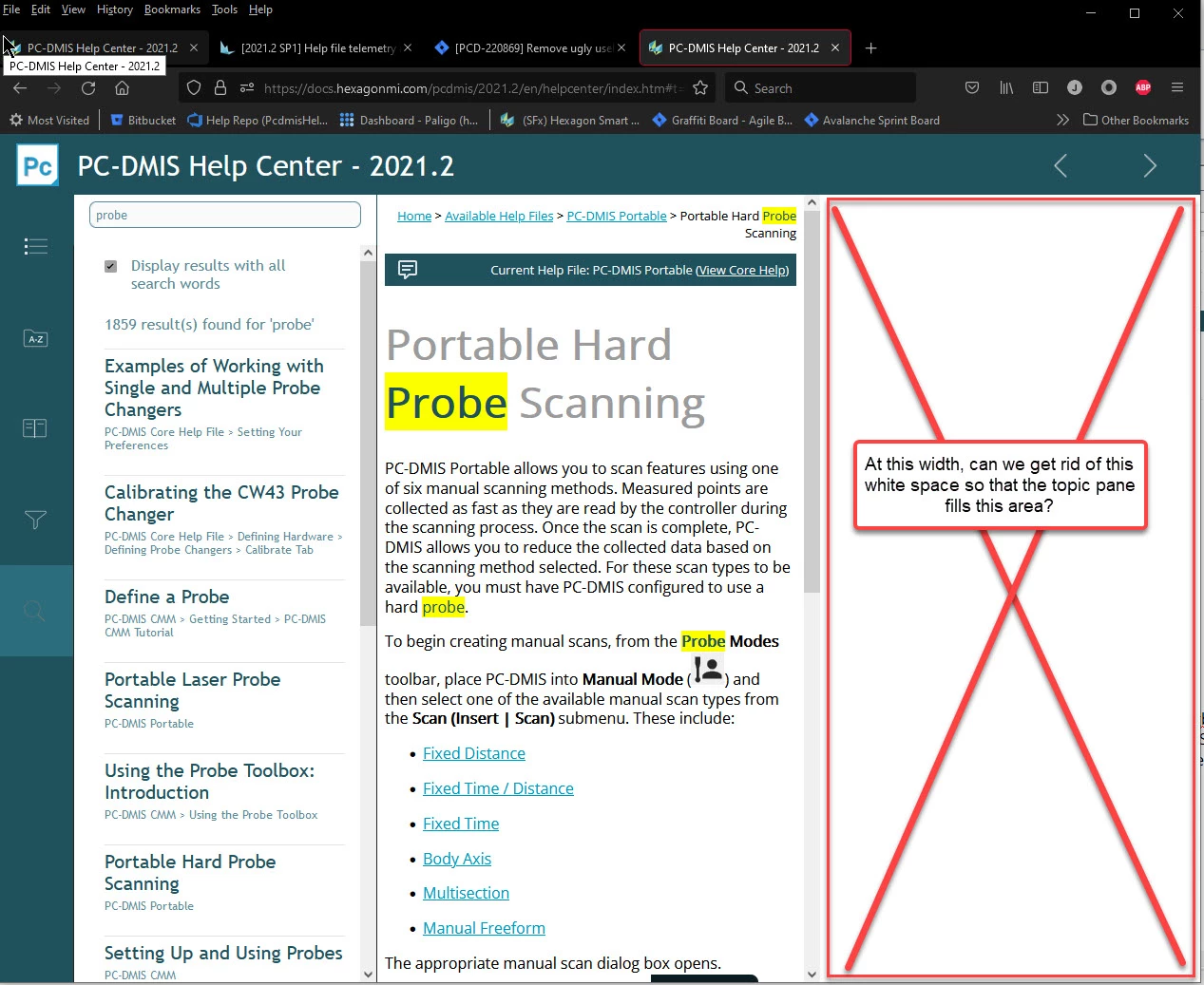
 

To reproduce:

  1. Set your screen resolution to 1920 x 1080.
  2. Set your browser's width somewhere between 1290 to 945 pixels wide to where the navigation bar slides to the left of the screen
  3. Then click Search or Index, and you'll see the topic pane get really squished.


Feel free to try it out here in our public help file:
https://docs.hexagonmi.com/pcdmis/2021.2/en/helpcenter/index.htm#t=mergedProjects%2Fhelpcentertopics%2FUsing_the_Online_Help.htm


I know I can go change the width smaller or larger to make it go away, but I think it should work within the above defined range of widths as well. Does anyone have a fix for this?


Thank you in advance!

    This topic has been closed for replies.
    Correct answer Jared Hess

    The fix is to ensure that layout-rtl.css file doesn't exist in the parent project on future versions of my generated help system. I found that I can control this in my source project by going into my !ScreenLayout! folder of my parent project, locating my the subfolder with my layout name (in my case HMI), and then renaming or deleting layout-rtl.css there. When I build the parent, that .css file is excluded.


    Just sharing in case anyone else ever runs into the same thing.


    Unfortunately, it looks like my above scripting idea to turn off that layout-rtl.css file dynamically won't work. (Well, I  -might- be able to get it to work on my webserver as everything is on one domain, but it won't work for the offline help system that users install on their file system. This is because my script is called from the .htm page which is inside an iframe of the full-context view merged help system. The parent index.htm from RoboHelp is what calls the layout-rtl.css file, but I can't access the parent DOM without getting cross-domain errors. In short, my script can see off my own .css files, but not RoboHelp's css files.)


    So, I've manually removed the .css file from my source folder.


    2 replies

    Community Expert
    November 18, 2021

    You might have needed to add !important after the new property to force it to override the rtl css. I'm still not sure why rtl is applying for you, as it doesn't in my test project. It's a bit weird. 🙂

    Community Expert
    November 17, 2021

    For some reason you have both the layout.css and the layout-rtl.css applied to your output at the same time. It doesn't seem to do that on a RH2019 fairly vanilla Azure Blue screen layout. So perhaps determine why that's happening?


    Otherwise the relevant style in the devtools is "body.media-landscape div.topic.sidebar-opened", and a possible fix for ltr languages would be to add right: 0 in the layout.css. 


    However, that will probably mess up rtl languages, if that is needed.

    Jared Hess
    Legend
    November 17, 2021

    Hi @Amebr , thanks for your response. Currently, we only have left-to-right languages. I added your suggested fix into the layout.css file of my parent project (this is a merged help system), like this:

    body.media-landscape div.topic.sidebar-opened {
                                                   left:25em;
                                                   right:0;
    }

    But that didn't seem to make any difference.


    However, removing/renaming the layout-rtl.css file from my template/hmi directory (hmi is the name of my layout) did do the trick!


    Anyway, since I have other languages and other versions to fix this on, I'm thinking I could probably do a Javascript fix to affect all languages and versions at once on my site, turning off the style sheet via code using something like this:

    for ( i=0; i<document.styleSheets.length; i++) {
        void(document.styleSheets.item(i).disabled=true);
    }

    (Taken from top answer on  https://stackoverflow.com/questions/5278062/how-could-i-turn-off-a-stylesheet)

    Jared Hess
    Jared HessAuthorCorrect answer
    Legend
    November 17, 2021

    The fix is to ensure that layout-rtl.css file doesn't exist in the parent project on future versions of my generated help system. I found that I can control this in my source project by going into my !ScreenLayout! folder of my parent project, locating my the subfolder with my layout name (in my case HMI), and then renaming or deleting layout-rtl.css there. When I build the parent, that .css file is excluded.


    Just sharing in case anyone else ever runs into the same thing.


    Unfortunately, it looks like my above scripting idea to turn off that layout-rtl.css file dynamically won't work. (Well, I  -might- be able to get it to work on my webserver as everything is on one domain, but it won't work for the offline help system that users install on their file system. This is because my script is called from the .htm page which is inside an iframe of the full-context view merged help system. The parent index.htm from RoboHelp is what calls the layout-rtl.css file, but I can't access the parent DOM without getting cross-domain errors. In short, my script can see off my own .css files, but not RoboHelp's css files.)


    So, I've manually removed the .css file from my source folder.