
RH 2019 - Questions
RoboHelp 2019 problems
Hi Y'all,
In this discussion, I will be asking questions on how to format text, how to use the different options like "Lists", and why RH acts in a certain way.
1- There are two types of text environment I’m using: the general Body and the Drop-down text Body.
- Why does the text or the paragraphs format differently?
- See image “23 avr.19 – List formatting in Author mode” (at the end of the page.)
- See image “23 avr.19 – List formatting in View mode” (at the end of the page.)
- Author and Preview mode are the same, the published View mode is different.
- Why and how can I fix this?
2- Copy/paste part of a phrase (not even a paragraph) to another phrase from and to the same topic;
- The part copied was automatically formatted (in bold) as the text already there.
- Selected the copied text to remove the bold format. Impossible.
- Had to click “Clear formatting” and reformat the entire phrase (Font, Size, Left Margin, Bold for part of the text)
- Why did it not accept the copied text as it was?
- Why did I have to Clear the formatting to reformat it???
3- It seems that inside a Drop-down text “box”, top and bottom margins do not occur. I position my cursor at the beginning of the paragraph, insert the value (ex.: 6 pt for bottom or top, depending) and the paragraph stays the same. Left margin is possible (ex.: 14 pt).
4- As someone else asked, “Why is there between 3 and 6 seconds delay when I click the Font scrolling arrow? You answered that RH had to verify the Font listing or group or available.
- When the Topic is open for edition, can’t it check the fonts available once and remember it?
- I’m pretty sure that 99% of RH users use the fonts offered.
5- Why, after 4 or 5 clicks or actions, in the topic, RH has a 6 to 9 second delay, every time??
- Imagine clicking 400 times in RH during a day. That’s 100 X 8 sec.
- I wait over 13 minutes because of that. Add the Font selection wait and other waiting or reformatting.
6- I tried to click at the beginning of a Drop-down text title. I don’t know why, it selected the letter on the right. Clicked anywhere else in the document, it selected the letter on the right all the times. I saved my work, closed the Topic and reopened it. I could now click at the start of a line or between two letters.
- It’s not the first time this happens. Why is this happening?
7- When, at the start of an empty line (break), if I press backspace, it won’t delete the previous line. If I press delete, it won’t delete the line I’m on. I have to go at the end of another line and press delete to delete the next line, and this does not always work.
- I’m just trying to delete a line, why is it so difficult? There is no configuration or formatting or a type of character before or after or whatever else that should make it impossible to delete a simple line.
8- I’m in a Topic that was imported from RH 2017. When I click in a line, the Font size will be shown, the Font type or the text format won’t. We should be able to see all the text information.
9- For some reason that I cannot grasp, if I click in a line, I will see the Font size (type will show p). If I click another line, even the font size disappears (type will show span).
- Why “Span” for a paragraph and “P” for another paragraph that’s the same as the first?
- With my cursor still in a Span type line, I clicked the Update Style button, thinking that it would change it to P, or stay the same, or it would open an option window, or something to help me.
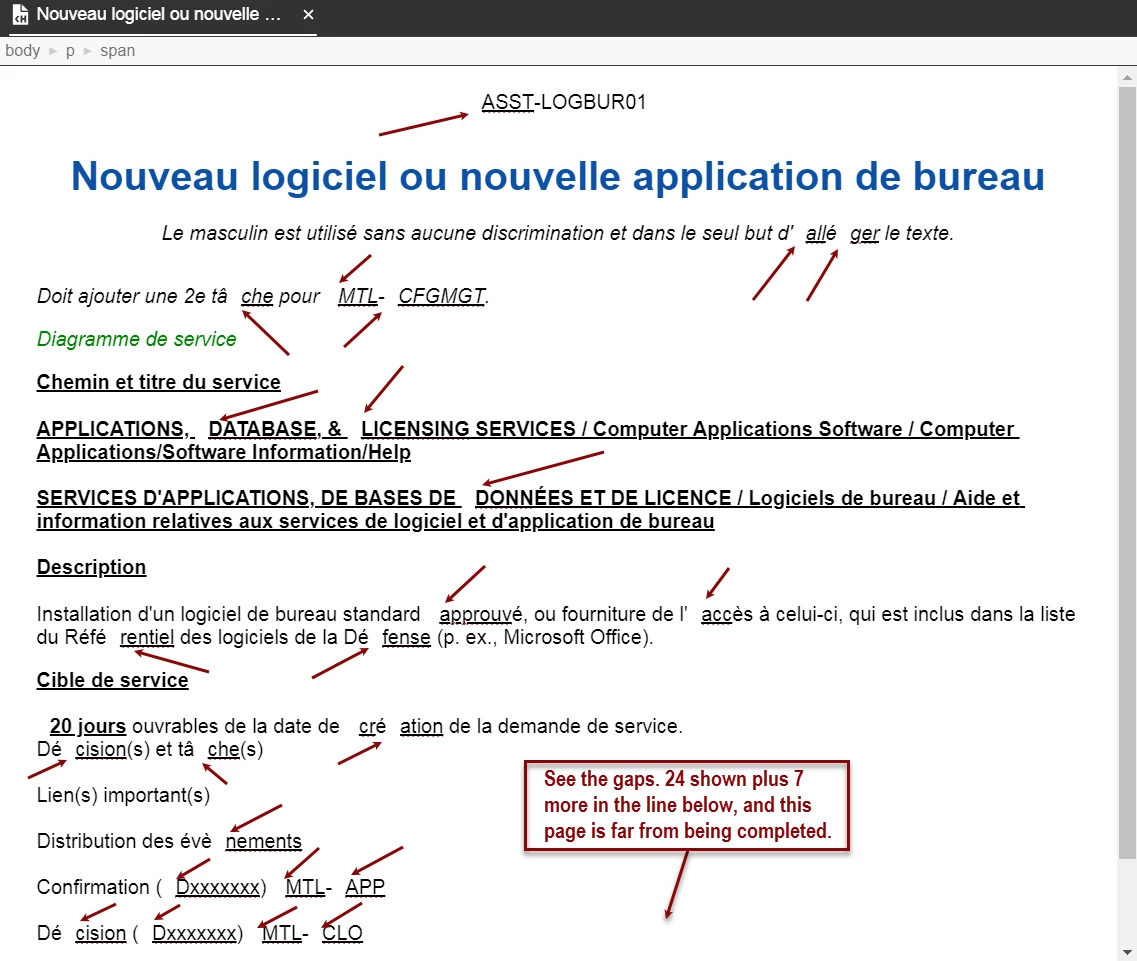
- After I clicked the button, the entire topic blinked once, the Type remained to Span, but the entire Topic changed. Now, I have gaps between two words. There are also gaps inside words (ex.: appl ication). The size of the gaps are about two extra spaces.
- I tried the Undo button. It undid nothing.
- If I place my cursor on the gap’s right side and press Backspace, the gap will remain, but the letter on its left will be erased.
- Tried to erase a word that had that gap. The word was deleted, but not the gap.
- Question: WHY do you have that Update type button? What was it meant to do?
- Now, I will have to redo that Topic.
- Before I started the new Topic, I noticed that the text on the right of the gaps had a dotted line under it. I right clicked that part and selected Ignore. The dotted line and the gap disappeared. Doing this corrected some of the gaps, but for others, it did not fix them. I will still have to redo the Topic.
10- Before creating a new Topic, to replace the previous one, I renamed topic by adding the #2 at the beginning of the name. I also renamed the document (ch on the icon) in the Content section. I then closed RH and restarted the project.
- The Topic name was changed. The document under Content as disappeared.
- Why did it disappear?
- Where did it go?
- Why something as simple as renaming a document would do that??
11- Right now, I’m using the “Learn a Latte” demo project with the “Employee and Student Perks” and “Dress” Topics open.
- When I click in the Title (h1), the size and color of the font will show.
- Why won’t the Font show?
- Why won’t the text format (B-I-U) show if it is used, or even after I’ve used it?
- With my cursor in the middle of the word “Dress”, when I click Italic and Underline, the word will change to those formats. They will be removed when I click the buttons again.
- While I am still on the word, why doesn’t the format buttons highlight so that I can see when they are on or off?
- Did the same thing as in “a.”. The difference is that I selected the word.
- All format info disappears; size and color.
- I can format the word by clicking Italic and Underline.
- I can remove the Underline by clicking the icon again.
- Italic will not be removed by clicking the icon again. Even if I deselect the word and click in the middle of it, clicking the Italic button will not remove the format. I have to click the Undo button a few times to go back to before I used that format.
- I’ve noticed that depending on the Type, the formatting will be different. Is it because it is a “h1” type?
- Why is it doing that? I should be able to format text either by clicking inside the word or by selecting part or all of it.
12- I’ve just opened my project and the last Topic I worked on last night. When I saved and closed it, it had no errors. Now, there are 31 gaps. Please see image “RH Gaps” (at the end of the page). I’m going to remove them by right clicking on them and selecting “Ignore”. Then, I will save it, close the Topic and RoboHelp just to see if my corrections will still be there.
- I’ve just corrected the Topic and I noticed that the Save changes asterisk is not present on the Topics tab. I guess that ignoring the gaps is not considered a change.
- Let’s close it and see what will happen…
- The exact same gaps reappeared. Does this mean that I will have to completely REWRITE THIS TOPIC… AGAIN???
I will end this part here. There will be a part 2.
Thanks,
Pierre
Image “23 avr.19 – List formatting in Author mode”

Image “23 avr.19 – List formatting in View mode”
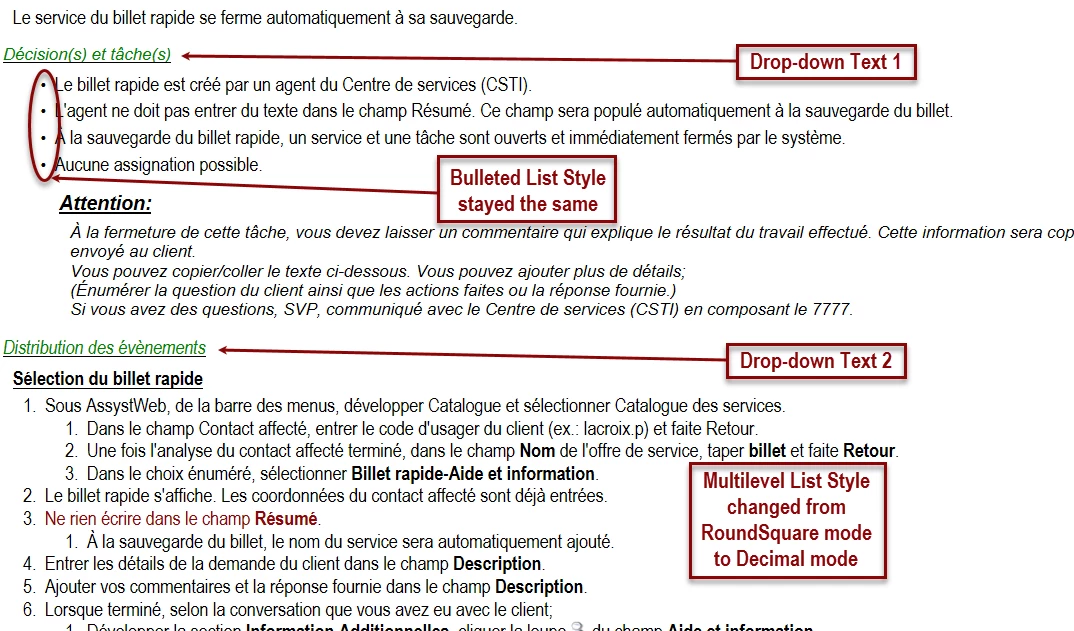
Image “RH Gaps”


 AdChoices