Erwin.Timmerman
Inspiring
September 8, 2021
Answered

RH 2020.5 TOC problems for PDF when upgrading from RH 2019 new UI

  • September 8, 2021
  • 3 replies
  • 368 views

Hi all, I'm trying out the PDF function of 2020.5, but have found something that, if I understand it correctly, is a step backward over the RH 2019 PDF output.

My situation:

  • I have an online project which consists of nested TOCs. There is one big PDF wich is a printout of the complete project, for people who prefer to use PDF over online.
  • All my topics start with H1. Some of them have a mini TOC using bookmarks and have H2 inside them.
  • The current nested TOC goes approximately 3 levels deep, sometimes (but not often) 4 levels.
  • The topics must be usable at any depth of the TOC, so I cannot use H2 or H3 as the main topic header.


In RH 2019, this all worked fine. I could insert topics at any level of the TOC and the indents in the printed TOC would move accordingly. The printed TOC matched the online TOC exactly, so that even support people could point users over the phone to the correct PDF topic while using the online help themselves.


However, with 2020, if I understand it correctly I now have 3 options:

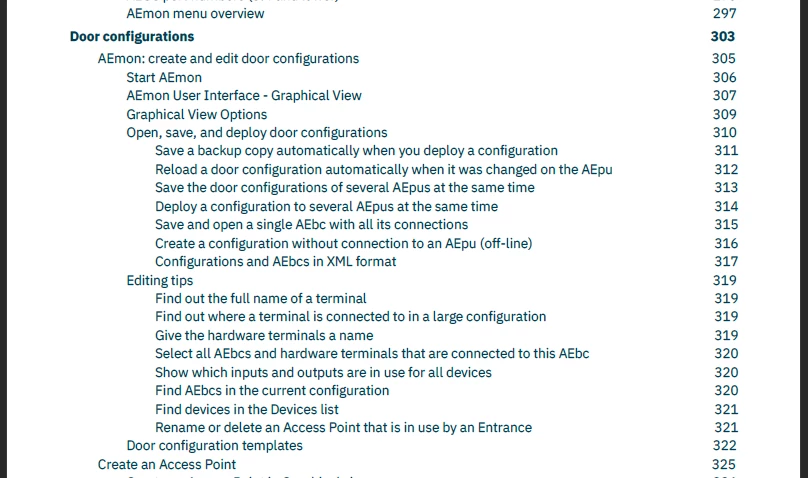
  • Keep using the online TOC structure for PDF, but that will no longer produce a TOC at the start of the document. The PDF bookmarks are now single level.
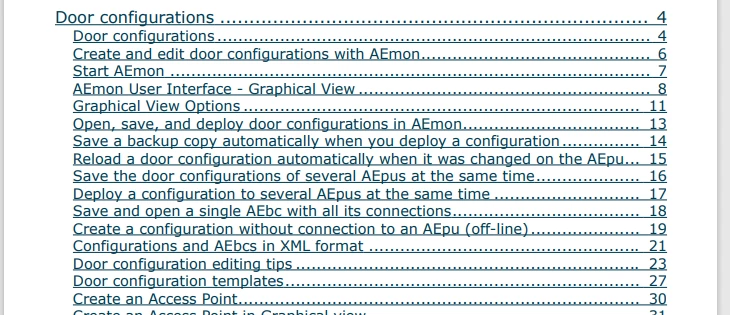
  • Use a book TOC without sections and depend on the H1, H2, H3 in the topics to provide the correct indentation in the printed TOC. This is no option because that would fix the topics at a specific level in the TOC, while I want them to be reusable at other levels.
  • Use a book TOC with sections, but these only go one level deep. Which for novels would be perfectly fine, but for tech docs usually is not. I mean, Framemaker uses nested TOCs all over the place, for a reason (at least, FM10 did, I haven't used FM since then).


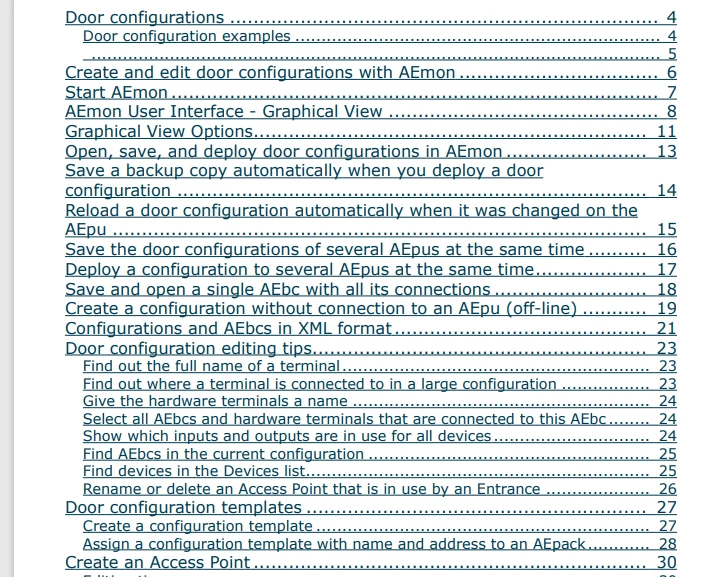
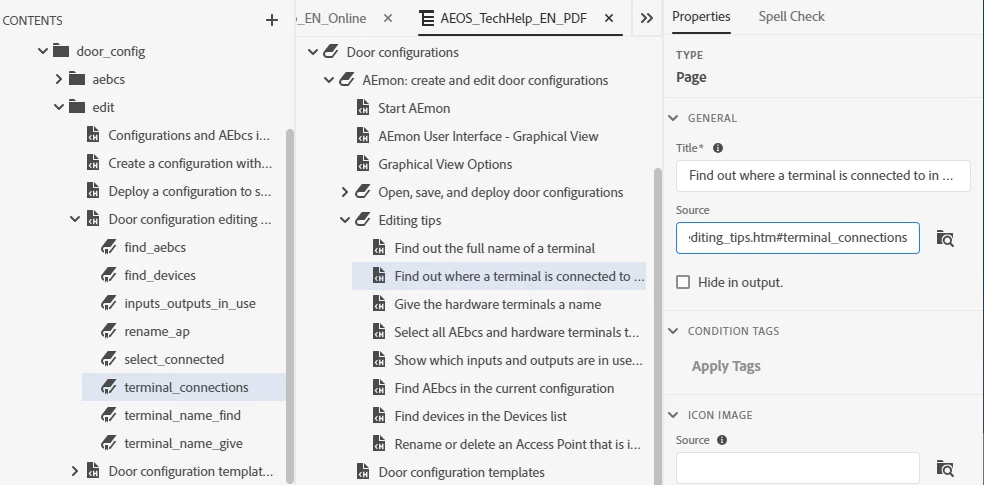
I have attached an image on how the TOC was organized in 2019, and how the output looked, which is how I want it to look. And two images of how it looks now (one with sections, the other with the H1 H2 H3 settings). Don't care about the different font and the dots, I can fix that (I hope?). But the 2-level indentation doesn't make things any clearer.

Is this indeed the way it is, or am I missing something? I'm not too eager on editing 800 pages of topics changing the heading levels to H2 and H3, when that's something I don't really want to be using in the first place.


This topic has been closed for replies.
Correct answer Peter Grainge

Chapter Names and Topic Titles = Only top level sections in the TOC.


Use Topic Heading Styles = No good for you as your topics are Heading 1.


This is an issue I have discussed with Adobe and all I can say is they are aware this does not meet the requirements of many users. I am hopeful it will be addressed.

________________________________________________________
See www.grainge.org for free Authoring and RoboHelp Information

3 replies

Erwin.Timmerman
Inspiring
September 10, 2021

For us, this currently blocks an upgrade to RH2020. PDF output for 2019 was working OK enough not to go the Word route (still kind of buggy but there were workarounds available). I have put quite some time in getting the master pages for PDF right, but that has all changed now and has to be redone. That would be worth it though, to get full CSS3 support. But unfortunately that is not the biggest hurdle.


Problem is, we compile our RH source directly from git using the commandline compiler, when building the rest of our software. The locked docs of older versions of our software (which still get bugfix updates but normally no doc updates) will now need to be updated with new 800-page TOCs simply because the new compiler won't produce a satisfactory output otherwise. Because the TOCs also reference multiple bookmarks in the same topic (the H2 headings) which now results in multiple copies of the full topic being included in the output. So I need to delete all the bookmark references from the TOC as well. This is just not worth the effort, especially when the outcome is not as good as it was before upgrading.


This is a shame because I was really looking forward to the Zendesk and git integration and the translation functions. And the improved output of the normal PDF pages, because I must say that the new pdf engine compiles a lot faster, and if it has full CSS3 support should have some great ways to do styling on the contents pages.


If they insert a compatibility function in which you have the option to still use the old TOC style (maybe just for PDF and not for Word if it causes problems there), I'm in. That way you at least have a choice. People who need the extra depth or bookmark references in the TOC could use the legacy TOC style, amd people who don't, can use the new system. 


I will continue on working to get the PDF output working OK on my test system, so that if they do fix the PDF TOC generation output for 2019 users, we're ready for the upgrade.

Peter Grainge
Community Expert
Peter GraingeCommunity ExpertCorrect answer
Community Expert
September 8, 2021

Chapter Names and Topic Titles = Only top level sections in the TOC.


Use Topic Heading Styles = No good for you as your topics are Heading 1.


This is an issue I have discussed with Adobe and all I can say is they are aware this does not meet the requirements of many users. I am hopeful it will be addressed.

________________________________________________________
See www.grainge.org for free Authoring and RoboHelp Information

Use the menu (bottom right) to mark the Best Answer or Highlight particularly useful replies. Found the answer elsewhere? Share it here.
Participant
January 18, 2022

@Peter GraingeThe issue still persists in version 2020.6.76. Did you hear anything from Adobe regarding this problem in the meantime?

Erwin.Timmerman
Inspiring
September 8, 2021

Ideally, I would like to be able to use a TOC with some levels deep (say, 4) and that when using the sections option, every topic heading in a pdf output would be replaced as follows:

H1 -> H(1+L), H2 -> H(2+L), etc. where L is the number of levels deep the topic is inserted in the TOC. Then you could use the H1/H2/H3 option to determine the depth in the TOC. This would instanly create the correct level depth in Word as well.