
Inspiring
October 5, 2020
Question

RH 2020 - Configuring Tables of Contents in PDF output

  • October 5, 2020
  • 7 replies
  • 299 views

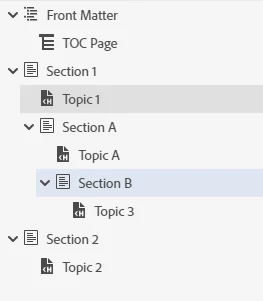
This is what my Table of contents looks like in Robohelp.
 

This is what it look likes like in PDF output.
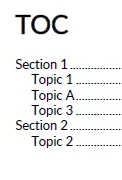
 

Why is the TOC in the output only reflecting the first section and not any of the sections within a section?  

All these headings are heading 1. Is that the reason why? But in the Web output, they are topics per page so I want every heading to be a heading 1. 

    This topic has been closed for replies.

    7 replies

    Inspiring
    October 5, 2020

    OK. Thank you for your help.

    Peter Grainge
    Community Expert
    Community Expert
    October 5, 2020

    I'm not sure you will get what you want. The way the TOC works is now different for online and print outputs. Take a look at the TOC topic in About RoboHelp.


    Use the menu (bottom right) to mark the Best Answer or Highlight particularly useful replies. Found the answer elsewhere? Share it here.
    Inspiring
    October 5, 2020

    All the projects I am using have been upgraded from RH 2019. I havent tried this in a new project created in RH 2020. I will give that a go.

    Inspiring
    October 5, 2020

    I want the TOC in my PDF output to be the same as the TOC in my Robohelp project. Neither option gives me what I want. If I select chapter names and topic titles, I only get the top section and then all the TOC entries underneath are a flat list. If I select Use topic heading styles, I just get a flat list of TOC tiltles, except where I have a topic that also has a heading 2. 

    Peter Grainge
    Community Expert
    Community Expert
    October 5, 2020

    I'm not clear from that whether you are saying having two TOCs is giving you what you want or there is still an issue.


    Use the menu (bottom right) to mark the Best Answer or Highlight particularly useful replies. Found the answer elsewhere? Share it here.
    Inspiring
    October 5, 2020

    If I choose the topic headings and select 3 levels I just get a flat list of topics, except where I happen to have a heading 2 in the same topic. And it uses the topic titles not the titles in the TOC. I need to use the titles in the TOC because of my product name change. In other words, the same topic now refers to two different products so I have to have product specific TOCs.


    Peter Grainge
    Community Expert
    Community Expert
    October 5, 2020

    In the layout section of your preset, change the TOC Structure setting to Use Topic Heading Styles. I think that is the issue.


    Use the menu (bottom right) to mark the Best Answer or Highlight particularly useful replies. Found the answer elsewhere? Share it here.