
Inspiring
November 4, 2020
Answered

RH 2020 - Failed to generate Word document

  • November 4, 2020
  • 9 replies
  • 1838 views

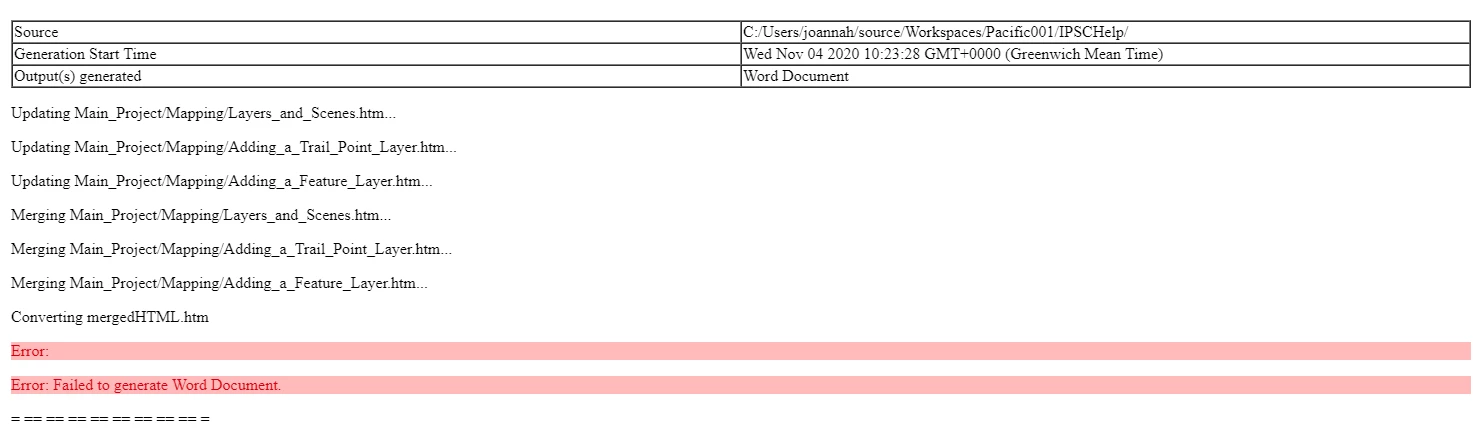
I am having trouble with one particular project. I can create word output from other projects. This particular project was created in RH 2019. I created it by importing a word document. Now, I can generate word output from a new topic created in this project but if I try to generate word output from existing topics, it fails. This is the log file.
 

    This topic has been closed for replies.
    Correct answer debbies3920563

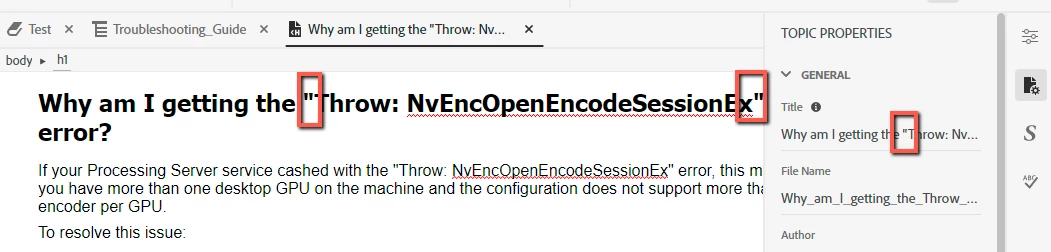
    I also had this issue using RoboHelp 2020 (this project was originally created in RoboHelp 2019). I finally narrowed down the issue. I had to remove all quotation marks from the header and the title of the topics:

    9 replies

    Peter Grainge
    Community Expert
    Community Expert
    December 7, 2022

    @MAGALI5E35 Please confirm the exact version of RoboHelp you are using, it's on the Help menu.

    ________________________________________________________

    My site www.grainge.org includes many free Authoring and RoboHelp resources that may be of help.


    Use menu (bottom right) to mark as Best Answer or to Highlight particularly useful replies. Found the answer elsewhere? Share it here.
    Participating Frequently
    November 2, 2023

    Hello,
    Version 2022.3.107


    Participating Frequently
    November 3, 2023

    And now Version 2022.3.0.123

    debbies3920563Correct answer
    Inspiring
    October 28, 2021

    I also had this issue using RoboHelp 2020 (this project was originally created in RoboHelp 2019). I finally narrowed down the issue. I had to remove all quotation marks from the header and the title of the topics:

    Participating Frequently
    December 6, 2022

    Hello, same problem: can not generate word.

    I remove all the " but does not change the problem.
    Did you find a solution?
    Regards.

    Legend
    November 12, 2020

    It always is the last topic you look at 🙂 Great to hear you solved it!

    Inspiring
    November 11, 2020

    Thank you Karin for your help. Once I identified the topic that was causing the problem (in other words, the last new topic I added! Sigh!) I removed the table and word output generated successfully. Thanks again for your help!

    Inspiring
    October 28, 2021

    How did you identify the topic causing the problem?

    Peter Grainge
    Community Expert
    Community Expert
    November 4, 2020

    Create a new project. Import one topic that does generate and one that does not. Generate that making sure no expressions are applied. What happens?


    Use menu (bottom right) to mark as Best Answer or to Highlight particularly useful replies. Found the answer elsewhere? Share it here.
    Legend
    November 4, 2020

    I have experienced that several things seem to have changed between 2019 and 2020 version. I know that it's a lot of pricky work to find the error. If the error is caused by some strange source code, it will not help if you copy your html files into the new project.

    Maybe just split your TOC in 2 parts and see if one of them works an the other not. Then you can cut the topics further down. Sorry that I can not provide a better idea. Maybe someone else can.

    Inspiring
    November 4, 2020

    Actually Word is not generating output for that new topic I created now! 

    Inspiring
    November 4, 2020

    The thing is, this was working fine. I dont know why its stopped working? Also I can generate word output from new topics I create in this project but not existing topics and I have tried various combinations. Also this project is huge it would take me ages to go through all my topics to try and work out what is wrong. Whats the best way to start again? Create a new project and import my html topics in? But then I will end up duplicating the error probably.

    Legend
    November 4, 2020

    I don't know if I can be of any help here, but I'd like to share what little I know. I have come across a problem with Word output because in my project I had some topics with tables. To these tables I had assigned a table style, but when I looked into the source code, I saw that the table also had some kind of "direct style properties" that were partly the same as defined in my style. This duplication of styles seemed to cause some problem with the Word output. It did not cause problems with HTML5 or PDF output. 

    So, you might want to check your source code for such things.

    Otherwise, I usually proceed like this: only include a few topics into my TOC and change them and thus trying to identify what is causing a problem with Word output.