


Inspiring
July 1, 2021
Answered

RH 2020 Update 5 - Error Failed to save file - using sharepoint

  • July 1, 2021
  • 17 replies
  • 816 views

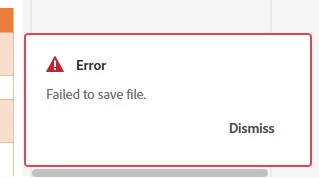
I have a brand new project that I created yesterday on my local c drive. I added the project to Sharepoint. I have checked in some image files that I added yesterday. I have one topic in this project. I added to the topic throughout yesterday. However, at the end of the day I went to close the project (thinking everything was saved) and I got this error. The project closed and I have lost some of my updates. 

I searched on this site and this error seems to be a permissions error ie not having permissions to the folder where the project is. But I do have permissions  and I have another project stored with this hierarchy and I have never received this error before and its still working fine.


    This topic has been closed for replies.
    Correct answer joannah98656944

    This problem was caused by saving projects on one drive rather than c drive. I think RH defaults to c:\users\username\docments\my robohelp projects but my documents folder is automatically syncing to one drive so I was creating projects on one drive and Adobe Tech support said this was not supported.


    So in the end because even reinstalling Robohelp did not fix the issue, I had to back up the "my robohelp projects" folder on one drive and then delete it and then uninstall and reinstall Robohelp, which fixed my issues.


    The only issue is when I reinstalled Robohelp, it still picked up the my robohelp projects folder on one drive as its default location even when I selected change location and specified a folder on my c drive. So I just have to  manually browse to a location on my c drive when I create new projects. I have raised this with Adobe as I am not sure if this is a bug or because of the fact that my documents folder is automatically syncing with my documents folder on one drive. 

    17 replies

    Inspiring
    July 9, 2021

    I've raised a new feature request:


    https://tracker.adobe.com/#/view/RH-9635


    Thank you very everyone for all your help on this. 

    Peter Grainge
    Community Expert
    Community Expert
    July 9, 2021

    No matter where your projects are located, when you create a new project it will default to Documents \ My RoboHelp projects and your IT have configure that to be on OneDrive.

    ________________________________________________________
    See www.grainge.org for free Authoring and RoboHelp Information

    Use the menu (bottom right) to mark the Best Answer or Highlight particularly useful replies. Found the answer elsewhere? Share it here.
    Peter Grainge
    Community Expert
    Community Expert
    July 9, 2021

    I think the reason they are saying OneDrive is not supported is that it seems to be slow synchronising as others have reported here. To be clear, cloud drives are really only OK for one author who may work off of multiple machines.


    I agree with @Amebr that it is not a bug as the common bit with others is Adobe are saying it is not supported and in scenarios where in theory it could nonetheless work, practically the way OneDrive works makes it unusable and Adobe have no control over that. The issue here is more about the way your IT people have configured things.


    I also agree that a feature idea would be worthwhile and I would certainly vote for it. I never use the default. When I create a new project I simply configure its location to be where I want it.


    After posting click the number that will appear, then copy the link here. It makes it easier for others to vote and support you.

    ________________________________________________________
    See www.grainge.org for free Authoring and RoboHelp Information

    Use the menu (bottom right) to mark the Best Answer or Highlight particularly useful replies. Found the answer elsewhere? Share it here.
    Inspiring
    July 9, 2021

    Further to this, I wanted to clarify that:

    1. I copied the My robohelp projects from one drive to the root of c drive
    2. Deleted it from one drive.
    3. When I reinstalled Robohelp, I selected change location to change the default location to be My robohelp projects in the root of c but Robohelp seemed to ignore this.
    4. When I checked after install, Robohelp had automatically created the My robohelp Project in One drive again and set this to be its default location, despite my trying to specify a different default location on install. 
    Community Expert
    July 9, 2021

    I don't think it's technically a bug, but if they don't support projects on OneDrive, I think it would make sense to be able to set an alternate default location, as more and more companies are defaulting the Documents folder to OneDrive.


    You can request features and report issues here: https://tracker.adobe.com/

    Post the item number in the discussion so people can easily vote if they want the same functionality.

    Inspiring
    July 9, 2021
    1. My working directory for projects added to sharepoint is my local drive. I hardly had anything in One Drive. I had some outputs in one drive  and I had a couple of RH projects that I was using to experiment with. I think half the time this was just when I was experimenting and I was just accepting defaults rather than specifying a specific folder on my local drive. Its seems this was enought to cause some issues. Adobe Tech Support told me you should not use one drive at all.
    2. In my organization my users\username\documents folder is synced to one drive automatically. My IT people told me that other applications may be affected if we removed the synchronziation between my documents folder on my c drive with my documents folder on one drive. So we have not done this.
    3. When I reinstalled Robohelp, I tried to change the default location to be a random folder on my C drive. Robohelp does not seem to recognise that I have changed my default location. Robohelp is still displaying the documents folder on one drive as its default location. I assume this is because of the automatic syncing? But I am not sure. I told Adobe Tech Support about this. I do not know if this is a bug or not.
    Jeff_Coatsworth
    Community Expert
    Community Expert
    July 8, 2021

    Safest best practice is to have a c:\projects\{project_name}\ location to work in - avoids all that OneDrive synching stuff.

    Peter Grainge
    Community Expert
    Community Expert
    July 8, 2021

    I thought your projects were on a local drive or network drive. In theory OneDrive should work but I have found that whilst you can put a project on Google Drive and work on it, when I tried OneDrive it was a different matter. In both cases though I am talking about one person working on the project. In theory two people can work on it but in practice I would only do that where users are in different time zones.


    OneDrive is not the same as Sharepoint which can be used for source control with check in and check out.


    By default RoboHelp will create new projects in Documents > My RoboHelp Projects. It sounds like you need to talk to your IT to find out where that folder is located. 

    ________________________________________________________
    See www.grainge.org for free Authoring and RoboHelp Information

    Use the menu (bottom right) to mark the Best Answer or Highlight particularly useful replies. Found the answer elsewhere? Share it here.
    joannah98656944AuthorCorrect answer
    Inspiring
    July 8, 2021

    This problem was caused by saving projects on one drive rather than c drive. I think RH defaults to c:\users\username\docments\my robohelp projects but my documents folder is automatically syncing to one drive so I was creating projects on one drive and Adobe Tech support said this was not supported.


    So in the end because even reinstalling Robohelp did not fix the issue, I had to back up the "my robohelp projects" folder on one drive and then delete it and then uninstall and reinstall Robohelp, which fixed my issues.


    The only issue is when I reinstalled Robohelp, it still picked up the my robohelp projects folder on one drive as its default location even when I selected change location and specified a folder on my c drive. So I just have to  manually browse to a location on my c drive when I create new projects. I have raised this with Adobe as I am not sure if this is a bug or because of the fact that my documents folder is automatically syncing with my documents folder on one drive. 

    Peter Grainge
    Community Expert
    Community Expert
    July 1, 2021

    See https://helpx.adobe.com/contact/enterprise-support.other.html#robohelp for your support contact options.

    ________________________________________________________
    See www.grainge.org for free Authoring and RoboHelp Information

    Use the menu (bottom right) to mark the Best Answer or Highlight particularly useful replies. Found the answer elsewhere? Share it here.