


Participating Frequently
July 12, 2022
Question

RH 2020 Update 8 - an issue faced while topic creation

  • July 12, 2022
  • 6 replies
  • 303 views

Hi all,

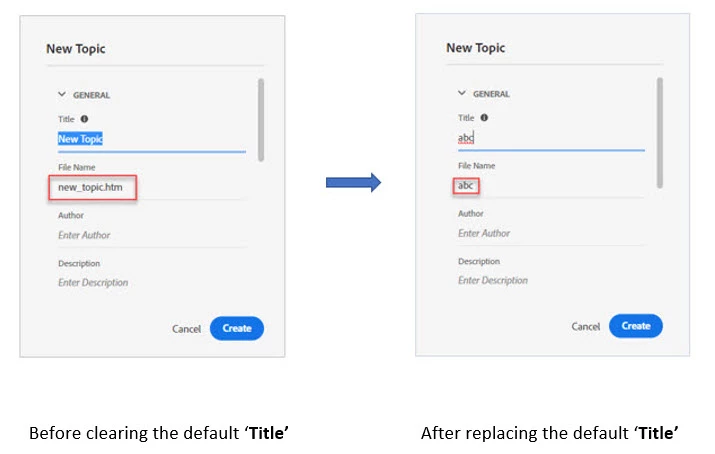
While creating a topic, we type the 'Title' and then the 'File Name'. Before updating to Update 8, for the 'File Name', I didn't have to type the name with'.htm' as '.htm' appears automatically on the system. But now, if I cleared the default 'Title' and replaced it with a new 'Title', the '.htm' extension doesn't appear on the 'File Name' field. In such a case, if I didn't notice carefully, instead of a topic, a folder is getting created.

Please check the screenshots for a better understanding of the issue.

Did anyone else face the same issue?
    This topic has been closed for replies.

    6 replies

    Peter Grainge
    Community Expert
    Community Expert
    August 31, 2022

    In your image you have obviously deleted the title first as when I just start typing with the default title still showing before I type, what I am typing has htm after it.


    See this video. https://www.grainge.org/demos/title/title.mp4


    Ignore the bit before the title is blue. I accidentally took focus off the field.

    ________________________________________________________

    My site www.grainge.org includes many free Authoring and RoboHelp resources that may be of help.


    Use the menu (bottom right) to mark the Best Answer or Highlight particularly useful replies. Found the answer elsewhere? Share it here.
    Community Expert
    August 30, 2022

    I see the issue if I press Backspace or Delete before typing the title. If I start typing with the existing title still selected, the .htm is added correctly.

    Participating Frequently
    August 31, 2022

    Yes, correct. It's a bug and adobe acknowledged it as a bug.

    Peter Grainge
    Community Expert
    Community Expert
    July 13, 2022

    Something else I should have suggested. I'm just wondering if the issue is restricted to this project.


    Try this in the About RoboHelp sample project. You should see them on the Starter Screen but if not then click Open Project on the Starter Screen to open File Explorer. Browse to Documents and then My RoboHelp Projects.

    ________________________________________________________

    My site www.grainge.org includes many free Authoring and RoboHelp resources that may be of help.


    Use the menu (bottom right) to mark the Best Answer or Highlight particularly useful replies. Found the answer elsewhere? Share it here.
    Participating Frequently
    August 30, 2022

    I tried all these methods but still it's not working. Also I tried by uninstalling the existing RoboHelp from my machine, downloading Update 8 from adobe.com and installing again. That also didn't work.

    Peter Grainge
    Community Expert
    Community Expert
    July 12, 2022

    OK. As you have seen it is not working that way for me and you are the only person to report this on the forum so far.


    Three options.

    1. The quickest would be to go to Download RoboHelp (adobe.com) and download Update 8 from there. Uninstall what is on your machine, reboot and install the download. That will take say a quarter of an hour or so. It will not affect your project and you can retain your settings.
    2. Alternatively go to Support. See https://helpx.adobe.com/contact/enterprise-support.other.html#robohelp for your Adobe Support options. The email link tcssup@adobe.com is recommended as it reaches a team dedicated to Technical Communication Suite products including RoboHelp. That could take a few days.
    3. Live with it. It is technically an option but not one I would recommend as this is an overt indication something is wrong. There is then the nagging doubt of what else?

    ________________________________________________________

    My site www.grainge.org includes many free Authoring and RoboHelp resources that may be of help.


    Use the menu (bottom right) to mark the Best Answer or Highlight particularly useful replies. Found the answer elsewhere? Share it here.
    Peter Grainge
    Community Expert
    Community Expert
    July 12, 2022

    That is not what I am seeing, I did test it. Are you following these steps?


    Right click in Contents Panel and select New > Topic.


    This dialog appears.


    I have changed it as shown. No extension.


    The topic is nonetheless created correctly with the extension. 


    ________________________________________________________

    My site www.grainge.org includes many free Authoring and RoboHelp resources that may be of help.


    Use the menu (bottom right) to mark the Best Answer or Highlight particularly useful replies. Found the answer elsewhere? Share it here.
    Participating Frequently
    July 12, 2022

    These are the steps that I followed:

    1.  Right-click on Contents Panel and select New > Topic. This dialogue box appears.


    2.  I changed the Title and didn't provide the .htm extension.


    3. Instead of topic, a folder is created.


    4. Now, I manually provided the extension.


    5.  Topic is created.

      This is how it's working for me. So, my question is, do we have to manually add the '.htm' extension? This started to happen on Update 8 before that it worked automatically. 

    Peter Grainge
    Community Expert
    Community Expert
    July 12, 2022

    I think if you look in Topic Properties > General or right click the file in the Contents Panel and select Properties, you will see the HTM extension has been applied.

    ________________________________________________________

    My site www.grainge.org includes many free Authoring and RoboHelp resources that may be of help.


    Use the menu (bottom right) to mark the Best Answer or Highlight particularly useful replies. Found the answer elsewhere? Share it here.
    Participating Frequently
    July 12, 2022

    The '.htm' extension must be manually added in the 'File Name' field. If not, a folder gets created instead of topic creation, and we cannot convert it back to a topic. Before updating to Update 8, the '.htm' extension got added automatically.