
Participating Frequently
March 13, 2024
Question

RH2020 Previous page and next page buttons not working in header on topic page

  • March 13, 2024
  • 2 replies
  • 398 views

I added Previous and Next [page] buttons to the header of my frameless topic pages, but nothing is happening when they are clicked. The buttons should be based on navigation and not on browser sequence.


As you can see in the following screenshot, I used "history.go(-1)" as the Previous button javascript, which is the same code that worked prior to converting to a frameless output.
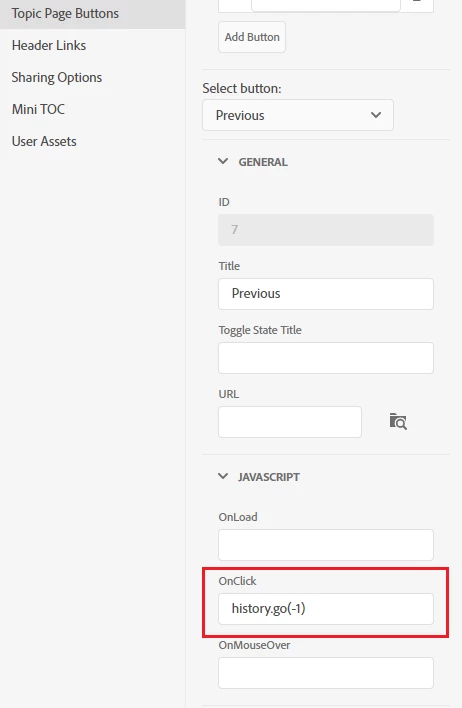
 

I also tried:

previous()

history.back()

window.history.back()

goBack()

     and

history.go(+1)

forward()

history.forward()

window.history.forward()

goForward()


Does the frameless output require different settings?


    This topic has been closed for replies.

    2 replies

    Jeff_Coatsworth
    Community Expert
    Community Expert
    March 14, 2024

    Also - any reason as to why you're not on the latest RH2022 patch? Your subscription includes updates.

    Participating Frequently
    March 14, 2024

    Hi Jeff. I wish! Unless there is a security risk in an application, it is extremely difficult to get it added to the company Deployable Technology List for patching and upgrades. 

    Jeff_Coatsworth
    Community Expert
    Community Expert
    March 14, 2024

    If it's your main authoring tool, I'd think it was already on the list!

    Community Expert
    March 14, 2024

    A very quick test suggests that history.back() works, but only after I press the button twice. I couldn't get history.forward() to work at all. 


    Possibly Frameless is what they call a "single page application"? https://developer.mozilla.org/en-US/docs/Web/API/History_API/Working_with_the_History_API


    However, you would need to go to Adobe for confirmation, and advice on what the correct method to implement back/forward buttons is.


    See the following page for support contact options. The email address is recommended as it goes to a dedicated Robohelp team.
    https://helpx.adobe.com/contact/enterprise-support.other.html#robohelp

    Participating Frequently
    March 14, 2024

    Thank you! I'll send them an email. 🙂