
CarrieWilkey
Participating Frequently
October 2, 2019
Question

RoboHelp 2015 Won't Generate Printed Documentation to Word or PDF

  • October 2, 2019
  • 27 replies
  • 1008 views

I used to be able to generate PDFs or Word docs in RoboHelp 2015. However, the ability to do that recently stopped. We recently upgraded from Windows 1703 to Windows 1809. And, we switched from Office 2016 to Office 365.

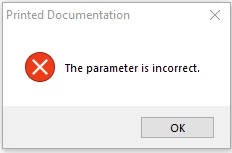
When I try to choose Printed Documentation, I get a "Parameter is Incorrect" error. Any ideas how to fix this? Does anyone know what this error means?

Thank you.
 

This topic has been closed for replies.

27 replies

Participating Frequently
October 23, 2019

I'm available now for the screenshare.  How would you like to do this?  I would prefer to communicate further not using this thread. 

Peter Grainge
Community Expert
Community Expert
October 23, 2019

I have removed your email address for security reasons. I will email you a link in a few minutes to take things forward.


Use the menu (bottom right) to mark the Best Answer or Highlight particularly useful replies. Found the answer elsewhere? Share it here.
Peter Grainge
Community Expert
Community Expert
October 23, 2019

Sorry, I meant 4pm BST which is 3pm GMT.


Use the menu (bottom right) to mark the Best Answer or Highlight particularly useful replies. Found the answer elsewhere? Share it here.
Peter Grainge
Community Expert
Community Expert
October 23, 2019

Then the issue has to be something in your setup as no one else has hit this problem with either version of 2019.


There must be something we are all missing.


Where does your Word normal.dot reside? Please tell me it is not on a network drive.


Could we do a screenshare? If yes I would like to do it in about 15 minutes from now, which is 4pm GMT (UK time).


www.grainge.org

Use the menu (bottom right) to mark the Best Answer or Highlight particularly useful replies. Found the answer elsewhere? Share it here.
Participating Frequently
October 23, 2019

I got the message using RoboHelp 2019 classic with one of the sample projects included with the software.

Peter Grainge
Community Expert
Community Expert
October 23, 2019

Receiving the message in 2019 changes everything. Hold up on going to support as I have already been in touch with where they would take it.


Can you share the project with me so that I can test it first to see if I get the message? I haven't seen it in 2017 or 2019. Are you talking about 2019 Classic or the new 2019? The latter does not need Word installed to generate a Word output so the message would be even more surprising.


If you are not willing to share with me, hopefully you can share with Adobe.


Let us know.


www.grainge.org

Use the menu (bottom right) to mark the Best Answer or Highlight particularly useful replies. Found the answer elsewhere? Share it here.
Jeff_Coatsworth
Community Expert
Community Expert
October 23, 2019

@awhickman - contact the RH folks at tcssup@adobe.com 

Participating Frequently
October 23, 2019

All the listed troubleshooting steps have been tested and we're still receiving the error message.  In installed a trial version of RoboHelp 2019 and we're still receiving the error message.

Peter Grainge
Community Expert
Community Expert
October 22, 2019

I have established from Adobe that log files are not created unless an output is generated and the process is not even starting here.


They have confirmed the steps in my previous post should work so please try them and let us know.


www.grainge.org

Use the menu (bottom right) to mark the Best Answer or Highlight particularly useful replies. Found the answer elsewhere? Share it here.
Peter Grainge
Community Expert
Community Expert
October 18, 2019

OK so the user profile is not the issue. It did fix this for someone in the past, hence saying to try it.


I don't think it will make any difference but now you have a new setup let's run through some fairly quick things but do them one at a time so you know which one fixed the issue if something does work.


  1. Was Word run on the new system before generating the printed output?
  2. Was Word used first?
  3. Were the security settings in Word set to low?
  4. Have you again deleted the PSS and CPD files and then reopened the project?


I am waiting to hear about the log files but that will likely not be until next week. I have offered to run this myself on 2017 and I have identified someone with a 2015 machine. if you want me to do that, see the Contact page on my site and send the project as instructed there. Do make sure you include a link to this thread and please do not email the project direct.


See www.grainge.org for free RoboHelp and Authoring information.

@petergrainge


Use the menu (bottom right) to mark the Best Answer or Highlight particularly useful replies. Found the answer elsewhere? Share it here.
Participating Frequently
October 18, 2019

I am the IT technician working on this issue.  I created a new test system and I am a different user than the original requestor. 

   *New System

   *New User Account

   *Same Error Message