


colleen_facs
Participating Frequently
January 25, 2019
Question

RoboHelp 2019 and SharePoint Online Settings

  • January 25, 2019
  • 2 replies
  • 1740 views

Hi, we are in the process of upgrading from RoboHelp 2017 to RoboHelp 2019 and I am having trouble getting the SharePoint connection to work for version control. When we upgraded our current project, it removed the SharePoint settings we had set up (it would have been nice to know that those wouldn't transfer over...it makes me worry that there are other settings that didn't transfer as well). I then figured out that although we used the SharePoint Connector in the 2017 version to connect to the version of SharePoint hosted on our company website, that is no longer an option with RoboHelp 2019.

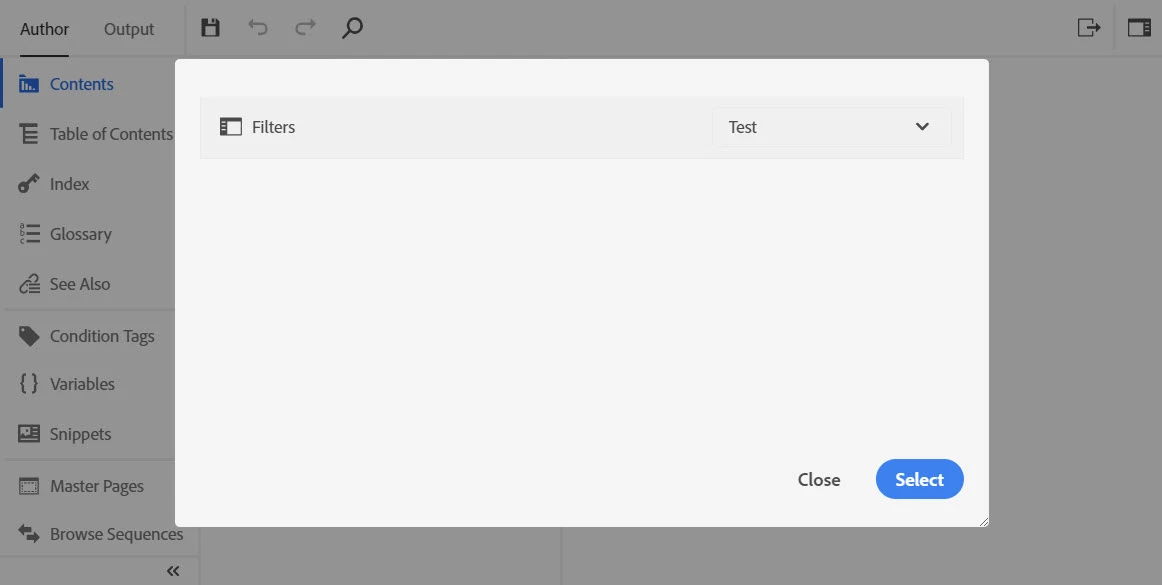
We have Sharepoint Online accounts, so it's possible to switch over to SharePoint Online, but when I add a connection profile nothing happens. I'm signed in and connected, but no folders show up in the selection window (see below) even though there are folders on the Sharepoint site:
The RoboHelp instructions were so vague that they aren't any help. When I was on the phone with Adobe support, the woman I talked to said they had more detailed instructions but didn't send them over after repeated requests. The Adobe support staff I spoke to on the phone were unable to help me and didn't seem to have much experience with connecting RoboHelp to Sharepoint Online.

Are there certain settings I need to enable on the Sharepoint site in order for this to work? Does anyone have a more detailed step by step documentation of this process?

If anyone could help, I'd really appreciate it. Setting up Sharepoint version control for the 2017 version was pretty easy so I had no idea this would be such a problem.

This topic has been closed for replies.

2 replies

Participant
February 21, 2019

Hi everyone,

Can I run the RoboHelp program itself off of Sharepoint?

I work in NYS government. Currently, I'm using Robo 2017 on a desktop computer.

I'm told that soon, we (actually, I'm a contractor here) will soon convert to VDI -- some sort of virtual desktop, whereby I will no longer have a desktop computer.  This is in addition to voluminous firewalls and other security measures here.

So, I'm not clear what, if anything, you can run from a network:

RoboHelp program files?

Source files for the project?

Output files?

Any help or new knowledge appreciated.

Thanks,

Mark Thiel

Peter Grainge
Community Expert
Community Expert
February 21, 2019

I believe it is only the output that can run on SharePoint but that's a very different thing to a virtual machine. The usual issue for Government agencies is authentication of RoboHelp. There are some special arrangements to cover that. I think you need to find out more and then you or your IT guys will need to liaise with Adobe Support.


See www.grainge.org for free RoboHelp and Authoring information.

@petergrainge

Use the menu (bottom right) to mark the Best Answer or Highlight particularly useful replies. Found the answer elsewhere? Share it here.
Participant
February 21, 2019

Peter,

Thanks for your reply.

I thought the same thing -- output only. I don't see how the program itself can be run from a network location and publish to another network location, as well.

With Sharepoint issues alone, I see comments saying that (if I understand correctly) you can only publish to a site-level domain, not to a subsite or subfolder.)

The customer (NYS gov) says that for security reasons, no one will have a desktop computer, and all software will live on their network (with all the security).  No USB ports or any other kind of port.

I don't see how this is going to work with RoboHelp, or what will happen to my project when the virtual desktop thing is implemented.

(In the past, I have tried keeping source files on a network. Not program files, source files. Everything looks okay at first, but then there are anomalies that increase over time.)

surbhi_maheshwari9120543
Community Manager
Community Manager
January 29, 2019

Hi,

Apologies for your trouble.

Let's discuss this issue over a screen share call. Please suggest the time for tomorrow.

We are in IST zone so please suggest accordingly.

Thanks and Regards,
Surbhi Maheshwari

colleen_facs
Participating Frequently
January 29, 2019

Our office will likely be closed tomorrow because of the cold (possible wind chill of -55°F). I have some availability today between 11am-1pm CST (which looks like is 10:30pm-12:30am in IST). On Thursday, I am available between 10am-4pm CST. Please let me know if any of those times will work. As I mentioned in my original post, any documentation you have on settings for setting up the SharePoint connection would also be helpful.

Inspiring
February 7, 2019

Hey... just been through this myself. Here's what I found.

That Filters screen is only looking in the Documents document library on your site (not a subsite).

For me, I had to create a new site, then add an empty folder in the default "Documents" document library.

Hope this helps you.