


Robohelp 2022: Default Dynamic Content Filter Not Honored at Topic Level On Direct Topic
Robohelp Version: 2022.4.179
Question: How do we apply a default content filter to a direct topic (topic without panel/function bar) for content-level condition tags?
Context:
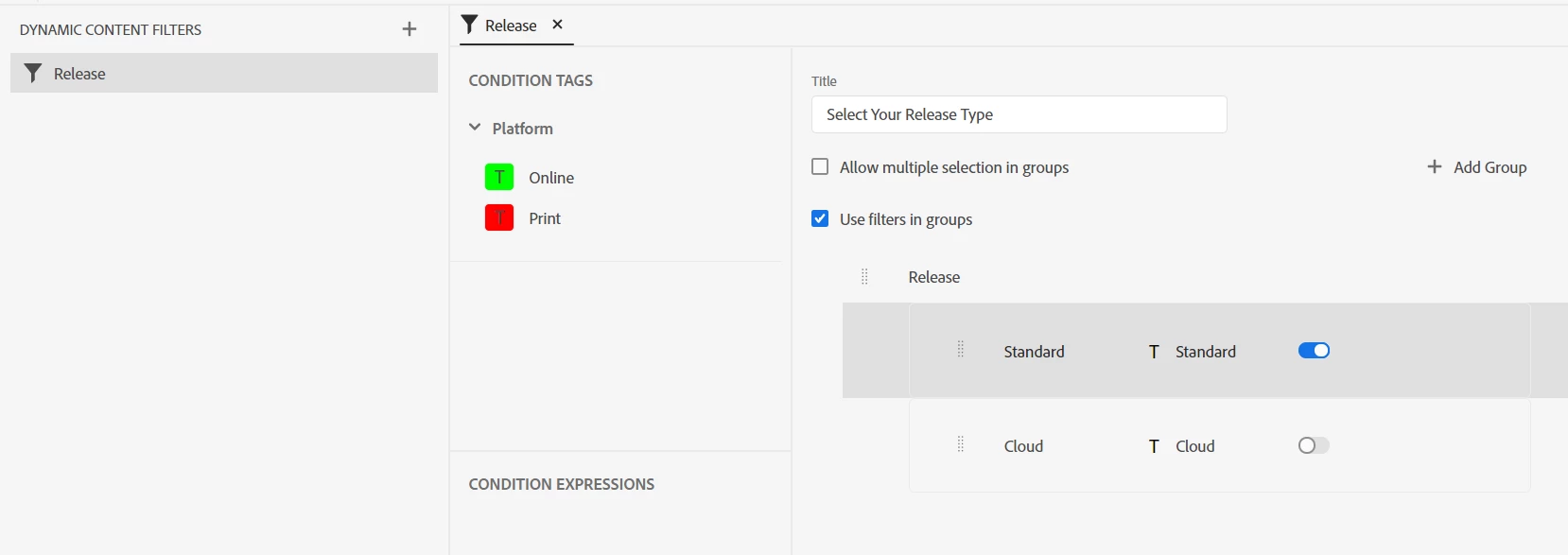
I have an HTML5 Responsive Output (Azure Blue) that is set with dynamic content filters to show/hide content based on whether or not the user has selected the "Standard" version or the "Cloud" version of our software (Standard has been set as the default):
We wanted it to be very obvious to users which version they are viewing, so we created a topic header that will state which version is currently selected:

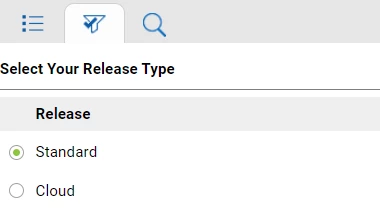
This works quite well as you can see above, however, we have an issue with our company search. For the search, it would not return actual topic titles/content when displaying the full site with the TOC. It would just return the site title. So, for our sitemap.xml, to add the help pages to the search, we changed the URL to direct topics (ex: instead of Help/index.htm#t=Home_Page/Welcome.htm it would be Help/Home_Page/Welcome.htm). This is when the topic displays with the "Click here to see this page in full context" button in the header and the panel/function bar are not present.
This works for the search purposes, however, page is unable to access the default topic information and instead displays both data-conditions.

My question is this: is there a way to insert a default filter value for this scenario or a way for this type of page to retrieve the necessary filter information?
Here is the html for the portion of the header that has the filter details (again, this works fine in the full site, but fails when viewing just the topic frame):
<div data-region="header" style=""><span><span style="font-size:10px"><span style="font-size:10pt;">This help site provides information on both Cloud and Standard releases. Use the <strong>Filters</strong> panel on the left to choose your release type. You are now viewing the<strong> <span data-condition="Product:Cloud">Cloud</span><span data-condition="Product:Standard">Standard</span> </strong> version. </span> </span> </span>
Any suggestions are very much appreciated!

 AdChoices