
RoboHelp 2022 is not readjusting heading levels as expected when new options are on in the template
I have a large project with topics that I reuse between various printed doc outputs. RoboHelp 2019 would adjust the headings according to the TOC so that a topic could be at one level in on document (e.g., H2) and a different level in a different document (e.g., H3). There was an option to take care of this. Then, in RoboHelp 2020, the printed doc hierarchy did not work the same way. The headings themselves determined the doc hierarchy entirely. This was problematic when I wanted to share topics between outputs (which was often). To solve it, I had to create extra topics that were heading only in some cases and add multiple headings (with different heading levels) to some topics with conditional build tages to determine which one to show in which layout. Overall, this is a messy solution.
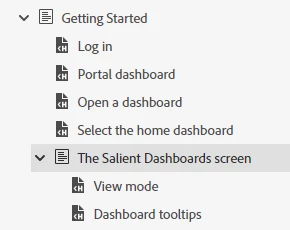
I was excited to see new options in RoboHelp 2022: Readjust heading levels as in the source TOC hierarchy and Add or replace heading from the source TOC to maintain the hierarchy options. In fact, I was able to use these in one fairly simple project to eliminate the messiness. This project only had two levels in the TOCs. Now in a bigger project, I am realizing that these options are not working for lower level sections. For example, here the "The Salient Dashboards screen" section is underneath the "Getting Started" section in the TOC.
However, when I generate this with those two options on, here is the hierarchy in the resulting Word doc. That section is moved up to the first level (not underneath Getting Started) and the heading 1 style is applied to the heading.
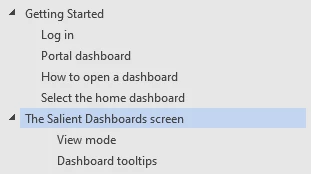
Has anyone been able to use these options successfully in a document with more than two levels?


 AdChoices