
Inspiring
December 2, 2020
Answered

Topic Not Updating in Published Output

  • December 2, 2020
  • 40 replies
  • 428 views

I'm using RH 2020.2.29 on a Win10 machine.


This is truly puzzling. I have a topic, Manage Self Service, that is not showing up correctly in published output. I've generated and published multiple times, and RH doesn't seem to be recognizing content-level changes I've made. 


The topic appears correctly in the Output pane, and should look like this in both the Mobile and Fusion outputs:
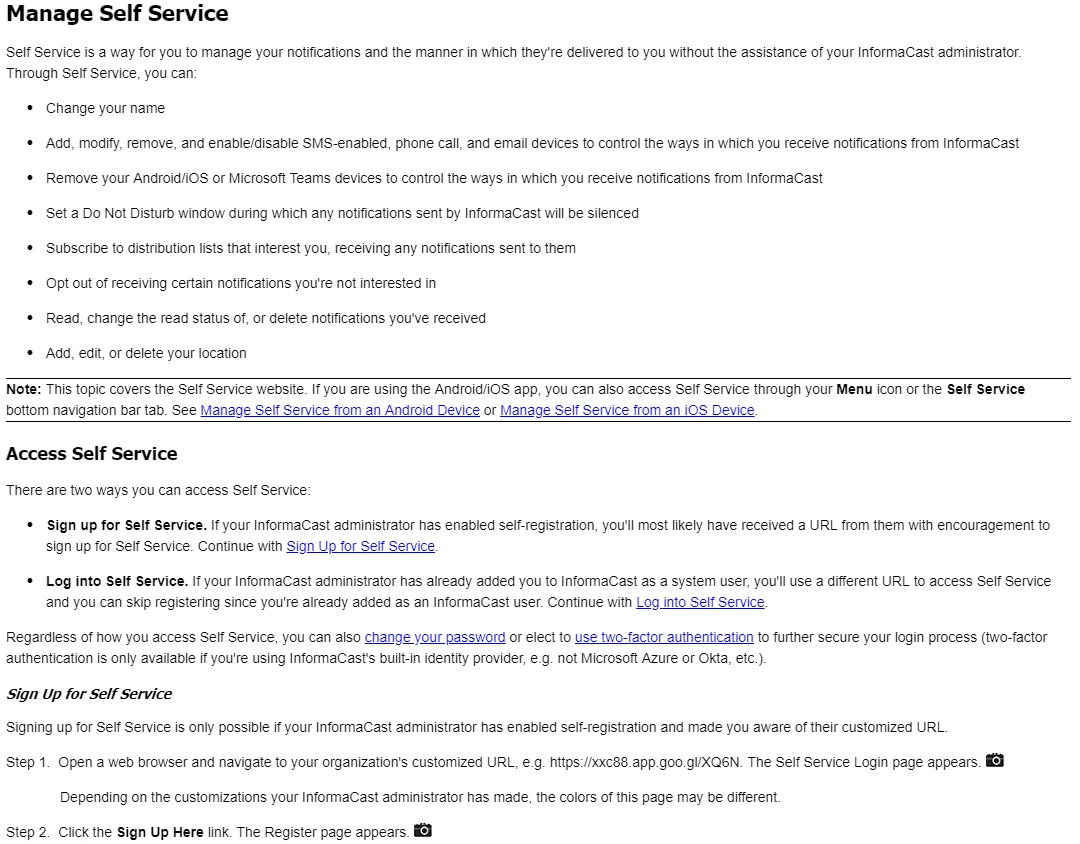
 

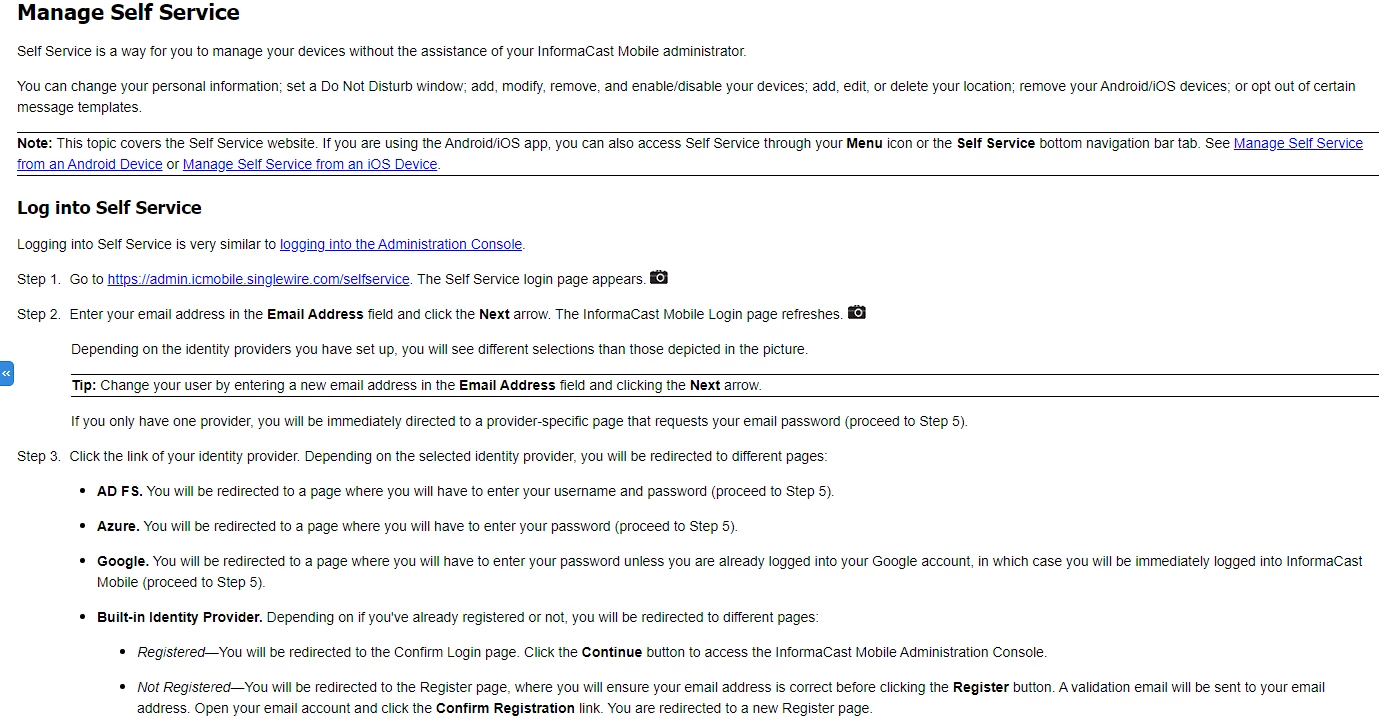
It instead looks like this in Mobile output:
 

And like this in Fusion output:
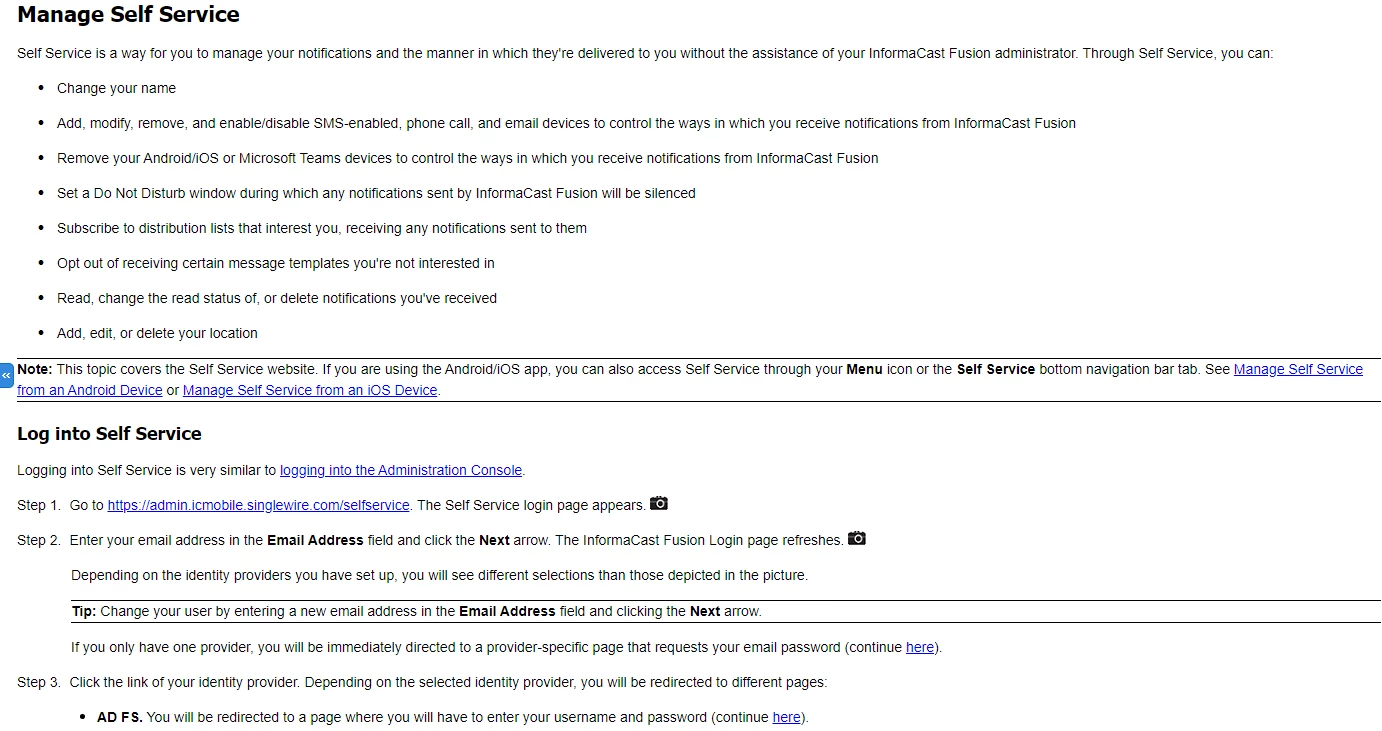
 

These are both valid PAST iterations of this topic, but not its current state.


This topic is conditionally included in both Fusion and Mobile outputs with a topic-level conditional tag of Mobile_Fusion, but there is no conditional text at the content level that would explain this behavior.


I have tried changing the conditional text tag at the topic level to remove it from both outputs, and when I regenerated, the topic was gone as intended. I changed the tag again, generated, and it reappeared, but it's still not seeing my latest edits. 

This topic has been closed for replies.
Correct answer Peter Grainge

For the benefit of anyone who hits a similar issue this is how we went about troubleshooting.


Because we were getting nowhere in the thread I offered to screenshare. The first stage was to just run through the process with Singlewire Tech Writer. That was simply to make sure there was no misunderstanding as to the process. Then I poked around the project a bit to no avail. I then suggested the topic was cut from the project with the option to remove references not selected. It was saved outside the project. Then a new topic with the same filename and title was created and it generated first time. At that point I left Singlewire Tech Writer to add the content back a few paragraphs at a time until it would not generate. 


It's basic but as shown here, it can solve a problem.


Now for the supreme irony. I advised Adobe of this before it was fixed in the hope they might be able to advise. Thanks to time zone differences that was when they were in the land of nod but this morning I got a reply. "Could the user be on a different version?" Bear in mind that the project worked for me but not for the Singlewire Tech Writer. They added that it could be as simple as a missing semi colon in an attribute.


@Singlewire Tech Writer Please compare the topic that now works in your project with the one we saved outside the project. That should confirm the difference is indeed a missing semi colon.


In this instance the fix is in Update 3 which I have and I'm guessing Singlewire Tech Writer is on Update 2. This is not a case of she should have checked for updates first as Update 3 was released while this thread was ongoing.

________________________________________________________
See www.grainge.org for free Authoring and RoboHelp Information


40 replies

Peter Grainge
Community Expert
Community Expert
December 3, 2020

Now we have some progress. I did ask earlier that you generate but I think you generated and published.


What does the red icon signify in Explorer?


Use the menu (bottom right) to mark the Best Answer or Highlight particularly useful replies. Found the answer elsewhere? Share it here.
Inspiring
December 3, 2020

This is what my RH screen looks like:


I then generated only. The topic is present in my Windows Explorer's view of the contents folder's sub-contents:


The topic is not present in the OutputPath folder's contents:

Peter Grainge
Community Expert
Community Expert
December 3, 2020

Please check the project is as I have shown, then right click it and select Show in Explorer. It should show the same as the second image.


Please confirm we are agreed so far.


Then generate only and confirm that when you click the topic in the TOC that the Peter link works but Manage Self Service does not.

________________________________________________________
See www.grainge.org for free Authoring and RoboHelp Information

Use the menu (bottom right) to mark the Best Answer or Highlight particularly useful replies. Found the answer elsewhere? Share it here.
Inspiring
December 3, 2020

Also, yes locally. Everything is on my C drive. 

Inspiring
December 3, 2020

The file is not present in either the OutputPath folder you asked me to create: 


Or the published output (the location of which remained the same): 


I added a new topic to the Administering folder titled Hello Peter. I generated and published. That topic does appear in both the OutputPath content and the published content. 

Peter Grainge
Community Expert
Community Expert
December 3, 2020

Not there in the published output, which will be in a different location, or not present in both?


Both the project and the generated output are on your local drive, correct?


Please post an image of the generated folder as in File Explorer.


Also add a new file to the same folder and TOC location. Do they make it?

________________________________________________________
See www.grainge.org for free Authoring and RoboHelp Information

Use the menu (bottom right) to mark the Best Answer or Highlight particularly useful replies. Found the answer elsewhere? Share it here.
Inspiring
December 3, 2020

I created a new folder under OutputPaths, named it FusionCUCMForPeter, generated and published, and that file is not there.

Peter Grainge
Community Expert
Community Expert
December 3, 2020

Ignore the path bit.


Yes I only changed the output path. I know you have done it already but please generate to a new folder and then in Explorer go the "same" folder in the generated output. 


Use the menu (bottom right) to mark the Best Answer or Highlight particularly useful replies. Found the answer elsewhere? Share it here.
Inspiring
December 3, 2020

Yes, that's the topic.


I'm not sure what you're saying. In my Windows Explorer, the topic is in C:\1RoboHelp\InformaCast Fusion_rh2019\contents\InformaCast_Mobile\Administering. In the project, it's in InformaCast_Mobile\Administering.


What did you change in the preset to get it to appear? I don't see a Generate To folder. Do you mean the Output Path on the preset's General tab or the Upload Location on the preset's Publish tab?

Peter Grainge
Community Expert
Community Expert
December 3, 2020

I just realised the topic is not where you said it was. Open the topic in RoboHelp and right click, select Locate in Contents Panel.

________________________________________________________
See www.grainge.org for free Authoring and RoboHelp Information

Use the menu (bottom right) to mark the Best Answer or Highlight particularly useful replies. Found the answer elsewhere? Share it here.