
Inspiring
May 2, 2024
Question

Translation process: Export to xliff and condition expression.

  • May 2, 2024
  • 3 replies
  • 633 views

I've been looking but haven't found an answer so far...
Is there a way to export to xliff only the content subject to a conditional expression?
I'm using Version 2022.3.93.

Here are the filters from the translation settings. I don't see a condition expression filter. 
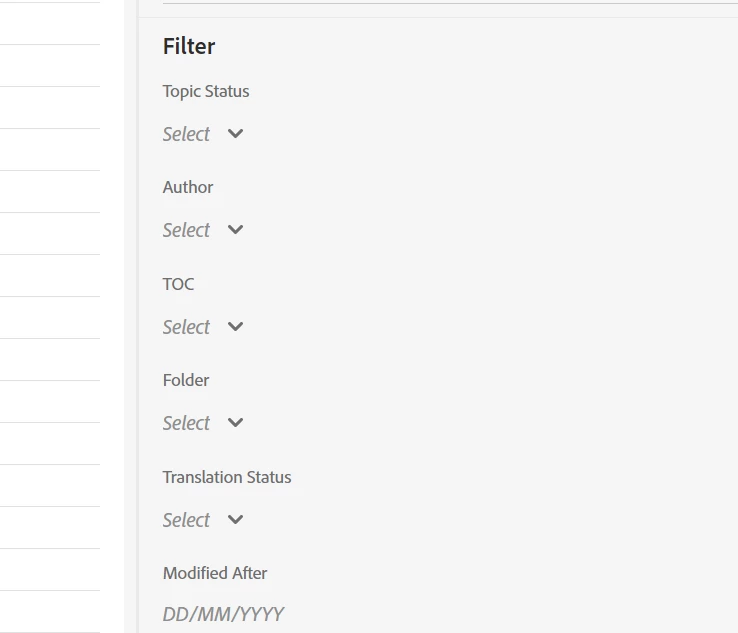
Isn't this use case common?  

Thank you for your help. 


    This topic has been closed for replies.

    3 replies

    Peter Grainge
    Community Expert
    Community Expert
    May 3, 2024

    In the About RoboHelp sample project you will see two styles called "authornote", one is a paragraph style and one is an inline style. It is the <p> tag duplicated with a bright pink colour applied.


    I have no real world knowledge of the translation process but could you not use that to instruct the agency? "Do not translate this part?" Apply a condition to it that you can exclude in the preset.


    Could that work?

    ________________________________________________________

    My site www.grainge.org includes many free Authoring and RoboHelp resources that may be of help.


    Use menu (bottom right) to mark as Best Answer or to Highlight particularly useful replies. Found the answer elsewhere? Share it here.
    Sandra42Author
    Inspiring
    May 3, 2024

    Hello. Thank you for your suggestion. I'll need to test...  I'll come back with some answers to that ASAP. 

    Inspiring
    May 2, 2024

    Nope, the filters you see are the filters you get (actually less, you cannot filter according to author name for snippets).


    Your post can be read a bit ambiguously: Do you want a filtered XLIFF export for topic-level condition expressions or content-level condition expressions?

    • The first case is across topics:  you want to translate topic A for product A and topic B for product B
    • The second case is within a topic: certain paragraphs are tagged for product A and others for product B, and you want to exclude those select paragraphs for product A.

    The second case would be straight-up impossible with Robohelp.


    As for the first case, your best bet is to work with TOCs. Throw all topics belonging to product A in a TOC reserved for product A, and use the TOC filter to export only those topics.

    As for the second case, you'll have to restructure your content such that information for product A is separated on topic-level.


    ***


    Depending on why you want to provide a partial XLIFF of a topic, you may have other options.

    If you want the translator to simply ignore sections for product A, you could run a script that applies a no-translate attribute on all tags with product A just before exporting the XLIFFS, and discard the applied changes afterwards. The translated topic will however still have information on product A, just untranslated (which is fine if you exclude it when generating the output).

    If the issue is related to information access to third-party vendors, then you are out of luck though.

    Sandra42Author
    Inspiring
    May 3, 2024

    Thank you for your reply.
    My situation is a mixture of the cases you describe, but as you can imagine, the problem relates more to the second case: export for a content-level condition expression.
    But what would be the point of using a single-source authoring tool if we can't use conditional formatting in the content?
    I think this requirement is a good candidate for a new feature, don't you ;-)? They can do it in output presets, so why not at xliff export, right?

    I'm faced with this situation because the content of my product B is ready, but the content of my product A is not quite ready. Therefore, I'd like to wait for the translation of the content for product A...
    Your suggestion to use a script to ignore the sections of product A sounds good to me, but I'm afraid I don't know how to write a script. I'm not a developer :-(.

    So I suppose that if I don't want to separate everything at topic level (unnecessary duplication), I'll have to send some content that's not ready for translation...

    Jeff_Coatsworth
    Community Expert
    Community Expert
    May 3, 2024

    Feel free to make a suggestion to the RH folks on how this process needs to be improved by using the Tracker (https://tracker.adobe.com/). Post your case # back here for other to vote on it. More votes can indicate more demand for a feature to the engineering team.

    Jeff_Coatsworth
    Community Expert
    Community Expert
    May 2, 2024

    Is the condition the other language you want translated to?

    Sandra42Author
    Inspiring
    May 2, 2024

    No, this is a product condition. I have content that applies to product A, content that applies to product B, and content that applies to both. I want to translate the content that applies to product B and to both. In other words, I want to exclude content that is tagged 'product A'.

    Jeff_Coatsworth
    Community Expert
    Community Expert
    May 2, 2024

    Sorry, haven't heard of anyone presenting with that scenario (not a lot of localization people on the RH forum).