


Known Participant
March 26, 2021
Answered

Upgrading RH 2017 project to 2020 not working

  • March 26, 2021
  • 11 replies
  • 1007 views

Hi,

I downloaded yesterday the trial version of RH 2020 to see whether the upgrading of my 2017 project works correctly. The project is quite huge and contains around 18.000 files when published, I tried by opening RH 2020 and select Upgrade project. 

The process starts running but not even 20 seconds later I get the following error and the import fails, forcing me to shut down the application.
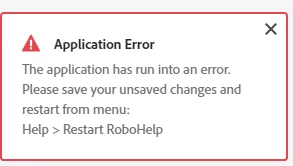
 

Could you please let me know how to tackle this issue and what could be the problem?

Thanks.

Angelica

    This topic has been closed for replies.
    Correct answer Peter Grainge

    You need to edit the CSS. It will be in Assets > CSS. Double click it to edit it. Because of the issue it may only open in source view rather than the graphical editor. 

    ________________________________________________________
    See www.grainge.org for free Authoring and RoboHelp Information

    11 replies

    Peter Grainge
    Community Expert
    Community Expert
    July 20, 2021

    I have no such script or I would willingly share it.


    Now we know lists are the issue I suggest you take a look at the Lists and Autonumbering topic in the RoboHelp Tour. In particular the section Lists upgraded from Classic versions.

    ________________________________________________________
    See www.grainge.org for free Authoring and RoboHelp Information

    Use the menu (bottom right) to mark the Best Answer or Highlight particularly useful replies. Found the answer elsewhere? Share it here.
    Known Participant
    July 20, 2021

    Thanks Peter. I was hoping @angelicas55431266 might have one as they mention working on one in a previous comment. Fingers crossed.


    Unfortunately due to time constraints our writer will likely have to install 2017 to complete this project. Inconventient, but the quickest way to solve our problem (short of a script). Will keep your article in mind in future though.

    Peter Grainge
    Community Expert
    Community Expert
    April 12, 2021

    There is no repository of customised skins that I am aware of.

    ________________________________________________________
    See www.grainge.org for free Authoring and RoboHelp Information

    Use the menu (bottom right) to mark the Best Answer or Highlight particularly useful replies. Found the answer elsewhere? Share it here.
    Peter Grainge
    Community Expert
    Community Expert
    April 12, 2021

    I'm not sure what you mean by "templates of skins". The frameless skins are templates in the sense they can be heavily customised using the skin editor. Production of a skin from scratch is a highly complex task. It requires a designer to come up with the required style and developers to make that function.

    ________________________________________________________
    See www.grainge.org for free Authoring and RoboHelp Information

    Use the menu (bottom right) to mark the Best Answer or Highlight particularly useful replies. Found the answer elsewhere? Share it here.
    Known Participant
    April 12, 2021

    I see, I was just wondering whether there were other available skins already customised by users and uploaded in the forum somewhere, as it often happens for other software. 


    Thanks anyhow!

    Peter Grainge
    Community Expert
    Community Expert
    March 26, 2021

    Everthing is different so the mini tocs may need some fixing too It might be worth looking at the RoboHelp Tour Introduction (grainge.org) on my site as there's lots of how to information there.


    Half an hour does not sound right. Have you checked the preset? Maybe the configuration needs some tweaking.

    ________________________________________________________
    See www.grainge.org for free Authoring and RoboHelp Information

    Use the menu (bottom right) to mark the Best Answer or Highlight particularly useful replies. Found the answer elsewhere? Share it here.
    Known Participant
    April 12, 2021

    Hi,


    Thanks for your help! After fixing the CSS it seemed to work fine.

    I am workin now on a script to automatically update the style of snippets and minitocs.


    In the meantime, are there any templates of laytout skins available to download?

    Known Participant
    April 12, 2021

    Beside the ones already available in RH.

    Peter Grainge
    Community Expert
    Community Expert
    March 26, 2021

    Behaviour of snippets has changed. In Classic they took on the style of the topic but you could apply a CSS. Now it's the opposite. Check what CSS is applied and whether that is what you want.


    I'm not seeing a quick way to change that.

    ________________________________________________________
    See www.grainge.org for free Authoring and RoboHelp Information

    Use the menu (bottom right) to mark the Best Answer or Highlight particularly useful replies. Found the answer elsewhere? Share it here.
    Known Participant
    March 26, 2021

    OK, I will try to do it manually.

    What about the MiniTOCs, also the style of that seems not correct anymore hmm.


    I tried anyhow to generate an output and it's been more than half an hour that says ''starting generation'' on the pop-up but no progress so far... is it normal?


    Thank you again.

    Jeff_Coatsworth
    Community Expert
    Community Expert
    March 26, 2021

    You also try pasting in your CSS to this validator tool - https://jigsaw.w3.org/css-validator/

    Known Participant
    March 26, 2021

    It found 189 issues but in 2017 and 2019 classic the projects and the styles are perfectly displayed 😕😕

    Peter Grainge
    Community Expert
    Community Expert
    March 26, 2021

    https://community.adobe.com/t5/robohelp/paragraph-styles-missing-and-application-error-after-upgrade-to-2019-from-classic/td-p/11917675

    ________________________________________________________
    See www.grainge.org for free Authoring and RoboHelp Information

    Use the menu (bottom right) to mark the Best Answer or Highlight particularly useful replies. Found the answer elsewhere? Share it here.
    Known Participant
    March 26, 2021

    I do not have any @Media only definiton in the CSS. 

    What else should I do?


    Thanks

    Known Participant
    March 26, 2021

    I managed to clean the .CSS and it seems like the styles now appear. The main issue stays with the snippets, that did not save their style when imported, and it seems like I have to reapply it one by one. Any solution for doing that in batch?

    Peter Grainge
    Community Expert
    Community Expert
    March 26, 2021

    There's a thread in the last couple of days that covers the most likely cause. Empty Styles or something like that.

    ________________________________________________________
    See www.grainge.org for free Authoring and RoboHelp Information

    Use the menu (bottom right) to mark the Best Answer or Highlight particularly useful replies. Found the answer elsewhere? Share it here.
    Known Participant
    March 26, 2021

    I found your solution in the other thread but I do not have any @217338 only definiton in the CSS. 😕😕

    What else should I do?


    Thanks

    Peter Grainge
    Community Expert
    Peter GraingeCommunity ExpertCorrect answer
    Community Expert
    March 26, 2021

    You need to edit the CSS. It will be in Assets > CSS. Double click it to edit it. Because of the issue it may only open in source view rather than the graphical editor. 

    ________________________________________________________
    See www.grainge.org for free Authoring and RoboHelp Information

    Use the menu (bottom right) to mark the Best Answer or Highlight particularly useful replies. Found the answer elsewhere? Share it here.
    Known Participant
    March 26, 2021

    Hi Peter,


    Thanks again for your answer. What do I need to edit in the CSS exactly? 


    At the moment, the project seems to read the CSS but in the Styles pane none of the existing styles appear, it's empty.

    Also, the topics' look seems overall to be fine, following the styles that were created in the previous version even if they do not appear in the side pane, and I only see an issue with the styles of some snippets that is not the correct one.


    The following error keeps on appearing as well:


    Any idea on how to fix this?
    Thanks


    Peter Grainge
    Community Expert
    Community Expert
    March 26, 2021

    How many topics rather than how many files?


    Were they in folders? Please tell me they weren't all in the root of the project. 


    Post back when you have tried in Update 4.

    ________________________________________________________
    See www.grainge.org for free Authoring and RoboHelp Information

    Use the menu (bottom right) to mark the Best Answer or Highlight particularly useful replies. Found the answer elsewhere? Share it here.
    Known Participant
    March 26, 2021

    Hi!

    Thanks a lot for the quick answer! I updated RH and indeed the import now worked BUT with one issue:

    Warning: Failed patching and copying CSS Dependencies from [path of .css file in the project]

    Is there a way to try to reapply the CSS or force it somehow? Or any other way to solve this issue?

    Thank you again!
    Angelica