robertstonefilm
Known Participant
May 20, 2017
Answered

Team Project won't save

  • May 20, 2017
  • 17 replies
  • 19705 views

For the past 24 hours my team project will not sync with creative cloud. This icon is in the lower left hand corner.

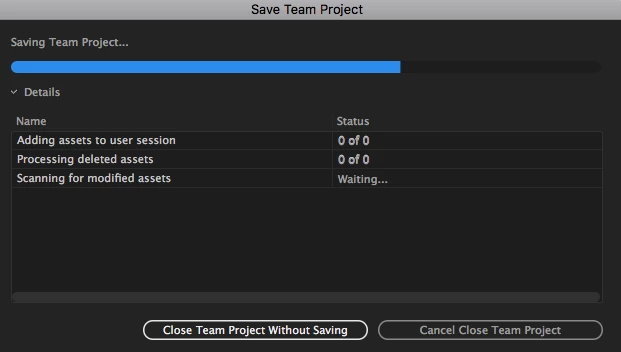
If I try to close the Team Project I get frozen in this window:

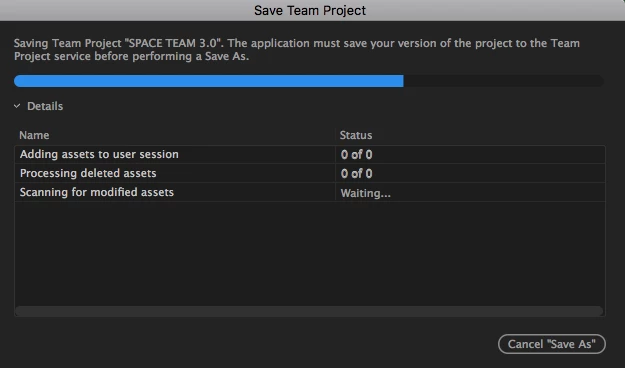
If I try to save it as a Premier project I get frozen at this window:

The only way to close down is to force quite but how can I be assured that I won't lose all my work?

This has been happening many times over the past week.

Correct answer jhunternolan

Neil,


I was just able to solve the problem.


Things I tried-

- Starting Premiere with no drives plugged in - fail

- Quitting and forcing save - fail

- Getting uninvited and revinted to team project - fail

- Every way of saving locally / saving to teams - fail

- Deleting autosave folder in Adobe Cloud Folder - fail


- GOING INTO CREATIVE CLOUD AND SELECTING A PREVIOUS VERSION (from 22.5 to 22.4) - WIN


Don't ask me why but after 2 weeks of asking people, digging in forums, and speaking with AE's, a simple version downgrade unclogged the pipe and let me in.  I now have a backlog of local saves that it's trying to upload when I share changes but I will have the team reject them and reshare their version of the project with me in the morning.


Cheers, hope this is helpful!


Sorry, to be clear, I replaced my install of Premiere (inside of creative cloud desktop app) with version 22.4 (I was on version 22.5) and that is what did the trick.


17 replies

Participating Frequently
November 20, 2023

While these are all decent workarounds a "workaround" is not what we need. 
What we need is for ADOBE to FIX the F** PROBLEM!!


We all pay way too much for the software not to work better than it does.  Period.

Participant
October 11, 2023

10/11/2023 and having the same problem. Pretty sad that Adobe seems to not care about fixing this several year old problem even though they charge us way more money (and recurring, not one time). Starting to see why everyone is switching to DaVinci. Might do it myself.

R Neil Haugen
Legend
October 11, 2023

It's a right pain when it doesn't work, no questions there. But the vast majority of TP users aren't having this issue. So we would need some information from you to help solve it.


The OS, some idea of the scope of the project, number of members and such, and probably some screen grabs also. A description of what you're doing ... and what you've tried for trouble shooting also helps.

Everyone's mileage always varies ...
Participating Frequently
December 16, 2022

UPDATE - As of v23.1 (Build 86) it seems there is at least "something" done ... 


My premiere recently crashed earlier today while trying to get updates on a team project.  After I had to force it to close because it wasn't responding, when I reopened premiere I saw the below in my "Recent" list.  As you can see there is now a new "type" of file called "PRPROJ_blah blah" - this appears to be some kind of temporary file that Adobe is creating.  I opened that file instead of my team project and surprisingly my changes were there - whew!


Then, I opened my team project and all my colleagues latest changes (from my get latest pull when it crashed) were actually in the project; it just seems like Adobe locked up after it updated the project for some reason.


Hopefully this will help someone else, it's not fixed but its better than losing an entire day's worth of work.

Participating Frequently
December 16, 2022

Participant
December 16, 2022

This just glitch just happened to me on version 23.1.0 (build 86) just today. Premiere wouldn't save or publish changes to my team project. It also wouldn't let me "save as" locally. Since I read on here that people have lost tons of work due to this bug, I exported all the work I had done as a precaution. I also created a new local project and then copied and pasted all of the sequences + assets from my team project into that new project (since, again, I couldn't use "save as" to save a local copy of the team project). After all that, however, once I hit "quit" the team project published my changes and allowed me to save.   

I think this might have scared me off from Team Projects for the time being, since it felt like I came very close to losing a half day of work over nothing. It's extra concerning that this has been a known issue for over 5 years and that the best trouble shooting guidance from Adobe seems to be "Whoopsy! Just close your project and reopen it... and risk losing hours of work in the process."

Participating Frequently
December 16, 2022

This problem was minimal and didn't happen often (for me at least) in v2022, however now that we are on v2022.1 (Build 86) the problem seems to have reoccured and is much worse.  Almost every time I save a team project it spins for 20-30 minutes and many times I have to cancel multiple times before it will let me publish my changes.


Come on Adobe - fix this already!

Elijah Ciali
Participant
October 8, 2022

Hello all,

Today I had this problem but fortunately wasn't forced to quit the application. I opened the team project within After Effects and voila, all of my unshared changes I had made in Premiere were there. After Effects could successfully share the changes and save the project for me! I restarted Premiere and kept all of my progress. I guess we know what the more stable team in Adobe is...

R Neil Haugen
Legend
October 8, 2022

That's interesting and useful information there, thanks for posting!


Neil

Everyone's mileage always varies ...
Participating Frequently
August 30, 2022

This is still a problem heading into Sept of 2022.  Adobe is so frustrating.  

Inspiring
August 31, 2022

Happening to me tonight, only way I found my way to this page to try to figure it out.  Very let down, running with a 6 person post team currently and it's about to need to be kicked to the curb. 

Participating Frequently
August 31, 2022

I left my computer on for 6 hours to see if it would resolve itself out.  No go.  Just hung on the exact same spot.  Come on Adobe.  

Participant
June 21, 2022

Just ran into this issue today. Had to force quit and lose my work!

Participating Frequently
August 26, 2022

Me too - still not fixed as of 2022.08.26 - come on Adobe!

Participant
April 11, 2022

This is still a problem in Premiere Teams. Our team, on OSX and Windows both, runs into almost every day. While we work on a project and click the up arrow to save our changes, we get the dialog that "the application is saving your version to Team Projects". Then it just sits there not doing anything. As an expirement we have let it sit like this for 24 hours, nothing. Internet connection is fine and all media is connected. The only solution is to "Quit without saving your changes". This leads to loss of our work. We have learned to constantly upload our changes so we only usually lost 15 minutes of work, but occassionally forget and hours of work can be lost. This really needs to be fixed. I'm guessing here but it seems like Premiere loses a connection to the adobe server on adobe's side. And the only way to get that connection re-established is to quit adobe. But that can only be done by not saving our changes. At least give us the option to save work locally in case of this bug (without converting to a local project and reconverting to a team project again) so we don't lose the work.


Participant
May 27, 2022

I had the same issue as Chris Hunt, where the save dialoge would be stuck at 100% and nothing happend. 

What fixed it for me was telling premiere to close without saving, which triggers a special dialoge box  "are sure that you dont want to share the changes you made" with a share button. Pressing share in this dialoge box let me upload it like usual. 

Participating Frequently
June 5, 2022

Just chiming in that I just ran into this problem and was hoping for a solution. I can't convert to a regular Premiere Pro file because it needs to "save version to Team Projects". I am at least able to export a Final Cut XML but that'll probably mean a headache for attempting to re-import it into a Premiere Pro timeline. I'm still able to edit and export files, but basically I'm not able to save to the cloud. Any other suggestions for things I can do before I eventually will have to force quit out?

Participating Frequently
December 10, 2021

THIS ISSUE IS STILL NOT FIXED 😞 I JUST LOST WORK BECAUSE OF IT. THANKS ADOBE.

R Neil Haugen
Legend
December 15, 2021

Details please, or your post is kinda wasted.


Which version of Pr are you using? On what OS? Is this an individual or Enterprise license? Which exact error was happening?


Those are some pretty basic things the devs or we other users would need to know to try and 1) help by 2) troubleshooting with you.


Neil

Everyone's mileage always varies ...
Inspiring
August 31, 2022

Neil, this still isn't figured out unfortunately.  Any thoughts on solutions?

Participant
July 27, 2021

Yep having exact same issue 4 days into using this... Adobe this has been here for years, for the love of God, please fix this, this shouldn't be an issue for 5 years