


Participant
August 18, 2022
Question

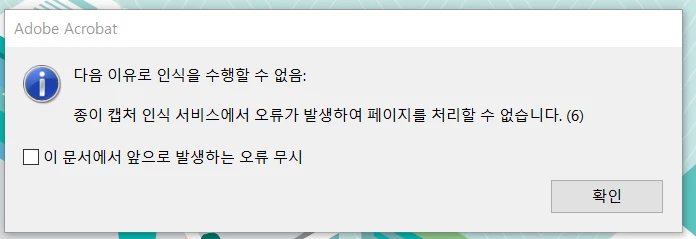
acrobat pro paper capture error (OCR)
  • August 18, 2022
  • 1 reply
  • 959 views

Paper capture recognition service an error(6)

I tried to deleted, and installed


And files copy to solution

https://helpx.adobe.com/kr/acrobat/kb/acrobat-could-access-recognition-service.html


But I'm still suffering from this problem

Let me know if anyone knows the answer

This topic has been closed for replies.

1 reply

Amal.
Community Manager
Community Manager
August 18, 2022

Hi there


Hope you are doing well and sorry to hear that.


Would you mind sharing the version of the Acrobat DC and the OS you are using? To check the version go to Help > About Acrobat and make sure you have the recent version 22.2.20191. Go to Help > Check for updates and reboot the computer once.


Also try to repair the installation from the help menu (Win Only)


You may also try to reset the Acrobat preferences as described here https://community.adobe.com/t5/acrobat-discussions/how-to-reset-acrobat-preference-settings-to-default/td-p/4792082


Regards

Amal

rea246810Author
Participant
August 19, 2022

This is the version of my acrobat.