
Participant
December 14, 2018
Question

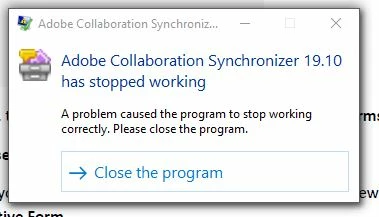
Error Message: Adobe Collaboration Synchronizer 19.10 has stopped working

  • December 14, 2018
  • 1 reply
  • 6020 views

How can I get the following error message -- "Adobe Collaboration Synchronizer 19.10 has stopped working" -- to stop showing up whenever I try to use Adobe Acrobat Pro DC? I can't find the program in order to close the program. I have to click the X box dozens of times to get the error to disappear so I can even read or edit a PDF. It's making me nuts!
This topic has been closed for replies.

1 reply

Participant
March 27, 2019

I'm expieriencing the same issue. Has anybody come across any solution for that?

Adobe Employee
April 1, 2019

Apologies for the inconvenience caused!

We would request you to kindly share the Crash dumps when “Adobe Collaboration Synchronizer” crashes for you.

When Reader Crashes (If you get this error message " Adobe Collaboration Synchronizer has stopped working") , Can you please share with us the Crash Logs .

For Getting the Crash Logs:

a.      When Adobe Collaboration Synchronizer crashes, Open Windows Task Manager

b.      -> Goto Processes, there you can see a process " Adobe Collaboration Synchronizer " / AdobeCollabSync.exe

c.      Right Click on this process and click "Create Dump File"

d.      Dump file will be created in the Temp folder of user (as specified on the dialog you get after creating dump files).

e.      Save this DMP file on any Cloud Storage and Share the link for that with us.

We will investigate it once you share this information with us.

Regards,

Arvind

Participant
April 1, 2019

arvindy

Thank you very much!

Right now we can not reproduce the error. Once the error occurs we will create the dump and send it to you.

Regards,

Marcel