



How do I return a non-password secured PDF from the /widgets v5 REST API call?
*** The Issue ***
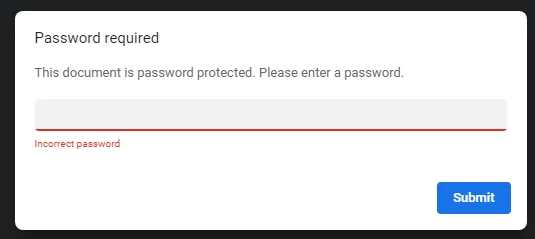
When calling GET /agreements/{agreementId}/combinedDocument I receive a file that is secured with a password. The original source document sent via POST /widgets with the below JSON options appears to not work for me and a password is needed by the PDF returned (in Step-5). In addition, the original file sent had NO security applied to it for testing.
So it boils down to this, what do I need to do to return a document that does not prompt me for a password?
REST Calls (the order I'm using to set this up)
These are the steps I am walking thru. Does this look correct to you?
Step-1: POST /transientDocuments (push our doc up to AdobeSign - expiry in 7days)
Step-2: POST /widgets (use the transient doc to create a widget doc - no expiry of doc now)
Step-3: PUT /widgets/{widgetId}/personalize (add email address to the widget doc)
Step-4: GET /widgets/{widgetId}/agreements ~~ Check for Signatures processing
Step-5: GET /agreements/{agreementId}/combinedDocument ~~ If signed, then pull the document over from AdobeSign (returned the following)
- %PDF-1.7 %���� 3622 0 obj <</Linearized 1/L 1220097/H[3840 766]/O 3625/E 238109/N 8/T 1147523>> endobj xref 3622 171 0000000016
- trailer <</Root 3624 0 R/Info 698 0 R/Encrypt 3623 0 R/ID[<1C498C8A4D094DBF4BEE55712097BB70><AD2F19010AEBB083A84A9590311D53EF>]/Size 3793/Prev 1147512>> startxref 0 %%EOF
- 1074/Filter/FlateDecode>>stream {��d� ��c/ <4�6��P(8ٟQ���B� '?#o���]'A֔�ɾ� �v�|�VM{#.3��#�
- NOTE, this alternate process (to Step-5 above) returns the same results -- a password secured PDF
- Step-5: GET /agreements/{agreementId}/documents & return documentId
- Step-6 GET /agreements/{agreementId}/documents/{documentId}
{
"widgetCreationInfo": {
"fileInfos": [
{
"transientDocumentId": ARGUMENTS.transientDocumentId
}
],
"name": ARGUMENTS.appDbaName,
"signatureFlow": "SENDER_SIGNATURE_NOT_REQUIRED",
"callbackInfo": ARGUMENTS.callbackUrl,
"securityOptions": {
"passwordProtection": "NONE",
"kbaProtection": "NONE",
"webIdentityProtection": "NONE",
"protectOpen": false,
"internalPassword": "",
"externalPassword": "",
"openPassword": ""
}
}
}
}
Found these various thoughts in the forums --
E-Sign Password Protection - Management Issues! (covers UI, but it mentions a final PDF with a password -- with tells me it's possible to NOT have it)
The password in the Options section is the "view final PDF" password. This password is only applied after the full signature cycle and is the one embedded in the PDF.
Echosign is automatically setting a password on a signed document
It seems that you are looking to modify the signed PDF received through E-Sign. For that, the documents are encrypted and they cannot be modified due to security reason.
Widget PDF copy in email is password protected
All Adobe Sign pdfs are protected if you contact your CSM agent they can set a "password sealer" password so you can remove protections. Note that its just one password for your entire account so id be careful handling access to that password.
Last time I looked, PDFs exported from Adobe Sign are password protected with an Owner password only. The User password is null, so you can view the document. The Owner password does restrict some operations.
How to encrypt your documents using Adobe Sign - You can leave Password Protect unchecked.
This option allows the sender to set a specific password that is applied to the Signed PDF document. This password is required to open and view the Signed PDF file.
*** This is allowed from the UI -- How is this done from the REST API? ***

 AdChoices