


Inspiring
September 17, 2017
Answered

Remapping and motion blur

  • September 17, 2017
  • 2 replies
  • 6291 views

I have a clip I want to speed up, and I also want to add motion blur. But adding motion blur the regular way didn't work. Why?
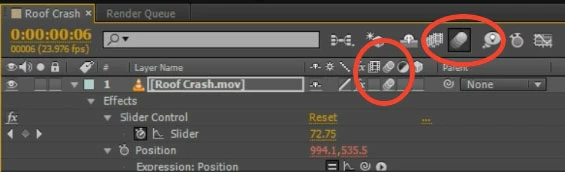
So I added CC force motion blur, which worked fine, until the two last frames. There was no motion blur whatsoever.

I read somewhere that I could create the clip into a pre comp, and I did. Added the CCFMB, but still didn't work. For my project I plan on doing some remapping, but if I can't add motion blur to it, it's a waste. So how can I fix this?

PS: I borrowed the image from Adobe After Effects Basics – Camera Shake

    This topic has been closed for replies.
    Correct answer Rick Gerard

    From the little I can see in your screenshot you are simply scaling up the time remapped layer so the zoom you did in camera went in a little farther. The scale increase happens over six frames. I don't see how far you scaled up the image.

    I think your goal is to add some additional motion blur to the shot to emphasize the snap zoom. I would do that with an animated radial blur set to zoom. You can use CC Radial Blur or Radial Blur. I think CC Radial Blur is a better effect. Then the only problem you have left to deal with is the loss of resolution caused by the scaling. Something like this enhanced snap zoom to a wasps nest would render faster and be much easier to control. If you have to scale up past about 120% then maybe throwing Detail Preserving Upscale into the mix instead of just scale will give you a better final image. The amount of Radial Blur ZOOM was animated between zero and 80, then back to zero.

    I hope this helps.

    2 replies

    angie_taylor
    Brainiac
    September 18, 2017

    If something is not moving fast enough for the default motion blur to be effective, You can increase the amount of real motion blur in the composition settings. Click on the Advanced tab and increase the Shutter Angle value to create more motion blur. It can increase up to 720. If you check the "Preview" checkbox you can see the blur changing in the comp panel as you adjust it.

    HaugenAuthor
    Inspiring
    September 18, 2017

    Hmm, it might be that it's not moving fast enough.

    Here's what I did. I zoomed from 100mm to 400mm. From 400mm, I need to scale the image to create an even greater zoom.

    From 100mm to 400mm I had to apply Pixel motion blur, and from 400mm I applied the native blur. But there was a gap between where I stopped zooming and the scaling began. And in this gap there was no blur. I solved it by overlapping the native (scaling) and pixel blur (remapping). Think that's the way to do it.

    Rick GerardCorrect answer
    Community Expert
    September 18, 2017

    From the little I can see in your screenshot you are simply scaling up the time remapped layer so the zoom you did in camera went in a little farther. The scale increase happens over six frames. I don't see how far you scaled up the image.

    I think your goal is to add some additional motion blur to the shot to emphasize the snap zoom. I would do that with an animated radial blur set to zoom. You can use CC Radial Blur or Radial Blur. I think CC Radial Blur is a better effect. Then the only problem you have left to deal with is the loss of resolution caused by the scaling. Something like this enhanced snap zoom to a wasps nest would render faster and be much easier to control. If you have to scale up past about 120% then maybe throwing Detail Preserving Upscale into the mix instead of just scale will give you a better final image. The amount of Radial Blur ZOOM was animated between zero and 80, then back to zero.

    I hope this helps.

    Roei Tzoref
    Brainiac
    September 17, 2017

    But adding motion blur the regular way did'nt work. Why?

    are you using the motion blur for specific properties or for the video itself? the native motion blur only works for transform properties: position, anchor point, scale and rotation, mask path's, text animators, shape properties and operators - this sort of things. not time remapping property. for motion blur on video or CGI renderes, that is - if the video itself has movement that you want to add motion blur to, use pixel motion blur effect. for motion blur on effects, use CCFMB effect.

    if this does not solve your problem, show us a full screenshot of your Ae interface and press UU on the layer in question so we can see everything. a detailed video capture would be nice too.

    HaugenAuthor
    Inspiring
    September 18, 2017

    I did a zoom on my 100-400mm, but that zoom was not fast enough. So I had to make it faster. But the two or three last frames was not affected by the CCFMB. I will try pixel motion to see what happens.