Participant
August 26, 2017
Answered

how to change colours of a vector shape in the middle of a transition?

  • August 26, 2017
  • 1 reply
  • 41957 views

trying to animate a character that entirely changes colour while being scaled up. How do i carry out the colour change transition in my animation? please help. very new to after effects

    This topic has been closed for replies.
    Correct answer Rick Gerard

    You can do this with a shape layer or you can add color correction to a vector layer imported from Illustrator or from an eps file.

    To learn about animating shape layer colors type animate shape layer in the search help field at the top right corner of AE.

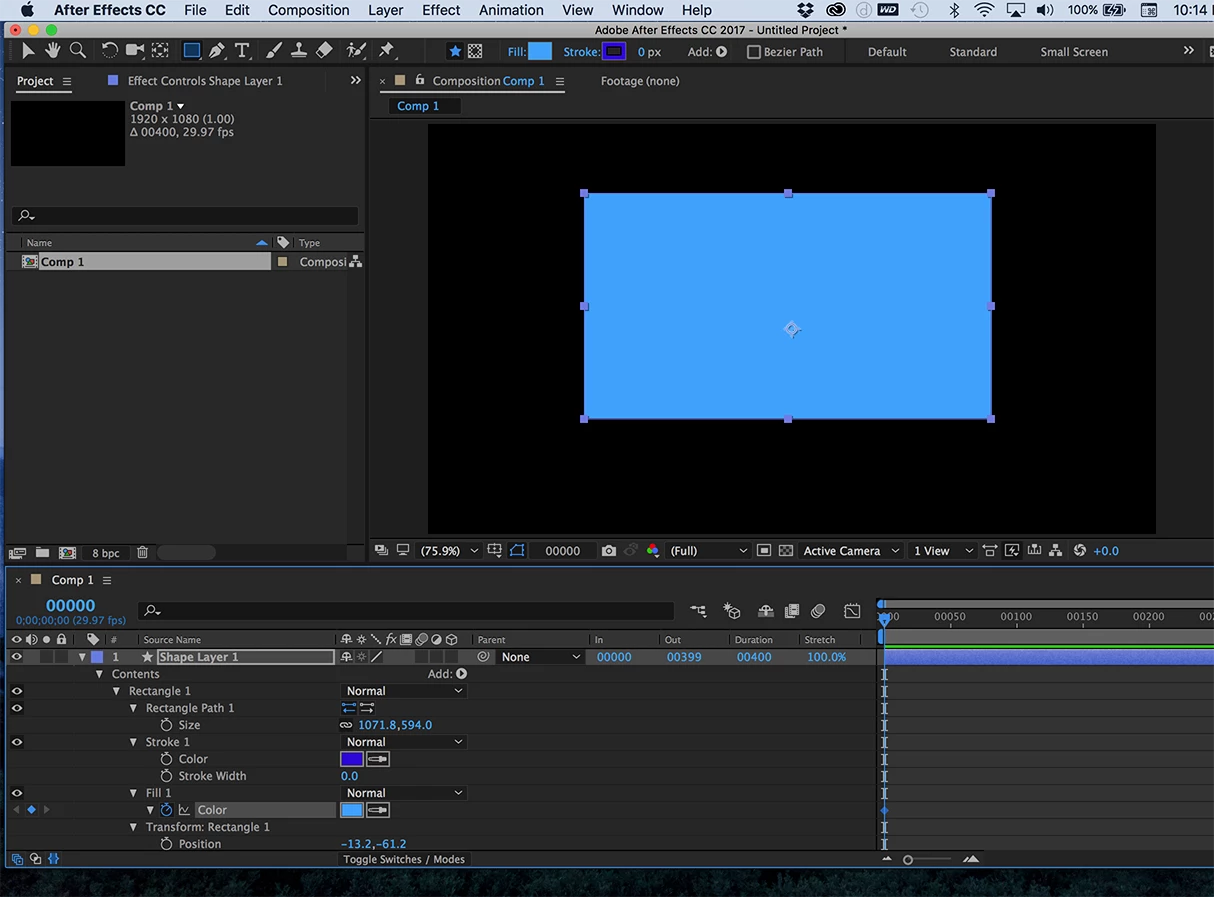
    To find the color property of a fill or stroke in a shape layer make sure that you are using a custom color, select the shape layer and press the U key twice. Anything that has a stopwatch can be animated. You can also find the color properties of a shape layer by just spinning things down.
    If you have created your character in Illustrator then you'll have to apply color corrections to the layer or convert the vector layer to a shape. Hue and saturation would be my first choice for most color shifting work. The right effect depends on the look you want and the footage.

    Be aware that you will loose some of the features you can put in a vector layer in Illustrator when it is converted to a shape.


    1 reply

    Rick GerardCommunity ExpertCorrect answer
    Community Expert
    August 26, 2017

    You can do this with a shape layer or you can add color correction to a vector layer imported from Illustrator or from an eps file.

    To learn about animating shape layer colors type animate shape layer in the search help field at the top right corner of AE.

    To find the color property of a fill or stroke in a shape layer make sure that you are using a custom color, select the shape layer and press the U key twice. Anything that has a stopwatch can be animated. You can also find the color properties of a shape layer by just spinning things down.

    If you have created your character in Illustrator then you'll have to apply color corrections to the layer or convert the vector layer to a shape. Hue and saturation would be my first choice for most color shifting work. The right effect depends on the look you want and the footage.

    Be aware that you will loose some of the features you can put in a vector layer in Illustrator when it is converted to a shape.
