Hi Brant,
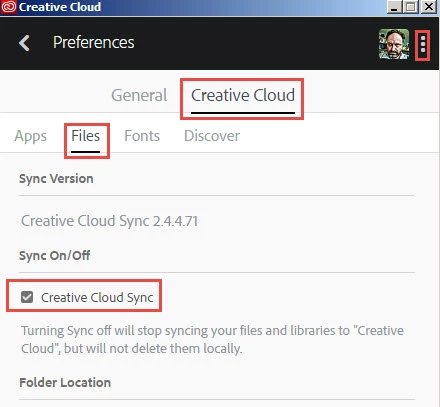
One of the features which is part of the Creative Cloud app is file sync. It is intended to be an easy way upload files into the cloud storage included with your membership. Like you described, when running, the sync feature keeps the local content in the Creative Cloud Files folder and the online cloud storage synchronized (similar to Dropbox). New files added to the local folder get uploaded to the online storage, files uploaded to the storage online via a browser get downloaded locally to the Creative Cloud Files folder. If you weren't interested in using file sync, you can simply turn it off in the Creative Cloud app preferences. There are a few other services that rely on having the sync service running - libraries and Typekit also rely on it to keep their content up to date and available too.
Here is a screen shot where to disable it
Even with sync turned off you can still upload/download files through a browser to use the cloud storage here
Adobe Creative Cloud
Hope that helps,
- Dave




 AdChoices