



Creative Cloud Installation fails at 3%. PIM Validation Failed. Process certificate didnt match to Adobe certificate!
I'm having trouble installing Creative Cloud.
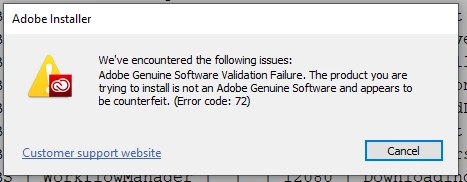
I downloaded the Creative Cloud direct executable from the adobe website and tried to install it. I keep getting the following error
"We've encountered the following issues: Adobe Genuine Software Validation Failure. The product you are trying to install is not an adobe genuine software and appears to be counterfeit (error code: 72)"
This is the log from ACC.log
06/12/19 00:10:20:222 | [INFO] | | ACC | LBS | ApplicationFacade | | | 13160 | **************** Starting LBS workflow. Version: 4.5.0.331 *******************
06/12/19 00:10:20:272 | [INFO] | | ACC | LBS | WorkflowManager | | | 13160 | LBS launched in LEGACY mode
06/12/19 00:10:20:272 | [INFO] | | ACC | LBS | ApplicationFacade | | | 13160 | Inside check for shouldLaunchLBSAsACCLauncher: ACC/pim.db does not exist at location C:\Program Files (x86)\Adobe\Adobe Creative Cloud\pim.db. Continue with installation
06/12/19 00:10:20:481 | [INFO] | | ACC | LBS | WorkflowManager | | | 12080 | ACCC System requirements check passed
06/12/19 00:10:20:777 | [INFO] | | ACC | LBS | ProductInfo | | | 12080 | Product Sap Code not specified in the product information file
06/12/19 00:10:20:777 | [INFO] | | ACC | LBS | ProductInfo | | | 12080 | Applet Version not specified in the product information file
06/12/19 00:10:20:777 | [INFO] | | ACC | LBS | ProductInfo | | | 12080 | Applet ID not specified in the product information file
06/12/19 00:10:20:777 | [INFO] | | ACC | LBS | ProductInfo | | | 12080 | Product locale not specified in the product information file
06/12/19 00:10:20:777 | [INFO] | | ACC | LBS | ProductInfo | | | 12080 | Product name not specified in the product information file
06/12/19 00:10:20:778 | [INFO] | | ACC | LBS | WorkflowManager | | | 12080 | Bootstrap LBS is successful
06/12/19 00:10:20:795 | [INFO] | | ACC | LBS | WorkflowManager | | | 12080 | Bootstrapper Lock acquired
06/12/19 00:10:20:813 | [INFO] | | ACC | LBS | WorkflowManager | | | 12080 | LBS Lock acquired
06/12/19 00:10:20:838 | [INFO] | | ACC | LBS | WorkflowManager | | | 12080 | Deployment lock check passed
06/12/19 00:10:20:855 | [INFO] | | ACC | LBS | WorkflowManager | | | 12080 | The resolved URL for package service is https://prod-rel-ffc.oobesaas.adobe.com/adobe-ffc-external/core/v1/applications?name=CreativeCloud&name=CCLBS&osVersion=10.0.0&platform=win32
06/12/19 00:10:22:587 | [INFO] | | ACC | LBS | WorkflowManager | | | 12080 | Successfully downloaded application xml at path C:\Users\Paris\AppData\Local\Temp\{D23B6070-CB75-4A43-B8D7-130E56A90E61}\applications.xml
06/12/19 00:10:22:618 | [INFO] | | ACC | LBS | WorkflowManager | | | 12080 | ACC Version on Machine is
06/12/19 00:10:22:637 | [INFO] | | ACC | LBS | WorkflowManager | | | 12080 | compareAndDownloadPIM entered
06/12/19 00:10:22:638 | [INFO] | | ACC | LBS | WorkflowManager | | | 12080 | PIM is not present at location: C:\Program Files (x86)\Common Files\Adobe\Adobe Desktop Common\Core\AdobePIM.dll
06/12/19 00:10:22:638 | [INFO] | | ACC | LBS | WorkflowManager | | | 12080 | machineVersion 0.0.0.0,serverVersion 4.8.2.476
06/12/19 00:10:22:639 | [INFO] | | ACC | LBS | WorkflowManager | | | 12080 | Downloading latest CCLBS
06/12/19 00:10:27:992 | [INFO] | | ACC | LBS | WorkflowManager | | | 12080 | PDM successfully downloaded PIM
06/12/19 00:10:28:093 | [INFO] | | ACC | LBS | WorkflowManager | | | 12080 | Downloading status 0
06/12/19 00:10:28:095 | [INFO] | | ACC | LBS | WorkflowManager | | | 12080 | Successfully downloaded pim at path C:\Users\Paris\AppData\Local\Temp\{D23B6070-CB75-4A43-B8D7-130E56A90E61}\CCLBS\PDIM\AdobePIM.dll
06/12/19 00:10:28:214 | [ERROR] | | ACC | LBS | WorkflowManager | | | 12080 | PIM Validation Failed:Process certificate didnt match to Adobe certificate! CANameChain: Adobe Inc.{|}DigiCert EV Code Signing CA (SHA2){|}DigiCert High Assurance EV Root CA
06/12/19 00:10:51:821 | [INFO] | | ACC | LBS | WorkflowManager | | | 12080 | Posted UI close message
06/12/19 00:10:52:831 | [INFO] | | ACC | LBS | ETS | | | 13160 | Waiting for the async thread to get the task completed
06/12/19 00:10:52:831 | [INFO] | | ACC | LBS | ETS | | | 12152 | Async thread is completed. Now exiting from function.
06/12/19 00:10:52:831 | [INFO] | | ACC | LBS | ApplicationFacade | | | 13160 | ****************Closing LBS workflow*******************
I see an error with the PIM Validation.
Steps I tried to fix this:
I'm running the installer as an Admin.
I've tried to manually install the certificates the installer is using by right clicking it->Digital Signatures->Details
Nothing that I did seems to fix it.
Can someone help me out?
 AdChoices