


Exit
  • Global community
    • Language:
      • Deutsch
      • English
      • Español
      • Français
      • Português
  • 日本語コミュニティ
  • 한국 커뮤니티
1

Installation Photoshop : une erreur inattendue s'est produite (code erreur : 1)

Community Beginner ,
Oct 31, 2019 Oct 31, 2019

Bonjour,

Je souhaite télécharger Photoshop CC mais un message d'erreur apparait.
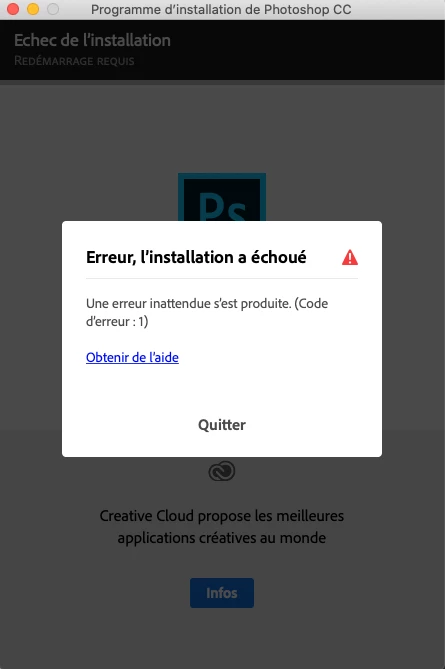
Capture d’écran 2019-10-31 à 13.03.29.png

J'utilise pourtant le dernier programme de téléchargement pour MacOS 64 bits.

Je suis sur le MacOS Catalina 10.15

D'avance merci pour votre aide...

TOPICS
Installation
1.0K
Translate
Report
Community guidelines
Be kind and respectful, give credit to the original source of content, and search for duplicates before posting. Learn more
community guidelines
Guest
Oct 31, 2019 Oct 31, 2019
Translate
Report
Community guidelines
Be kind and respectful, give credit to the original source of content, and search for duplicates before posting. Learn more
community guidelines
Community Beginner ,
Oct 31, 2019 Oct 31, 2019

Hi
Thank you Ged.
Sorry, but i don't speak english very well, so its difficult.

I have to start a free trial for use creative cloud desktop, and then... use a free trial for use photoshop? it's not make sens.

I don't understand... i have just try to start a free trial and i follow the process that i received by mail

Capture d’écran 2019-10-31 à 14.25.05.png
Capture d’écran 2019-10-31 à 14.26.31.png

adobe give to me a .EXE but i have a mac....

Translate
Report
Community guidelines
Be kind and respectful, give credit to the original source of content, and search for duplicates before posting. Learn more
community guidelines
Community Beginner ,
Oct 31, 2019 Oct 31, 2019

i try by an over way... but....

this is the hell ... the installation stop at 5% again and again and again

Capture d’écran 2019-10-31 à 18.08.25.png

Translate
Report
Community guidelines
Be kind and respectful, give credit to the original source of content, and search for duplicates before posting. Learn more
community guidelines
Adobe Employee ,
Oct 31, 2019 Oct 31, 2019

StephaneGilb, it is not necessary to read English to follow the steps referenced by Ged.  The help page is available in many languages.  Please look for the Country/Region option at the bottom of the page to adjust the language of https://helpx.adobe.com/download-install/kb/failed-install-creative-cloud-desktop.html.


You can also reach out to our support team at https://helpx.adobe.com/contact.html for direct assistance.

Translate
Report
Community guidelines
Be kind and respectful, give credit to the original source of content, and search for duplicates before posting. Learn more
community guidelines
Community Beginner ,
Nov 03, 2019 Nov 03, 2019
LATEST

Hi Jeff,
Thanks you for your time, and answer.

I try all fixed issues. It doesn't work. And i used creative tool cleaner too.
I have just adobe acrobat on my imac.

and now... adobe give to me a .EXE instead of .DMG


Capture d’écran 2019-10-31 à 21.40.05.png

A try since 5 days to install Photoshop. It becoming ridiculus.

Translate
Report
Community guidelines
Be kind and respectful, give credit to the original source of content, and search for duplicates before posting. Learn more
community guidelines