


October 21, 2016
Answered

Lightroom 6 Won't Install on My Mac ... Installer fails to initialize

  • October 21, 2016
  • 9 replies
  • 6956 views

Lightroom 6 Installation help

I have a MacBookPro running OS X El Capitian. 2.2GHz intel Core I7 that was New in 2017.

I successfully had Photoshop CS3 & Bridge running and then suddenly it stopped. Did a dis-install and tried to reload it and it won't install from CD..

SO ... I have just purchased Photoshop Lightroom 6 and downloaded it... BUT IT WON'T EVEN INSTALL....

I open Downloaded Lightroom_6_LS11.dmg file> Then select INSTALL.app  > I get this error>
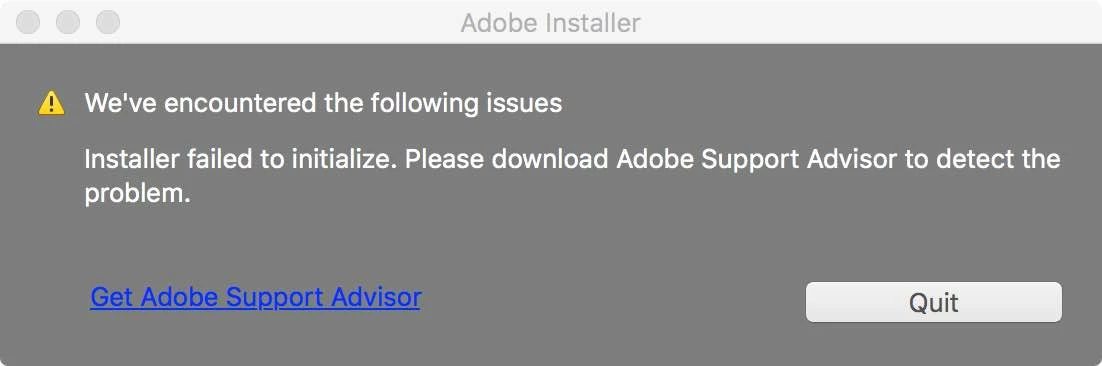
I follow the instructions to 'Get Adobe Support Advisor' But that does not work and I then get this message >
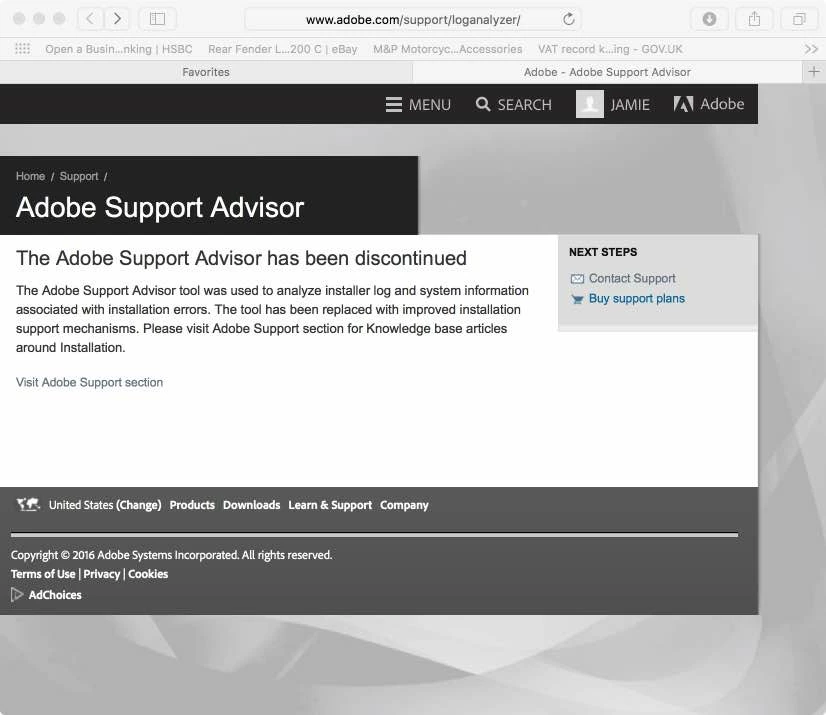
So I visit Adobe Support Section and did a search and I don't seem to be able to find anything to help as everything seems to be to help you once it is installed.

Why are adobe selling a product that is clearly not fit for purpose?

Anyone able to offer any advice?

    This topic has been closed for replies.
    Correct answer

    Hi Geoff

    the case number was 0220067488 but they closed it without a resolve. Spent most of this morning trying to deal with tec support to reopen it and got no where.

    i kept going around in circles with them.

    Apple tec support managed to get it loaded in the end. But it kept locking up or bombing out. As I could not get any support this morning from Adobe I gave up  After almost three hours. I uninstalled all adobe software and went for a refund.

    Total time trying to resolve the issue 27 hours :-(

    I have since done a clean install of Mac OS and reloaded all other software successfully without any glitches.

    so at the end of the day it will for ever remain unsolved and I guess there is not a lot you can do now.

    Really disappointing having used many adobe products over the last 26 years and in the past I rarely ever needed any support. But when I did things used to get resolved really quickly and without any fuss. It would seem that things have sadly changed  for the worst.

    But thanks to everyone on this thread who tried to help.

    9 replies

    October 26, 2016

    I never got a resolve as stated...

    But you could try messaging jeff who posted above my previous by going into his profile and referring to this thread... He has been the only person who actively wanted to seem to help... The tec people didn't and kept messing me about... But you might need to try flagging it up with them first.. But my problems started before Siera was installed as I was on El Capitan.... Then upgraded El Capitan and the Siera... So having done clean installs before reloading any other software I was giving the Adobe products first bite to try and prevent other software clashing... But it seems that the Adobe Lightroom6 and Various Base Mac OS version seem to have compaterbility issues..

    Glad I am not the only one but sorry you are having the same issues. Sorry I can offer any better advice and what would resolve the issue for you

    Best of luck

    Correct answer
    October 24, 2016

    Hi Geoff

    the case number was 0220067488 but they closed it without a resolve. Spent most of this morning trying to deal with tec support to reopen it and got no where.

    i kept going around in circles with them.

    Apple tec support managed to get it loaded in the end. But it kept locking up or bombing out. As I could not get any support this morning from Adobe I gave up  After almost three hours. I uninstalled all adobe software and went for a refund.

    Total time trying to resolve the issue 27 hours :-(

    I have since done a clean install of Mac OS and reloaded all other software successfully without any glitches.

    so at the end of the day it will for ever remain unsolved and I guess there is not a lot you can do now.

    Really disappointing having used many adobe products over the last 26 years and in the past I rarely ever needed any support. But when I did things used to get resolved really quickly and without any fuss. It would seem that things have sadly changed  for the worst.

    But thanks to everyone on this thread who tried to help.

    Jeffrey_A_Wright
    Community Manager
    Community Manager
    October 24, 2016

    Jamiej15769218 I do see a request for a refund for Lightroom 6 was granted for case 0220067488. I am sorry you were unable to resolve the error with your Lightroom 6 serial number being accepted.

    If you find you face difficulties licensing future Adobe software titles then I would recommend a complete removal of the currently installed software followed by the use of the CC Cleaner Tool.  You can find details on the use of the CC Cleaner Tool at Use the Creative Cloud Cleaner Tool to solve installation problems​.

    Participant
    October 26, 2016

    When I upgrade my MacBookPro to Sierra ...Lightroom 6 can't open it's not responding than I uninstall and  when I install again I have same problem in this topic ......I do everything include use CC Cleaner Tool like you tell and still can't install 

    What can I do now ?  Request for a refund too ?

    This's my Order Number: 10237411559
    October 24, 2016

    Strange that other software in loading ok And working but adobe Lightroom 6 isn't. And the HD has a freshly installed HD with all updates done...

    Jeffrey_A_Wright
    Community Manager
    Community Manager
    October 24, 2016

    Jamiej15769218 I am sorry that you continue to face errors using Lightroom 6.  You indicated you worked directly with our support team?  Do you have a case number that I can reference?

    October 22, 2016

    I have done the following.

    1) ran disk utilities

    2) done system upgrade

    3) had adobe Tec support remote access my machine for an hour with no joy ... they gave up..

    4) should be noted the the laptop has had very little use and has very little other software on it

    5) had apple support and re loaded the system software.. still no joy running El Capitan

    6) upgraded to whole new latest system software 'siera

    still not working

    October 24, 2016

    well after 27x hours of bouncing back and forth from adobe tec support (who have been totally rubbish) and apple tec support who have been great.

    Apple helped me rebuild the whole software on the computer from afresh.. still had problems loading  Adobe Lightroom 6

    The Adobe Lightroom 6 produce was finally installed thanks to apple and not adobe... but it bombs out all the time. So it is unusable.

    Apple say that there is nothing wrong with my computer having remote accessed it and the issue is with Adobe.

    Adobe Tec support have been totally useless. spent ages trying to deal with them. forever being disconnected or the tec support person forever disappears forcing you to start all over again. and again, and again and again....   

    Trying to get a refund ....  that is not all that easy....

    Just Shoot Me
    Legend
    October 24, 2016

    There are thousand and thousands, if not hundreds of thousands if not millions, of people using the latest LR on Mac computers that don't have your problems.

    So what does that tell you about your particular Mac.

    Apple techs, and Apple as a company, are famous for saying "There is nothing wrong with your Mac". Which is total BS. As you have found out.

    Best of luck to you.

    October 21, 2016

    Just done disc first aid - has not thrown up any problems...

    How do I rest permission?

    Any other advise?

    Just Shoot Me
    Legend
    October 21, 2016

    Same Disk Utilities tab, there is a reset permission button. Or there use to be on the Mac I had several years ago.

    Morph3u5
    Participant
    October 21, 2016

    For Windows this solved the issue for me just 5 minutes ago:

    Installer failed to initialize please download adobe support advisor problem fix 2016 - YouTube

    There ist probably a similar way on MAC.

    October 21, 2016

    Adobe software was last instalment

    Community Manager
    October 21, 2016
    Just Shoot Me
    Legend
    October 21, 2016

    Something is wrong with your Mac. More than likely some type of permissions problem or some piece of hardware could be failing.

    No software just stop working for no reason. Usually that reason has something to do with the hardware in your system and some times other software you installed or the OS has become corrupted in some way or there is a permissions problem.

    Open Disk Utilities and go to the First Aid tab and check the drive for errors and reset permissions. Then try to do the install.