

Participating Frequently
May 13, 2014
Answered

Tiff 8-bit or Tiff-16

  • May 13, 2014
  • 3 replies
  • 25088 views

A Magazine has asked me to send my images in a high res format and as TIFF.

Which one would you recommend Tiff-8bit or Tiff 16b.

ANd what is best AdobeRGB or PhoproAdobe.

Many thanks!!!

This topic has been closed for replies.
Correct answer rob day

There are cases where 16-bit has an advantage during editing, but printing presses aren't capable of outputting the larger number of gray levels in a 16-bit file. InDesign ignores the extra bits, or at least if you export 16-bits to PDF, the object gets converted to 8-bit.

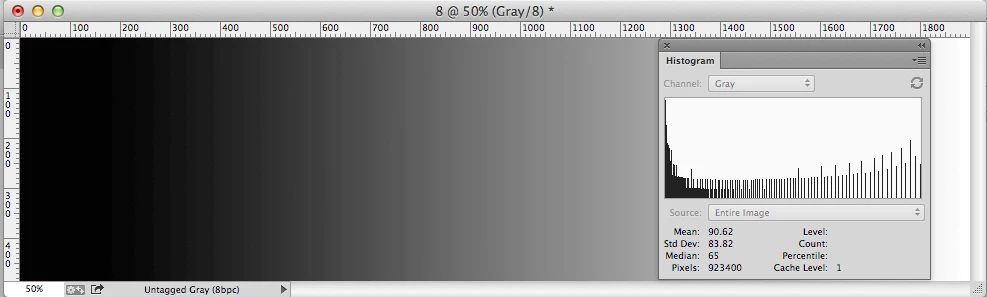
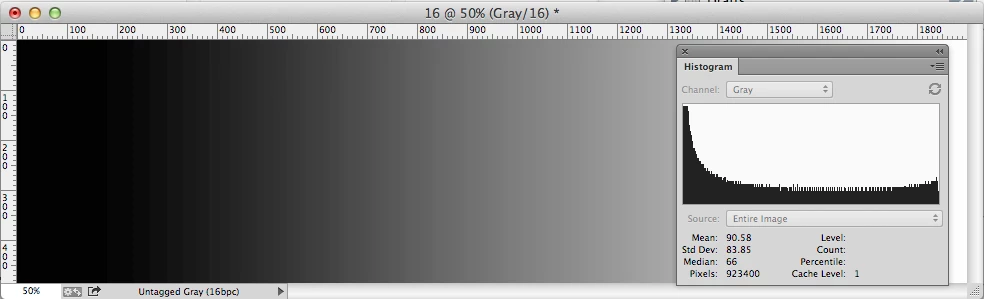
If you edit in 8-bit without using an adjustment layer 16-bits can have an advantage—the image's gray levels won't degrade. Here I've made a big levels adjustment on an 8-bit and 16-bit gradient and you can see the missing gray levels in the 8-bit version.
ANd what is best AdobeRGB or PhoproAdobe. (ProPhoto RGB?)

The image will have to get converted to CMYK at output so the results will be virtually the same as long as you embed the RGB profile. ProPhoto sounds better but in practice it's hard to find a difference in the numbers after a conversion to CMYK. It has a larger color gamut, but in the end the colors still get converted into the smaller CMYK gamut.

3 replies

Dov Isaacs
Brainiac
May 13, 2014

To expand on what others have said in this thread …

With regards to photographic imagery coming out of your camera as processed JPEG files, converting to 16-bit colorants really buys you nothing and for that matter, unless you are editing the imagery, creating a TIFF file likewise offers no advantage.

However, if you shoot RAW, then it makes perfect sense to store your imagery for subsequent editing as 16-bit TIFF to avoid cascading lossy compression saves and to allow for more accurate color adjustments using all the 12 to 14 bits-per-colorant that come out of most professional grade cameras in their RAW formats.

Unless the publication to which you are submitting imagery needs to do significant color editing of the images you submit, 8-bit per colorant TIFF should suffice. Note that when placing digital imagery into an InDesign document whether in a TIFF or PDF container, the low order 8 bits of 16 bits are discarded. Only 8 bits-per-colorant imagery is ever exported or printed by InDesign (or Illustrator).

Also note that if submitting TIFF files, it is perfectly safe to use LZW or ZIP compression; they are not lossy!

          - Dov

- Dov Isaacs, former Adobe Principal Scientist (April 30, 1990 - May 30, 2021)
FernyybAuthor
Participating Frequently
May 14, 2014

Thank you so much for the information  and for taking the time to post your reply Dov.

Yes, all my images are shot in RAW. I have followed the advice and saved them as Tiff 16- bit , but keep them as 8-bit and Adobe RGB (1998)  for submissions.

Thanks again!!

Dov Isaacs
Brainiac
May 14, 2014

Adobe RGB is a fairly wide gamut color space and is considered pretty much standard. There are monitors on the market now that claim the ability to directly support Adobe RGB.

Unless your clients specifically request something other than Adobe RGB (and why they might insist on something else is a totally separate issue), you should be quite safe using the Adobe RGB color space. You certainly aren't loosing anything that would be printable from your original imagery.

That having been said, color management and favorite color spaces are a religion of its own. I try to avoid any debates about this!

          - Dov

- Dov Isaacs, former Adobe Principal Scientist (April 30, 1990 - May 30, 2021)
rob day
rob dayCorrect answer
Brainiac
May 13, 2014

There are cases where 16-bit has an advantage during editing, but printing presses aren't capable of outputting the larger number of gray levels in a 16-bit file. InDesign ignores the extra bits, or at least if you export 16-bits to PDF, the object gets converted to 8-bit.

If you edit in 8-bit without using an adjustment layer 16-bits can have an advantage—the image's gray levels won't degrade. Here I've made a big levels adjustment on an 8-bit and 16-bit gradient and you can see the missing gray levels in the 8-bit version.

ANd what is best AdobeRGB or PhoproAdobe. (ProPhoto RGB?)

The image will have to get converted to CMYK at output so the results will be virtually the same as long as you embed the RGB profile. ProPhoto sounds better but in practice it's hard to find a difference in the numbers after a conversion to CMYK. It has a larger color gamut, but in the end the colors still get converted into the smaller CMYK gamut.

FernyybAuthor
Participating Frequently
May 14, 2014

Rob, I very much appreciate you taking the time to answer my questions and all the information you have posted on here. Thank you!!

BobLevine
Brainiac
May 13, 2014

8

Steve Werner
Brainiac
May 13, 2014

I agree with Bob about 8-bit. Adobe RGB profile is fine for printing.

FernyybAuthor
Participating Frequently
May 13, 2014

THank you very much Steve