
Playback speed question
I was recently testing out the slo-mo video features of a new Nikon Z7 camera by recording a 5 second MP4 at 120 FPS. I then imported it into Premiere Pro CC and in Speed/Duration I set it to 25%. On the timeline it changed to 20 seconds, just as you would expect. The resulting video, when exported, looks like the 4X slow-mo that it is, and looks pretty good, too - I like this camera . . .
BUT here's my question. In the Export dialog it correctly identifies the source as 120 (119.88) fps. But it lists the Output as 60 fps. Why isn't it 30fps? It plays like it's at 30, i.e., it's 4 times slower than the original, not just half. I tried both Frame Sampling and Frame Blending options in the Speed Duration dialog with the same result.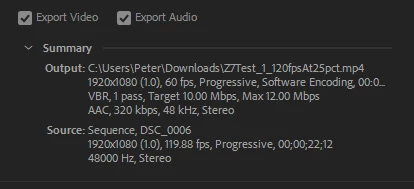
Thanks in advance!


 AdChoices