


New Participant
July 7, 2023
Question

Acrobat Pro on PC running windows 11 is missing key Accessibility tools

  • July 7, 2023
  • 2 replies
  • 965 views

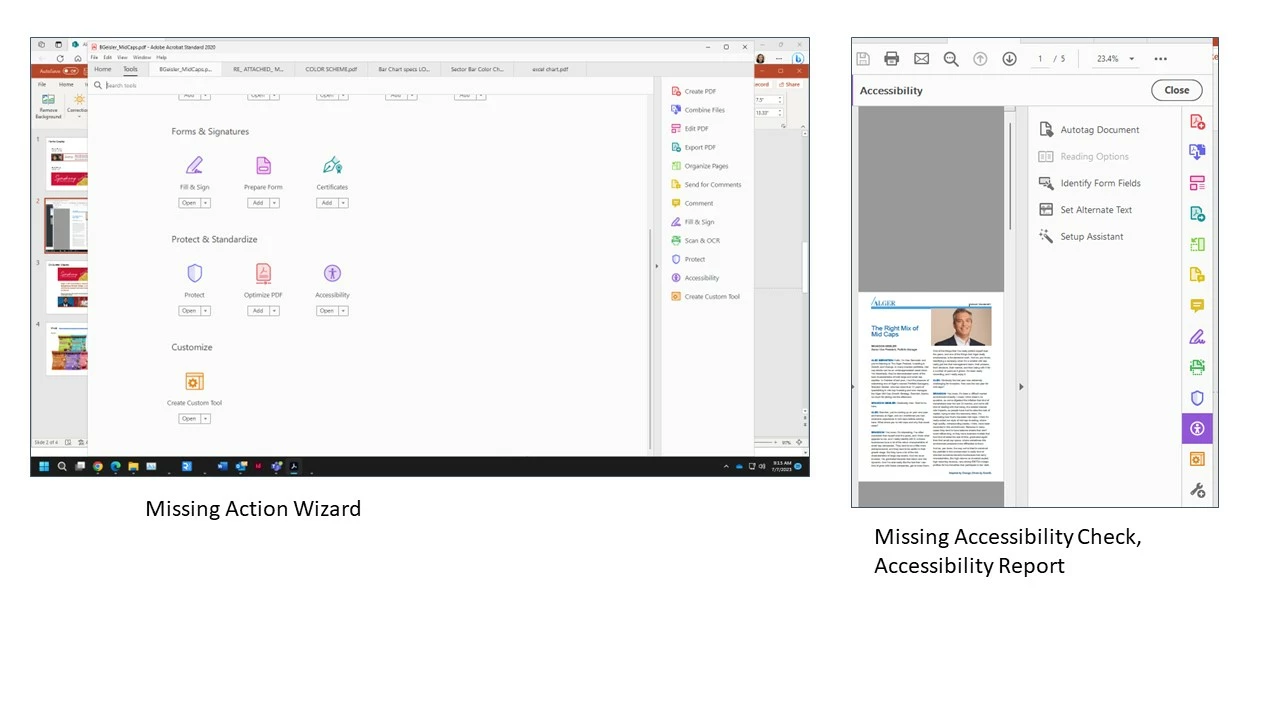
I using the latest version of Acrobat Pro on a pc running windows 11 and am missing key accessibility tools I need to use to make several pdfs ADA compliant.  The accessibility tool is missing Accessibility Check and Accessibility Report. The Action Wizard Tool is completely missing. A screenshot of my Acrobat Pro interface with the missing items is below.  I am very confusesed as their support pages do not mention anything about Acrobat Pro not supporting these features on a PC. Do I need an older version of Acrobat Pro? Any insight would be very helpful. Thank you.
This topic has been closed for replies.

2 replies

Bernd Alheit
Community Expert
Community Expert
July 11, 2023

You use Acrobat Standard, not Pro.

Amal.
Community Manager
Community Manager
July 11, 2023

Hi @Suzanne228505089khs 


Hope you are doing well and thanks for reaching out.


What is the version of the Acrobat Pro you are using? To check the version go to Help > About Acrobat and make sure you have the recent version 2020.005.30467 installed. Go to Help > Check for updates and reboot the computer once.

Also try to repair the installation from the help menu (Win Only) and see if that works.

Please try to reset the Acrobat preferences as described here https://community.adobe.com/t5/acrobat-discussions/how-to-reset-acrobat-preference-settings-to-default/td-p/4792082


If it still doesn't work, please remove the application using the Acrobat cleaner tool https://www.adobe.com/devnet-docs/acrobatetk/tools/Labs/cleaner.html , reboot the computer once and reinstall the application using the direct link
https://helpx.adobe.com/download-install/kb/acrobat-2020-downloads.html


Let us know how it goes.


Regards
Amal


[Edited]

New Participant
July 11, 2023

Hi Amal,


Thank you for getting back to me and for your instructions on how I can trouble shoot this issue.I am running 2020 Release (Classic) Version 2020.005.30467, which is not the latest. Acrobat is part of my Adobe Creative Cloud subscription and  according to my creative cloud app dashboard, acrobat is up to date. I also Checked for updates under Help within acrobat and it also says no updates available. Repair Installation didn't seem to work either.

I am on a virtual PC running VMware7,1 so I am going to ask IT to reboot my computer. If that doesn't work I'll try to download the latest version from the direct link you included above. I will keep you posted. Thanks.