


jjo5555
Participating Frequently
April 3, 2022
Question

Activation Limit Error on Same Device every morning

  • April 3, 2022
  • 3 replies
  • 5713 views

Every single morning I'm told I reached device activatiuon limit and it shows me the two devices I'm signed in on. One of them is the exact same device I'm trying to use. So I have to click sign out of the hostname I am already on in order to use Acrobat on the same device.

It is getting boring having to log in and reactivate every single day.
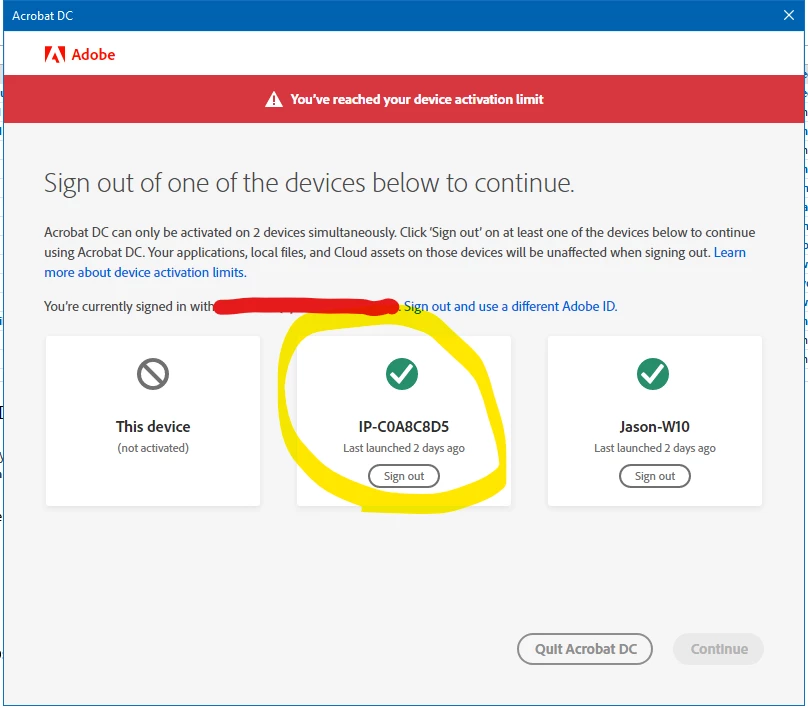
 

Please make it stop!


3 replies

Dako1
New Participant
January 21, 2025

Just had a fairly similar issue but this time it thought the same computer was seven computers and kept stating I had to log out of them but would re-log that computer in seven times each time I reopened the app even when ending all sessions through my account. It appears whatever system adobe is using does not actively communicate with the Creative Cloud accounts other than to ask you to log in. I had to uninstall the entire CC suite then reinstall it to get it to work which was a waste of 2 hours of my work day, especially similar to your case the other individual I work with is not located in the same room as I am and i had to call them to get them to uninstall on their end too. It's disheartening to see this issue persist two years later. It seems that adobe has decided to partition server space for its experimental AI rather than making sure it can communicate with its clients who pay and require functioning software for their livelihoods, in an age where it seems to require an internet connection for its apps to work.

kglad
Adobe Expert
January 22, 2025
jjo5555
jjo5555Author
Participating Frequently
January 22, 2025

Not relevant. I have 2FA and it still happens

Brainiac
April 4, 2022

It's designed to keep working unless the machine changes. I suspect some system changes (which Adobe won't tell us about) are causing it to look like a new computer. I've heard of some "anonymising" apps that cause the machine to keep changing so it can't be tracked; do you have anything like that?

jjo5555
jjo5555Author
Participating Frequently
April 4, 2022

It is every morning when I first use Acrobat after a reboot. It is running on a AWS workspace so could easilly be some sort of system change every reboot.

Brainiac
April 10, 2022

Thanks. If you're running a private AWS instance, which is rebooted but remains the same instance, it seems like Adobe software should know it's the same computer. However, if the instance is recreated each time, as many AWS services work, then you can expect to need to sign in, with forced sign off - because the sign in was to a different computer. This isn't broken. I looked at a 40 page AWS deployment guide, and it basically says this is how it will be. It does however suggest you sign out, rather than just shutting down the instance.


If it's a private instance, and it still happens, then don't reboot. Just leave it running.

Meenakshi Negi
Community Manager
Community Manager
April 4, 2022

Hello,


Thank you for reaching out, and sorry about the trouble.


As you get the error message repeatedly, please try to check the Active sessions on your Adobe account. Please use the steps suggested below:

1. Open the following link.

2. Sign in using the Adobe ID (email address) and password.

3. Go to the Account and Security tab and select Sign-in and security.

4. Scroll down the screen till Active Sessions Title.

Check the number of devices listed there.

You may also try to End sessions for all active sessions. Then sign in again to the application and check if you get the same error message again.


Let us know how it goes.


Thanks,

Meenakshi

jjo5555
jjo5555Author
Participating Frequently
April 4, 2022

It is not repeatedly. It is every morning when I first use Acrobat after a reboot.