


Participant
June 25, 2023
Answered

Can' use Snap Shot in Acrobat anymore without paying.

  • June 25, 2023
  • 3 replies
  • 30033 views

Why is Adobe making you pay for options in Acrobat that have been free for years?  Case in point: To print a mailing label with a Brothers QL-1100 printer, you have to create a PDF of the label, then use the 'Shap Shot' function in Acrobat to print it.  I can't do that now without paying a ridiculous $13.00 monthly fee.  Cmon Adobe, this is nonsense. 
Correct answer Faheem Imran

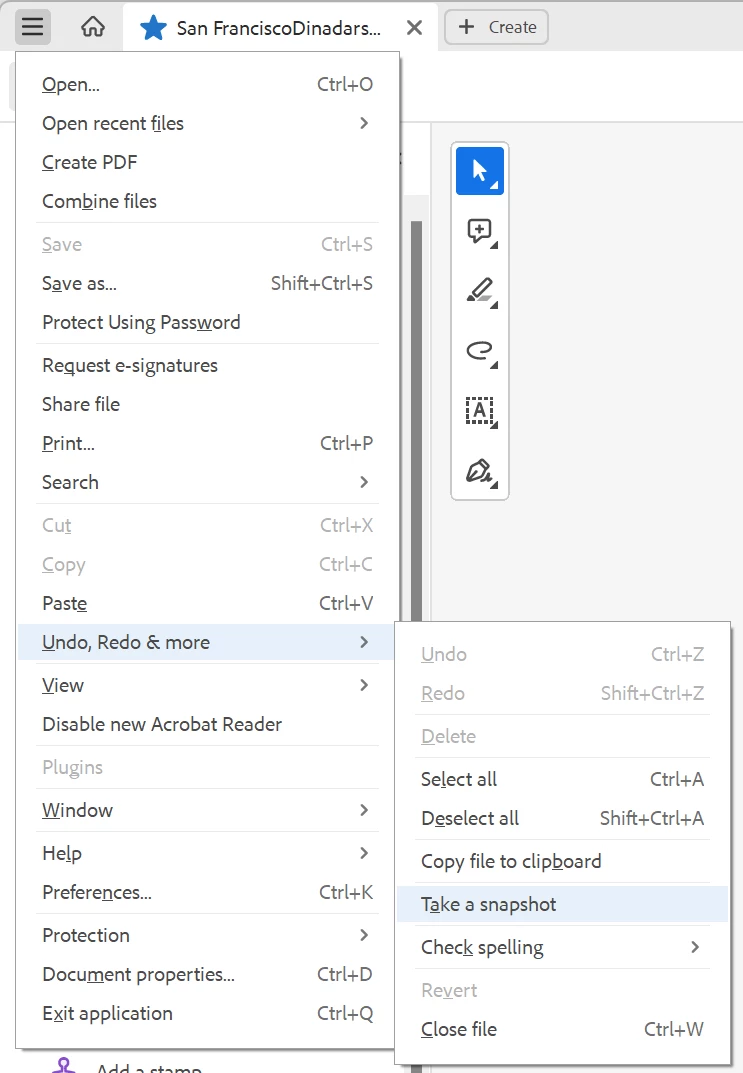
Quoting Answer from another post : Snapshot has been moved to unified File menu -> Undo, Redo & More -> Take a snapshot


Credits: @Zendu 

3 replies

Faheem ImranCorrect answer
Participant
September 15, 2023

Quoting Answer from another post : Snapshot has been moved to unified File menu -> Undo, Redo & More -> Take a snapshot


Credits: @Zendu 

Participant
September 26, 2023

Thank you, that is the answer we needed. I could only find help answers at Adobe for the "old reader" where the snapshot was under the Edit>More area, nothing for the "new Acrobat Reader" as your screenshot shows. I guess More was the secret clue.

jane-e
Community Expert
Community Expert
June 25, 2023

@Woodybear 


All the Snapshot feature does is copy what you have selected so you can paste it somewhere else. I'm confused about your workflow. Can you give us the exact steps you are using?

  • when you say you have to create a PDF of the label, how do you do that?
  • where is the mailing label coming from before you create the PDF?
  • is the mailing label from FedEx, UPS, USPS, or somewhere else?
  • if it is on the web, can you not right-click and save? Or copy?
  • after you create a PDF and copy with snapshot, where do you paste?


Check this help page from Adobe:

Be sure copying is allowed and be sure you are using the Adobe Reader application, not a browser.

https://helpx.adobe.com/reader/using/copy-content-pdfs.html


Copy an area of a PDF (Acrobat Reader application only, not browser)

The Snapshot tool copies an area as an image that you can paste into other applications.

  • Choose Edit > More > Take A Snapshot.
  • Drag a rectangle around the area you want to copy, and then release the mouse button.
  • Press the Esc key to exit Snapshot mode.

In another application, choose Edit > Paste to paste the copied image.


Jane

WoodybearAuthor
Participant
June 26, 2023

eBay gives you two options when you sell an item. 1. Print the label, 2. Download the label. I download the label and then open it. In this window, you can save it, print it or edit it. I select 'print' and print it to the 'Microsoft Print to PDF.' option.  From there, I open it in Acrobat and use the Snap Shot function to outline the label, which formats it to the size needed to print it with the QL-1100 printer.
The mailing label is from eBay.
The label is from the carrier you choose on eBay when setting up your item to sell.
Printing it to the 'Microsoft Print to PDF' function in the printer drop-down saves it as a PDF file on your computer. As opposed to printing it out.
I don't paste it anywhere; I open it in Acrobat. Then use the Snap Shot function to outline it; then, from the print drop-down choices, I select the Brother QL-1100 printer, then print the label.

I have a new computer, and the problem is Adobe has taken that, and many other options, away from Acrobat Reader, making you pay a monthly charge to use them now.
Thank you for your interest.
Jack


Bernd Alheit
Community Expert
Community Expert
June 26, 2023

The snapshot function is available in the free Acrobat Reader. 

Legend
June 25, 2023

Acrobat has never been free. Do you mean Acrobat Reader?

WoodybearAuthor
Participant
June 26, 2023

Yes, if that was the free one.  Now they are charging you for options that used to be free.