

Participant
October 15, 2023
Answered

Cannot change signature

  • October 15, 2023
  • 2 replies
  • 18291 views

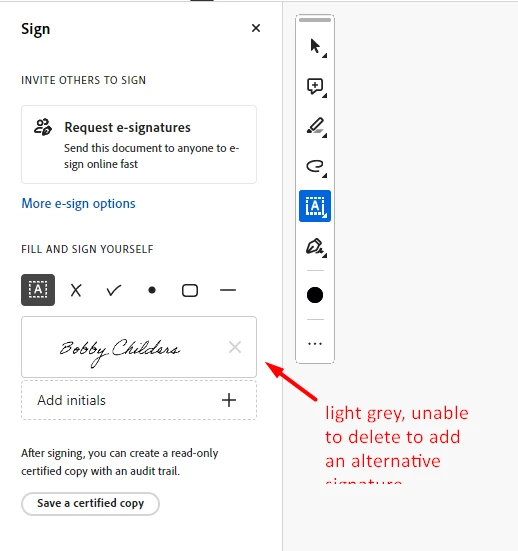
I have adobe pro and this has worked in the past, but has stopped working.  I want to change a signature in fill&sign - the X to delete a signature is grey, won't let me delete so I can change - HELP!



Correct answer Samuel331397637dmm

Easiest thing is something I saw in another thread on this topic as I was having the same issue. Simply Adobe Acrobat, click on you profile tab in the top righthand corner, and click "sign out." Once you are fully signed out, close the application. Then reopen the application. You will see the "sign in" option in the top righthand corner where your profile tab was located. Click on it and sign back in. Then reopen the document you were working on and you should be able to create a new signature. 

2 replies

Samuel331397637dmmCorrect answer
Participant
October 24, 2023

Easiest thing is something I saw in another thread on this topic as I was having the same issue. Simply Adobe Acrobat, click on you profile tab in the top righthand corner, and click "sign out." Once you are fully signed out, close the application. Then reopen the application. You will see the "sign in" option in the top righthand corner where your profile tab was located. Click on it and sign back in. Then reopen the document you were working on and you should be able to create a new signature. 

Participant
October 24, 2023

That should say "simply open Adobe Acrobat." 

Amal.
Community Manager
Community Manager
October 16, 2023

Hi @Clarence5DC5 


Hope you are doing well.


What is the version of the Acrobat DC you are using? To check the version go to Help > About Acrobat and make sure you have the recent version 23.06.20320 installed. Go to Help > Check for updates and reboot the computer once.

Also try to repair the installation from the help menu (Win Only) and see if that works.

Please try to reset the Acrobat preferences as described here https://community.adobe.com/t5/acrobat-discussions/how-to-reset-acrobat-preference-settings-to-default/td-p/4792082

You may also try to create a new test user profile with full admin rights in Win or enable the root account in MAC and try using the application there and check.

If it still doesn't work, please remove the application using the Acrobat cleaner tool https://www.adobe.com/devnet-docs/acrobatetk/tools/Labs/cleaner.html  , reboot the computer once and reinstall the application using the direct link
https://helpx.adobe.com/acrobat/kb/acrobat-dc-downloads.html 


Let us know how it goes.


Regards

Amal