


Copy link to clipboard
Copied
When i mark up a PDF in Acrobat pro for some reason it has started behaving differently to how it always has. No matter which comment tool i use, as soon as I leave the page I have added the comment to, the highlighted text or box added disspears. Comments added show in the sidepane and then when clicked the markup (highlight or textbox etc) shows where comment has been added but not properly (text box shows outline but no text in the box for example). Like this example:

Properties shows opacity at 100%:
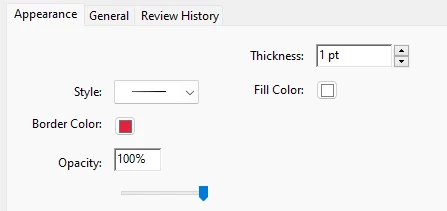
And highlight text is not showing as yellow highlight as added - it shows an outline box when the comment is clicked in the sidebar pane:

Although properties show this:
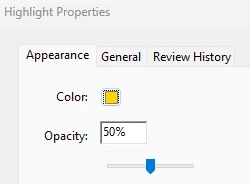
Its really frustrating as I can no longer easily see when scrolling through a document where the markup comments are as it no longer keeps visible any text highlighted, sticky note or text boxes added. Comments are only visible in the sidebar. It wasnt like this until recently and I have no new updates to install. Anyone else having same issues?
Copy link to clipboard
Copied
Hi @Angela30937598ug1u
Hope you are doing well and sorry to keep you waiting
Is this an issue with a particular PDF file or with all the PDFs? Please try with a different PDF file and check. If the file is stored on a shared network/drive please download it to your computer locally and then try again.
What is the version of the Acrobat DC you are using? To check the version go to Help > About Acrobat and make sure you have the recent version 23.03.20244 installed. Go to Help > Check for updates and reboot the computer once.
Also try to repair the installation from the help menu (Win Only) and see if that works.
Please try to reset the Acrobat preferences as described here https://community.adobe.com/t5/acrobat-discussions/how-to-reset-acrobat-preference-settings-to-defau...
You may also try to create a new test user profile with full admin rights in Win or enable the root account in MAC and try using the application there and check.
If it still doesn't work, please remove the application using the Acrobat cleaner tool https://www.adobe.com/devnet-docs/acrobatetk/tools/Labs/cleaner.html , reboot the computer once and reinstall the application using the direct link
https://helpx.adobe.com/acrobat/kb/acrobat-dc-downloads.html
Regards
Amal
Get ready! An upgraded Adobe Community experience is coming in January.
Learn more