


Digital Signature Block not working
Hi I am having trouble with the Digital Signature Block in Adobe Acrobat Pro. My goal is to create a field that shows the "Sign Here" flag in the upper-left corner, so that when a person clicks the box they are prompted to sign using secure Adobe e-sign with their password-protected Adobe ID credentials.
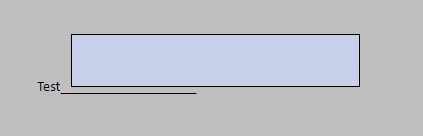
I was able to add a Digital Signature Block field, however when I exit out of the Prepare a Form menu the field only displays as a regular text field. It allows me to enter text but it does not include the "Sign Here" flag and does not prompt me to sign using my Adobe password-protected credentials. I have followed the troubleshooting steps below. I have also read this related article in the Adobe Community (which appears to be the same problem) but the article does not help me resolve this issue.
Would greatly appreciate some assistance.
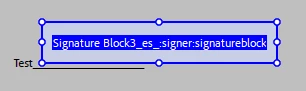
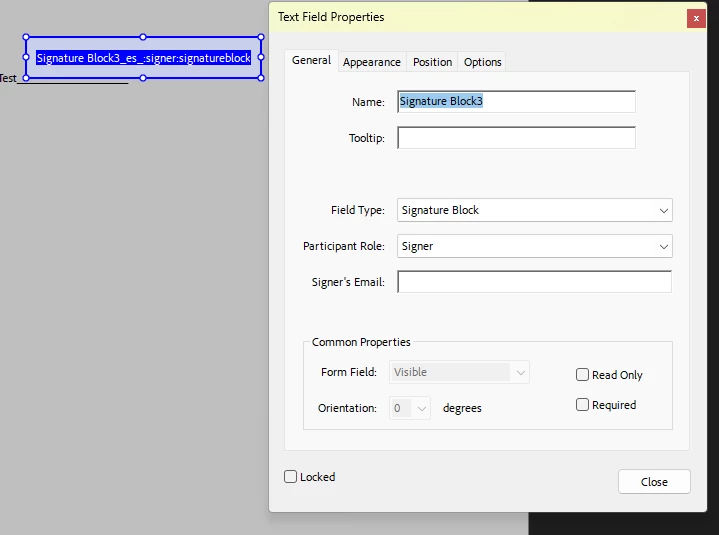
The screenshots furher below show the field as I added it, the Properties settings for the field, and finally how the field appears in regular PDF viewing mode (which is not how I want it, I want it to show the red Sign Here flag in the upper-left).
-Pete
- Prepared form for signing
- Ensured security setttings are not preventing signing
- Added the Digital Signature Block field

 AdChoices