


New Participant
April 12, 2021
Answered

Digital Signature - Sign Button Not Working

  • April 12, 2021
  • 5 replies
  • 64986 views

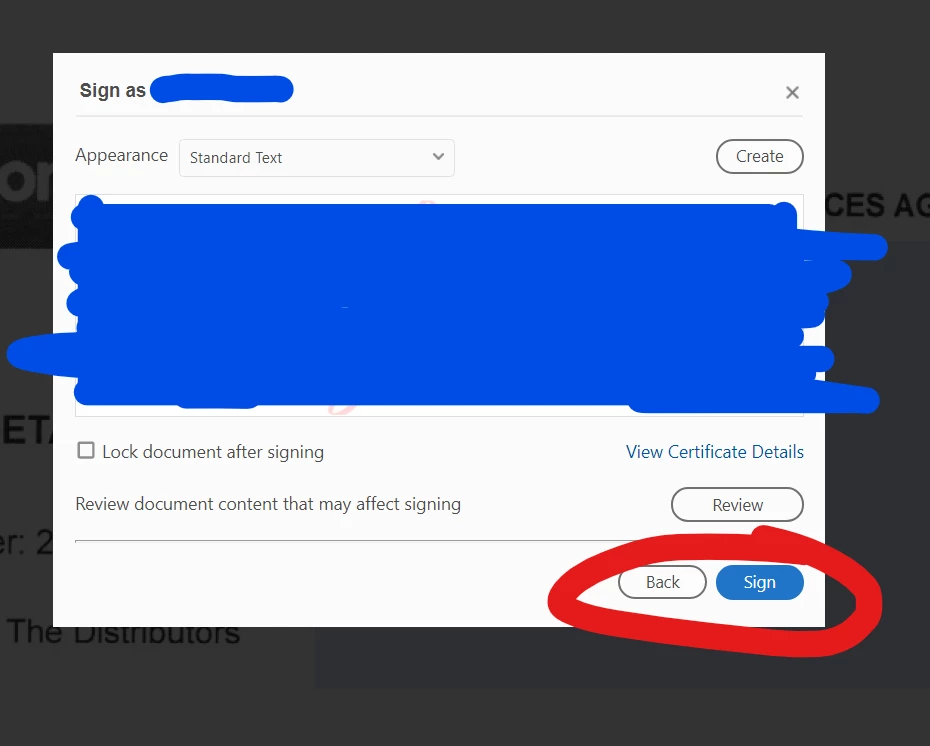
When I go to complete my Digital Signature, it wont allow me to Sign.


I have tried Saving the Doument, Checking for Update, Uninstalling and Reinstalling Adobe, Creating a new Digital Signature......


Correct answer Kai342601618827

I am also facing the above described issue on a CC installation on a Win10 PC.

Due to the CC installation, i cannot use the Acrobate Cleaner based solution.

5 replies

New Participant
January 27, 2025

I know these posts are fairly old, but I did find a fix for this problem that worked for me and didn't involve uninstalling anything.  Unfortunately I don't know exactly what did the trick, but I went to Edit > Preferences > Signatures > Creation & Appearance.  And took the following steps:

1.  Ensured the Default Signing Method was set to Adobe Default Security
2.  Signing Format set to CAdES-Equivalent
3.  Made sure all boxes were unselected.  Unselected "Include signature's revocation status"
4.  I changed "Enable Review of Document Warnings" to "Never"
5.  I changed "Prevent Signing Until Warnings Are Reveiwed" to "Never"
6.  I deselected "Use modern user interface for signing and Digital ID configuration.
7.  I then created a signature under "New" 

After I hit ok, the document immediately allowed me to sign.  I did not need to restart the program or my computer or re-install anything.  It took about 60 seconds to complete. 

New Participant
October 10, 2023

I am also facing this issue on a fresh new installation of CC on a Windows 11 PC. I'll confirm if the highlighted answer fixes this for me, but wanted to make ditto the above and make Adobe aware there seems to be a problem here!

Amal.
Community Manager
Community Manager
October 13, 2023

Sure! We are on standby. Please let us know if you experience any trouble and need more help.


~Amal

New Participant
October 13, 2023

I am also having this same issue. Once I click the SIGN button it doesn't do anything. I have removed the software and re-installed the software per instructions from the Adobe techs aboove, but this has not remedied the problem. Please let us know of an immediate solution to this as I cannot sign needed documents until this is resolved! What solutions (outside of the ones already tried that have not worked) are there out there ??

MALDIVES  EXPERTS
New Participant
August 16, 2023

I had the same problem. and have tired all the listed below however i still have not yet able to sign the documents. 

please help! 

Amal.
Community Manager
Community Manager
August 18, 2023

Hi there


What happens when you try to sign the PDF? Do you get any error messages? If yes, please share the screenshot or a small video recording to better understand.


What happens when you try to sign the PDF online via the link https://acrobat.adobe.com/link/home/ ?


~Amal

New Participant
August 29, 2023

I have had the same problem as well.  It is only on one particular device.  It works if I sign on elsewhere, but that does not help me.  Also, if I sign in on another device, the layout is different, as though it has been updated, but no matter how many times I uninstall and reinstall on my main device, I still get the old style with the inability to use the esign facility.  What is happening?

Participating Frequently
June 9, 2022

I have the same problem on Windows 10: I get to this step, I click on the blue "Sign" button, it seems to react (color slightly changes) but nothing happens afterwards. I tried both ways, in a signature field or by drawing a rectangle.

This is so frustrating, this functionality worked a few weeks ago and I signed a PDF document. Now I need to sign a very important financial document and I'm stuck...

Adobe, please help!

Amal.
Community Manager
Community Manager
June 10, 2022

Hi there


Hope you are doing well and sorry for the trouble. As the issue still occurs, please remove the application using the Acrobat cleaner tool https://www.adobe.com/devnet-docs/acrobatetk/tools/Labs/cleaner.html reboot the computer and reinstall the application using the link https://helpx.adobe.com/acrobat/kb/acrobat-dc-downloads.html


Also try to sign the documents via document cloud https://acrobat.adobe.com/link/home/  and see if that helps.


Regards

Amal

AkanchhaS8194121
Brainiac
March 15, 2023

I have tried all the suggestions.  Clean, uninstall, download zip file, etc.  Install, etc.  Nothing.  I have a critical document that needs a digital signature.  I have used this before.  My Adobe is a stand alone desk version.


Hi @michaelm25733765 


Sorry to see that you are struggling with the same issue. And we appreciate that you did try a couple of troubleshooting steps to resolve the issue on your own, but it didn't help.

In your case, what exactly happens when you try to apply the digital signature?


It could be an application setup or profile that might be causing trouble. Try the following step:

1- Close and reopen the application

2- For testing, 

Navigate to Acrobat>Edit>Preferences>Security (Enhanced)>disable "Protected View" and "Enhanced Security">OK>close and reopen Acrobat.

Note: these changes are only for testing purposes. Once tested, please change it back to the previous setting. 

3- Run this cleaner tool to remove the existing installer and application’s file traces:

https://www.adobe.com/devnet-docs/acrobatetk/tools/Labs/cleaner.html

Download the Acrobat installer from here:

https://helpx.adobe.com/acrobat/kb/acrobat-dc-downloads.html


Thanks,

Akanchha

Amal.
Community Manager
Community Manager
April 13, 2021

Hi Trent


Hope you are doing well and sorry for the trouble. As described you are unable to digitally sign the PDF.


Is this a behavior with a particular PDF file or with all the PDFs? Please try with a different PDF file and check.


As mentioned you have tried Saving the Document, Checking for Update, Uninstalling and Reinstalling Adobe, Creating a new Digital Signature but still the sign button is not working.


Please try to reset the Acrobat preferences to default as described in the help page https://community.adobe.com/t5/acrobat/how-to-reset-acrobat-preference-settings-to-default/td-p/4792082 and reboot the computer once and check if that helps.


If it still doesn't work, please create a new test user profile or enable the root account in Mac and try using the application there and check.


Regards

Amal


Trent5FBEAuthor
New Participant
April 13, 2021

Hi,


I have reset Acrobat Preferences, but no luck......


What do you mean about test user profile? In Acrobat?