


New Participant
May 2, 2024
Question

Drop-down answers disappearing when requesting E-Signatures

  • May 2, 2024
  • 1 reply
  • 1139 views

I am updating my business forms and there are two drop-downs in the form.  I create the form as an Adobe Form and then select "Request E-Signatures" both from the bottom right panel and from the E-Signatures tool - either way the same error occurs.

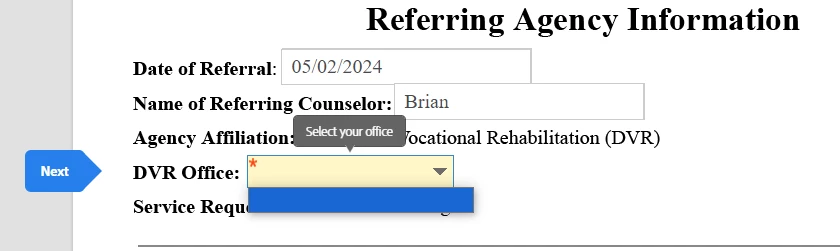
The form is set up, from what I can tell, in every way necessary to function properly.  When the document is sent to the recipient (me at a different email for testing), all fields work as expected EXCEPT the drop-downs.  The drop-downs can be clicked, but the options become a single blank option.  The screen-captured example is a drop-down list with about 20 options.  There is a later drop-down in the form with only 4 options.  Any advice would be very helpful!
 

This topic has been closed for replies.

1 reply

Amal.
Community Manager
Community Manager
May 2, 2024

Hi @TheCrystalHive 

Hope you are doing well and sorry to hear that

Is this an issue with a particular PDF file or with all the PDFs? Please try with a different PDF file and check. If the file is stored on a shared network/drive please download it to your computer locally and then try again.


Please share a small video recording of the steps you are doing and the issue for more clarity.

What is the version of the OS and the Acrobat DC you are using? To check the version go to Help > About Acrobat and make sure you have the recent version 24.02.20687 installed. Go to Help > Check for updates and reboot the computer once.

Also, try to repair the installation from the help menu (Win Only) and see if that works.

Please try to reset the Acrobat preferences as described here https://community.adobe.com/t5/acrobat-discussions/how-to-reset-acrobat-preference-settings-to-default/td-p/4792082 and see if that works.


~Amal

New Participant
May 7, 2024

Thank you for your reply, Amal.

This problem persists across any PDF that I attempt to add a drop-down field.  All other fields work without issue and the tabbing order I establish also works without issue.  The only problem is the drop-down fields.  This happens with fresh PDFs, ones I am editing, ones I am preparing, etc.

I am using Windows 10 Enterprise, 10.0.19045 Build 19045
AMD Ryzen 7 3700X 8-core Processor
16GB RAM
ROG STRIX B550-F Gaming motherboard
(if any of that hardware matters)
Adobe Acrobat version is up-to-date as of posting of this reply.  Check Updates returns "No updates available, Installed: Adobe Acrobat (64-bit)"

I have also repaired the installation and returned the installation to all default settings/preferences.
The attached videos do not show pop-up windows within Adobe, but the first video shows how I input the Drop-Down field using "Prepare Form".  I add the options: <Select One>, Email, Phone Call, Text Message with the checkboxes checked of "sort items", "check spelling", and "commit selected value immediately" with "<Select One>" as the default displayed option.

Then, since the Windows screen recorder considered pop-ups and drop-downs to be sub windows and won't show on a video, I've attached screenshots showing the blank drop-down fields.