


New Participant
November 23, 2022
Answered

Error when save as PDF/A - Could not copy file...

  • November 23, 2022
  • 11 replies
  • 27517 views

Hi


When I try to save any PDF File to a PDF/A File, I get the error message:
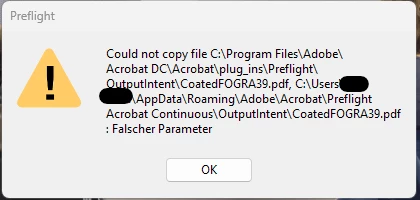


Preflight

Could not copy file C:\Program Files\Adobe\Acrobat DC\Acrobat\plug_ins\Preflight\OutputIntent\CoatedFOGRA39.pdf, 

C:\Users\%user%\AppData\Roaming\Adobe\Acrobat\Preflight Acrobat Continuous\OutputIntent\CoatedFOGRA39.pdf

: Falscher Parameter


I run the repair function, reinstalled Adobe Acroba Pro > no success


Then I copied all OutputIntent files from the path above to the mentioned user-folder path manually and now the following Errormessage appears when I try to save the file as PDF/A:
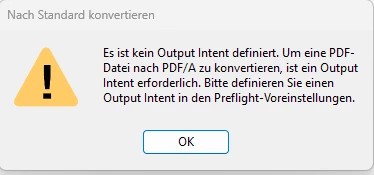


Nach Standard konvertieren:

Es ist kein Output Intent definiert. Um eine PDF-
Datei nach PDF/A zu konvertieren, ist ein Output
Intent erforderlich. Bitte definieren Sie einen
Output Intent in den Preflight-Voreinstellungen.


So, I defined an OutpuntIntent (see prnscrn) and I still get the same ErrorMessage concerning OutputIntent.
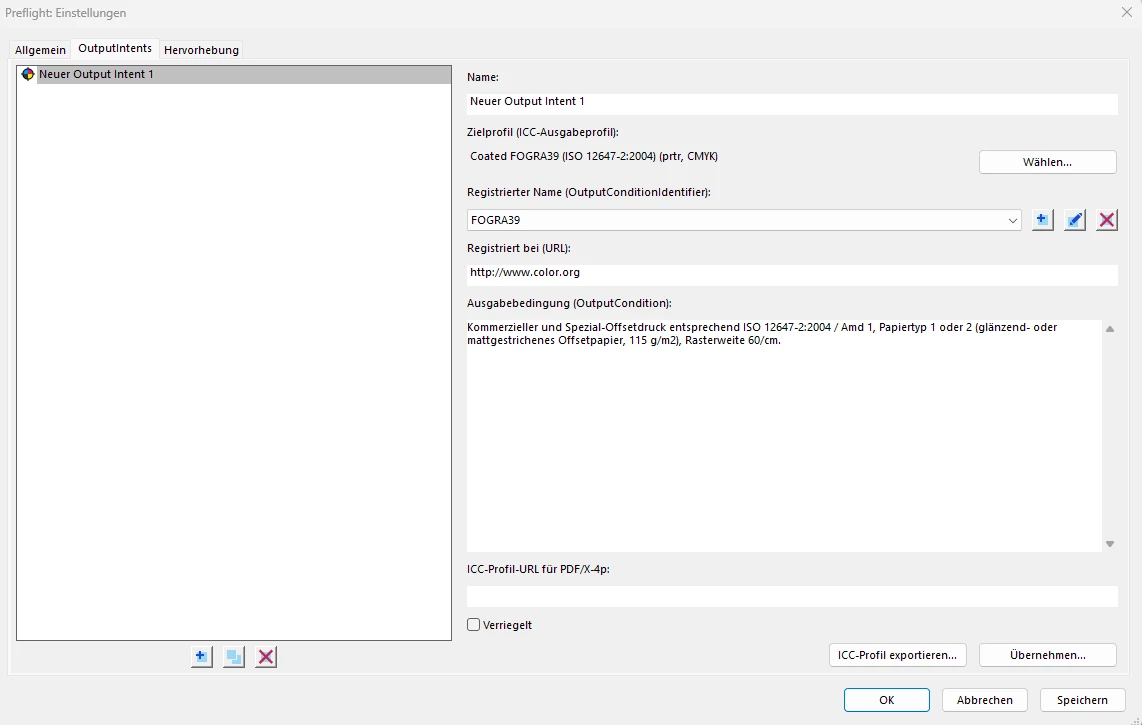


Ideas?


regards

Correct answer Kris38274894ji84

Found a solution that works:

  1. Turn off "Enable protected mode at startup"
  2. Close Adobe
  3. Delete the folder Preflight Acrobat Continuous (%APPDATA%\Adobe\Acrobat\Preflight Acrobat Continuous
  4. Open Adobe
  5. Turn back on "Enable protected mode at startup"

11 replies

Inspiring
June 26, 2024

What I've tried:

  • Uninstall of adobe with the cleaner tool and uninstalled creative cloud. (Didnt work)
  • Updated it to 24.02.20687. (Didnt work)
  • Ran as Admin account. (Didnt work)
  • Manually reset preferences through the roaming appdata file. (Didnt work)
  • Repaired installation through adobe. (Didnt work)    

Kris38274894ji84Correct answer
Inspiring
June 26, 2024

Found a solution that works:

  1. Turn off "Enable protected mode at startup"
  2. Close Adobe
  3. Delete the folder Preflight Acrobat Continuous (%APPDATA%\Adobe\Acrobat\Preflight Acrobat Continuous
  4. Open Adobe
  5. Turn back on "Enable protected mode at startup"
New Participant
February 24, 2025

This worked for me, thanks!

New Participant
July 12, 2023

Same issue here, this is the only reason I need the software and its not working.
Trying to install the 2021 version now to see if I can get it to work. Its awful.

New Participant
July 12, 2023

I figured it out!
Click 'Preflight'

Then click 'PDF Standards'

Select the standard

Analyze


Now change tab to 'Standards' with the diamond

Choose the right option

Continue

it should work


mariahweyne
Inspiring
July 12, 2023

Check this video https://youtu.be/Z5vh6kQ_vHU 

New Participant
March 21, 2023

same problem, any solution from Adobe company?

Meenakshi Negi
Community Manager
Community Manager
March 27, 2023

Hi Alberto5F8B,


Thank you for reaching out.


Would you mind sharing more information on what happens?

Do you get the same error message as mentioned in the post?

Share the steps you do to convert the PDF. Also, confirm if the file is saved locally on the machine.

Share the Acrobat and OS version numbers with us.


Thanks,

Meenakshi

New Participant
March 28, 2023

Thank you Meenakshi,

here some info:

  1. Do you get the same error message as mentioned in the post? Yes, same error and after the pocess "Click "Edit" > "Preferences..." > Security (Enhanced) > uncheck "Enable Protected Mode at Startup" and "Run in AppContainer"" Acrobat shows a new pop-up error "No output intent defined. An output intent is required to convert a PDF file to PDF/A. Define an output intent in the Preflight preferences.11:01" (translated form italian)
  2. Share the steps you do to convert the PDF. File> Save as other > PDF/A
  3.  confirm if the file is saved locally on the machine: yes
  4. Share the Acrobat and OS version numbers with us. Acrobat Pro: 2023.001.20064 64bit - OS: win 11 pro, build 22621


thanks for support

New Participant
January 27, 2023

Adobe Support just confirmed, that this is a bug.

They are working on it and they will fix it with the next possible update.


As a workaround, which is not working in all cases, they propose this:

Click "Edit" > "Preferences..." > Security (Enhanced) > uncheck "Enable Protected Mode at Startup" and "Run in AppContainer"

New Participant
December 6, 2024

Thanks! It works fine

New Participant
January 27, 2023

Hi.
Move all files from:
Program Files\Adobe\Acrobat DC\Acrobat\plug_ins\Preflight\OutputIntent
To the other location
Hope that helps.
Best regards

New Participant
January 27, 2023

I did this and receive a message "Could not create folder C:\Program Files\Adobe\Acrobat DC\Acrobat\plug_ins\Preflight\OutputIntent: Access denied"... I tried execute Acrobat as admin and give me the same error...

New Participant
January 27, 2023

From what I understand you did then:
Copy files from C:\Program Files\Adobe\Acrobat DC\Acrobat\plug_ins\Preflight\OutputIntent\,
To: 

C:\Users\%user%\AppData\Roaming\Adobe\Acrobat\Preflight Acrobat Continuous\OutputIntent\
After that you start Acrobat and try to save to PDF/A and get the error "Could not create folder C:\Program Files\Adobe\Acrobat DC\Acrobat\plug_ins\Preflight\OutputIntent: Access denied"

I would check if the folder:
C:\Program Files\Adobe\Acrobat DC\Acrobat\plug_ins\Preflight\OutputIntent\

Have all privileges for your account.

New Participant
January 19, 2023

Same problem here.

W11 Ent 

Adobe 2022.003.20310 64bit

New Participant
December 29, 2022

Same issue, any solution?

Abambo
Braniac
December 30, 2022

works for me! Share a PDF file (no confidential data on)!

ABAMBO | Hard- and Software Engineer | Photographer
New Participant
January 26, 2023

What did you did??

New Participant
December 7, 2022

Same issue here.

New Participant
November 24, 2022

I'm having the same problem on two computers with Win11 Home 64-Bit.

Ged_Traynor
Braniac
November 23, 2022

Moved to the Acrobat forum from Using the Community