


eabeer
Participant
March 23, 2018
Answered

Margin settings on Page Setup of Print dialogue window always grayed out at 1"

  • March 23, 2018
  • 1 reply
  • 42811 views

Whether I'm trying to print a PDF I create myself, or a commercial product user manual (PDF editing restricted), the margin settings on the Page Setup popup within the Print Dialogue window are always grayed out, showing 1".

I often need to print large PDF manuals in a 2-up format (2 doc pages per printed page).

Printers add extra white space between the 2 page images, so I need to reduce the PDF margins as much as possible to thus make the text larger and more legible.

The margin settings are grayed out for all three of my printers (Xerox Phaser office printer, Brother laser printer, Epson Inkjet printer).  They are grayed out even if I don't use the 2-up option and print the normal 1 doc page per printed page.

Is there a way to reduce margin size in all cases, even when the PDF is not editable?

Help would be much appreciated.  Thanks.
Correct answer Abambo

eabeer  wrote

Depending on the printer model type, the text will print to within 0.2" - 0.3" of the edge of the paper, but that's a hard limitation--not changeable. 

That's the printer's margin. There is no other margin involved with a PDF document.

A PDF is an electronic print (well that was the starting point of a PDF. Today it's much more but that's not relevant).

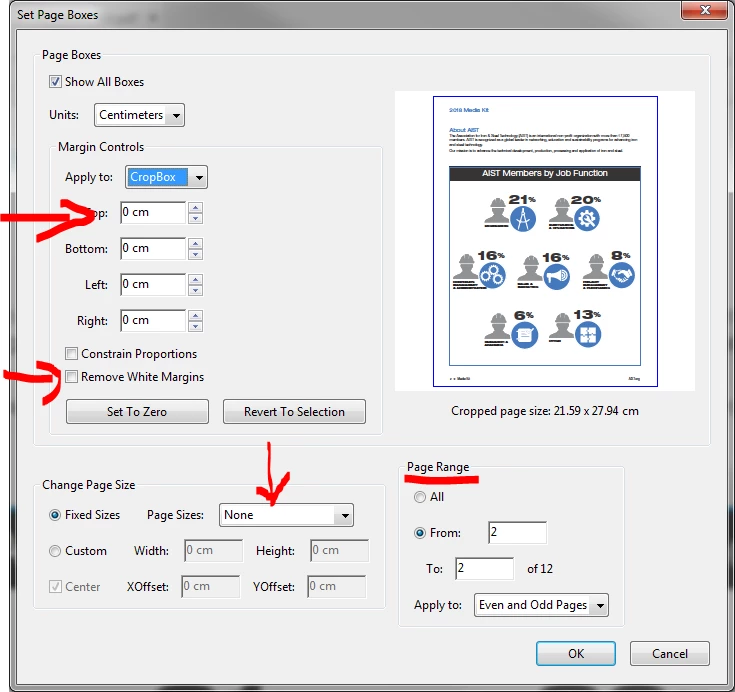
Any "margin" that has been defined in the PDF document has been defined by the Application creating the PDF file. With Acrobat DC (not reader!) it is however possible to crop the design to something smaller, if it is that what you need to do:

This is, however not possible if the document is protected.

1 reply

Abambo
Community Expert
Community Expert
March 24, 2018

The margin is a property of the printer and not of the PDF file.

ABAMBO | Hard- and Software Engineer | Photographer
eabeer
eabeerAuthor
Participant
March 24, 2018

I'm not so sure the margin is a property of the printer.  None of my printer settings (printer Properties in Windows, or hardware settings on the printer's front panel) have a settable margin.  Depending on the printer model type, the text will print to within 0.2" - 0.3" of the edge of the paper, but that's a hard limitation--not changeable. 

Anyway, I found another way to do mostly what I want, i.e. to print a larger doc image (by shrinking the margins & thus making room for expanded text size) of each 8.5 x 11 PDF in a 2-up image per page of paper.

My Xerox Phaser printer allows specifying custom-sized paper.  So, for a 2-up side-by-side 8.5 x 11 image on Legal paper (8.5 x 14), I define a "Big Legal" size of 10 x 14.3."  The printer, then gets fooled into thinking it has more paper size to work with, so it prints further to the edges and thus expands each page image resulting in larger sized text.  It'll print to within about 1/2" of the edge of the paper this way.  Unfortunately, I can't reduce the space between the 2-up images this way, so I have to put up with the PDF-defined right and left margins in the middle of the 2-up page. 

I wanted to get the page images all the way to within 0.2" of the paper edge, but I can't increase the Legal size any more than about 10 x 14.3 or my Xerox will think it has to Tile the printout, using 4 sheets of Legal paper.

Anyway, since so many software application manuals are no longer delivered as a hard copy with the product, it's nice to be able to print  a 2-up copy from the PDF  with text that is moderately expanded and thus large enough to read.  Obviously, a 2-up printing saves considerably on paper and somewhat on toner, also.

Abambo
Community Expert
AbamboCommunity ExpertCorrect answer
Community Expert
March 26, 2018

eabeer  wrote

Depending on the printer model type, the text will print to within 0.2" - 0.3" of the edge of the paper, but that's a hard limitation--not changeable. 

That's the printer's margin. There is no other margin involved with a PDF document.

A PDF is an electronic print (well that was the starting point of a PDF. Today it's much more but that's not relevant).

Any "margin" that has been defined in the PDF document has been defined by the Application creating the PDF file. With Acrobat DC (not reader!) it is however possible to crop the design to something smaller, if it is that what you need to do:

This is, however not possible if the document is protected.

ABAMBO | Hard- and Software Engineer | Photographer