


Participating Frequently
September 12, 2023
Answered

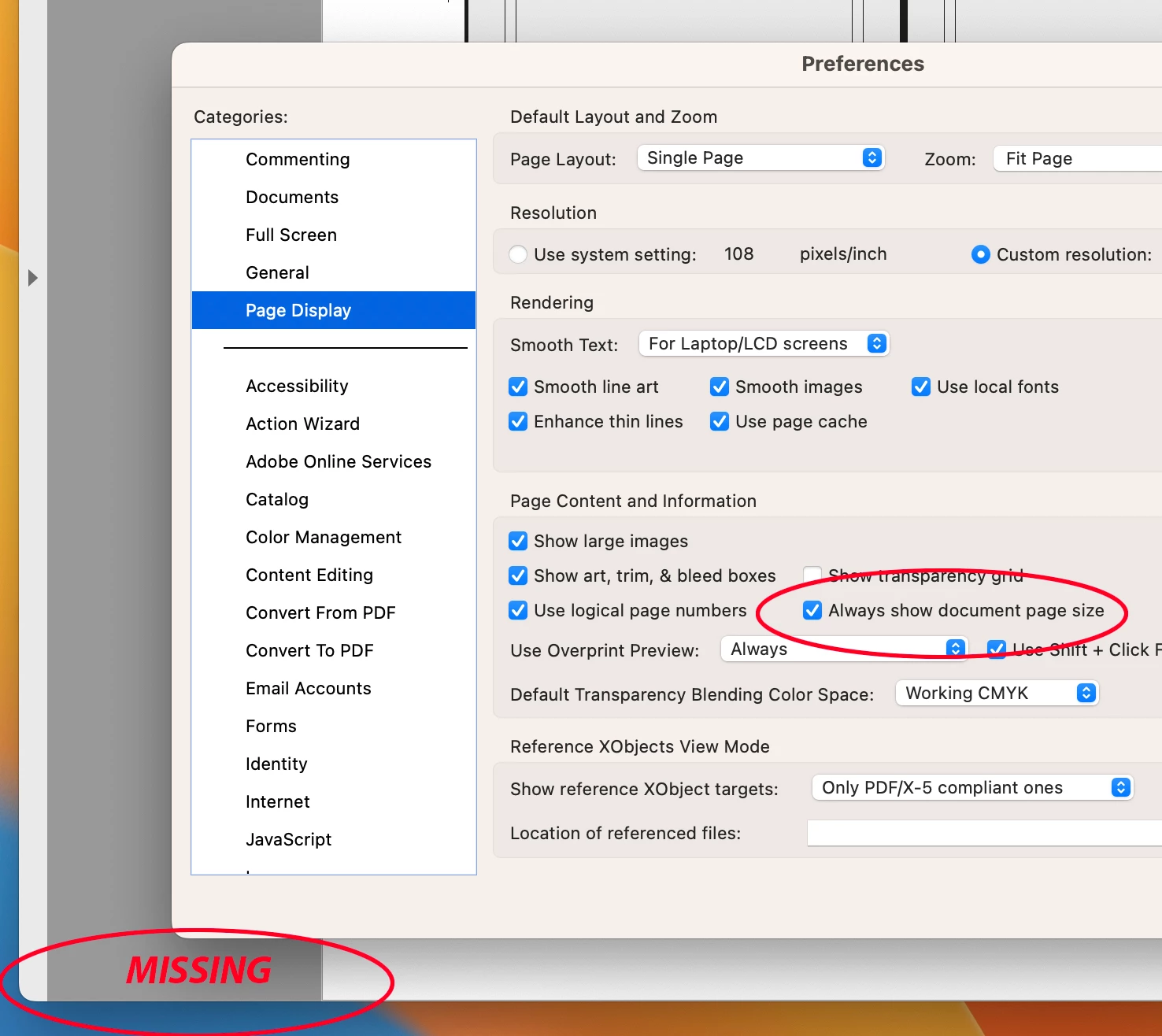
"Always Show Document Pages Size" in "Page Display" preference is suddenly not working !!!

  • September 12, 2023
  • 54 replies
  • 60325 views

I always rely on the Document Page size in the lower left frame bar of any and all PDF windows.  For some reason, today it is gone.  I have restarted Acrobat, rebooted my machine.  I have even deleted the Acrobat preferences and let it create a new preference file.  No matter what, this check box clicked or not clicked, does not yield me what I have relied on for many years.


Thoughts please.


Acrobat DC for Mav. v 2023.006.20320


Correct answer AJaycup

The solution is to go to the menu tab, down to view, then select "Disable New Acrobat". This reverts to Adobe UI before it was made to be garbage and will display the page size all the time. As far as I can tell, all the features are still there as well.

54 replies

Participant
October 11, 2023

What a bunch of Bologna. This is a feature that we in the print and design industry need to see on the fly at a glance. not digging deep into looking for. How can we roll back to a previous version of ACROBAT from CC. this is a major oversight on Adobe®.

Neil LCC
Participating Frequently
October 10, 2023

Hi folks. Have been following this and in communication with an IT tech at work. He was not having the problem with the 2023 version. As a test I went and installed Acrobat 2023 on a new Mac mini we recently started using in our department. It had no previous CC apps installed. The document size feature works as normal on that device too, and no issues with the scroll bars. So this sounds like an app update bug. 


Last week when I inquired about the issue he explained that Adobe's uninstaller was not very good at removing everything. In his opinion it leaves a lot of crap behind. He said when he has an unresolved issue, such as this, he'll remove the whole suite and use Adobe's cleanup tool. Then reinstall. An option if you want to take it that far.

Participant
October 10, 2023

Did folk who do not use this app for work make this decision?  It's really an inconvenient update and should be put back. 

Neil LCC
Participating Frequently
October 10, 2023

I just think someone screwed up and accidentally did it. It is not adding anything new because it had already been there, unless one checks the Always show..." box so in adding in other features they broke this. And hopefully they will hear our voices and fix the bug.

Participating Frequently
October 10, 2023

I would be inclined to agree with you that it was an accident if it weren't for this condemning snippet from this post: https://community.adobe.com/t5/acrobat-discussions/acrobat-scroll-framework-upgrades-for-macos/td-p/14096153


... Very unhelpfully linked by Adobe in another discussion that referenced this issue:

Participant
October 10, 2023

After a while now. I have eventually got used to the hovering or I just bring up my Enfocus Inspector and it shoes the size, but now this morning the hovering is gone...nothing shows up...Ive tried turning on or off "Always show document page size" and neither show anything in bottom left corner.

I even have my automatic updater turned off, and this is still happening!

Anyone else have the hovering dissapear on them now....hmmmm...what is going on???

Neil LCC
Participating Frequently
October 10, 2023

IT tells me Tuesday is Adobe update day. Thanks to a link earlier in this string I've installed an older version where the size feature still works. I have auto update OFF in my CC prefs AND in Acrobat prefs. But, this morning size was gone and hover not working. Yep, it's Tuesday, I've been updated to 2023. Second week in a row where Adobe updated even tho my preference is not. Here we go again, uninstall 2023 and reinsall older version. Maybe I have to turn off my computer on Mondays until they fix this dreaded thing.

Participating Frequently
October 5, 2023

it would be best to leave the matter as it was. And if the page size display option was turned off in the settings, hovering the lower left corner of the page could display page size. 

Participating Frequently
October 1, 2023

I posted this link and more feedback to another thread and Amal from Adobe has responed with a positive mesage, no timescales....


The other conversation is here.... 

https://community.adobe.com/t5/acrobat-discussions/adobe-acrobat-and-reader-september-2023-updates-now-available/m-p/14121926#M431618


Adobe Employee ,
Sep 29, 2023


LATEST

Hi @TriChas 


This issue is know to our engineering team and is being worked on.


The fix will be available in the future updates.


~Amal

Participating Frequently
September 29, 2023

Anybody here know how to get rid of these new popups that come up when using the Edit Pdf feature. It comes up under my cursor everytime I click a new object to edit. It is not helpful and always in the way for me.


Participating Frequently
September 29, 2023

This menu is always in the way now too. This new update sucks.

CampaignCatalyst.net
Participating Frequently
September 27, 2023

1. Having to "uncheck" the Always on to activate the Hover function is not intuitive.

2. Having done so it only shows the first dimension of my large file. 24.00x _____ 2nd dimension is missing.

3. Please put it back. The reason I turned on the "Always Show Document Page Size" so many years ago was that I didn't want to have to move my mouse over to hover the size on. Like so many others, I just want the size to be there ALL THE TIME!

Thank you.

Amal.
Community Manager
Community Manager
September 29, 2023

Hi all


This issue is know to our engineering team and is being worked on.


The fix will be available in the future updates.


~Amal

Participating Frequently
September 29, 2023

Hi Amal, 

thanks for acknowledging the issue. Would be good if you can clarify what the fix you are aiming for is? Will the page size display bar return? The scrollbars also?

Perhaps now is the time that we can make suggestions as to what would be helpful for Pro users in design/pre-press and related fields. 

If we can return the Page Size dimensions bar, perhaps there could be a whole "quick look" prepress info bar in that space – Perhaps it could list: Document Size / Detected Trim Size / Colour Spaces / Image Resolution Range …

I know those bits of info would be appreciated by me as an "Always Show" quick look part of the display. Perhaps others have suggestions on what would be handy.

Thanks

Participant
September 26, 2023

I don't like this update either. I rely on seeing the document size for proofing creative all day. Plus, the hover doesn't work for me.  A drag, bring this feature back please!

Participating Frequently
September 26, 2023

I uninstalled Acrobat Pro, restarted my mac and installed this older version. page size is there and i dont have to wait 5minutes for anoything to load!


https://trials.adobe.com/AdobeProducts/APRO/Acrobat_HelpX/osx10/Acrobat_DC_Web_WWMUI_1014.dmg#sa_src=web-messaging