


Known Participant
June 26, 2020
Answered

"Insufficient data for an image" error when opening a PDF file

  • June 26, 2020
  • 3 replies
  • 3341 views

Hi,


When I try to open a PDF file at https://www.dropbox.com/s/yrcdx5aawb3plgs/Ya-Gotta-Try-Nestico.pdf?dl=0 , I will always get "Insufficient data for an image" error.


I try to search online and find some similart posts, such as https://community.adobe.com/t5/acrobat/insufficient-data-for-an-image/td-p/9691197 and https://community.adobe.com/t5/acrobat-reader/insufficient-data-for-image/td-p/4334063


But the solutions for these posts do not work for my case.


I am using the latest version of Acrobat Reader(2020.009.20067).
 

This topic has been closed for replies.
Correct answer JR Boulay

I gave you a link for downloading the "OK" version I made. You could have at least downloaded and examined it.


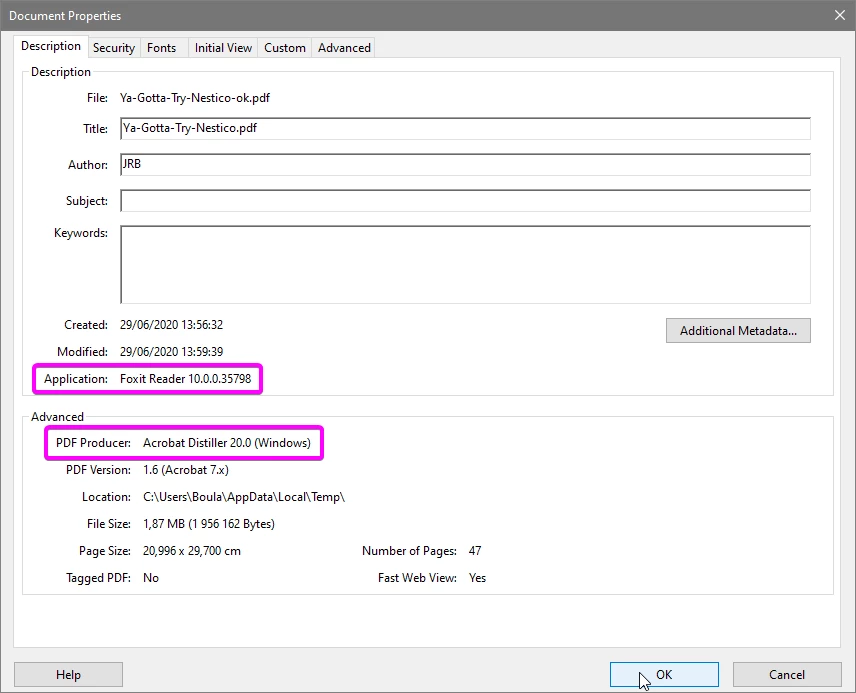
I don't know what is the problem with your file, I just found the solution to repair it: I opened your file with Foxit Reader and I use the AdobePDF printer to recreate a new file.


3 replies

JR Boulay
JR BoulayCorrect answer
Community Expert
July 3, 2020

I gave you a link for downloading the "OK" version I made. You could have at least downloaded and examined it.


I don't know what is the problem with your file, I just found the solution to repair it: I opened your file with Foxit Reader and I use the AdobePDF printer to recreate a new file.


Acrobate du PDF, InDesigner et Photoshopographe
ccw123Author
Known Participant
July 3, 2020

Thank you very much. Actually I download FoxIt Reader and try by myself. Your solution works perfectly. But at that time your last post does not exist, so I mark your previous post as a correct answer. Now I have marked your latest one as the correct answer.

JR Boulay
Community Expert
June 29, 2020

Here is your file in "OK" version: https://documentcloud.adobe.com/link/track?uri=urn:aaid:scds:US:c93e03e2-d214-434d-9158-e8174bc4fd6e


See Document Properties to find out with which software opened the messy file and which software re-converted it to PDF.

Acrobate du PDF, InDesigner et Photoshopographe
ccw123Author
Known Participant
June 29, 2020

Hi, JR_Boulay,


What is the problem with the file? And how you make it "OK" again? Thank you very much.


I check "Document Properties" and it shows several information, below:


1. Application: EPSON Stylus CX5400.

2. PDF Producer: Adobe Acrobat 6.0 Paper Capture. 

ls_rbls
Community Expert
June 29, 2020

Please share a little more about the type of PDF that you're trying to open.


Can you tell if this is a PDF that generated from another PDF producing software(i.e. like an SQL report, AutoCAD, PitStop, tax and accounting software  or other Adobe software that is not Acrobat )? 

ccw123Author
Known Participant
June 29, 2020

Not sure. I get the file from a friend. Below is what she said about the file:

"No idea how the file became corrupted. It was downloaded from a data service, scribd.com. Files on there are uploaded by many members."