


Participant
April 2, 2021
Answered

Send for Signatures hangs at 72% (still)

  • April 2, 2021
  • 21 replies
  • 57900 views

We are still having issues where Adobe Acrobat Pro DC 2021.001.20145  hangs at 72% when sending for signatures regardless of repair, updates, uninstall and reinstall.  I need a fix for this!

I'm attaching the System Report for review.  
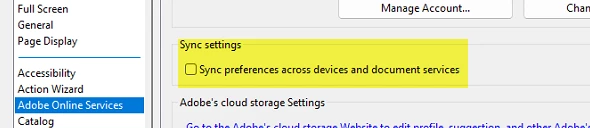
Correct answer LCAadmin

Turned this settting off, fixed my issues for useres.


21 replies

Participant
November 20, 2024

For business admins that have users that have Adobe Pro licenses experiencing this issue. It appears that removing and readding the license on the account resolves this issue.

Participant
October 1, 2024

I was able to bypass the 72% by compressing my files. 


In the application click on All tools--->View more--->Compress a PDF--->Advanced Optimization--->Click Ok. Then try to send the form out for signatures. 

Hopefully this helps everyone as well! 

Participant
October 21, 2024

Unfortunatly I have 3 in our school district that are still not able to get past 72%.

I had to reinstall 2 for server not connecting errors from bad installs.

But now getting stuck at 72% and I have turned Sync on/off, I did the optimization, our firewall is clear otherwise we would have hundreds with the issue. 
We are using Adobe CC and all 3 are fully up-to-date. Any help would be apreciated.

Participant
April 23, 2024

Its 4/23/2024 and this is still a problem.  Mine started freezing at 72% a couple of days ago and I have done everything suggested and still not working.  I have contracts that need to go out. This added to other glitches I have been dealing woth and I am wondering if Adobe is worth continuing with.  Its been years and the same problem has not been fixed. 

Amal.
Community Manager
Community Manager
April 23, 2024

Hi there,


Hope you are doing well.


Have you started experiencing this issue recently?


What is the version of the Acrobat DC you are using? To check the version go to Help > About Acrobat and make sure you have the recent version 24.02.20687 installed. Go to Help > Check for updates and reboot the computer once.
 
Also try to repair the installation from the help menu (Win Only) and see if that works.
 
Please try to reset the Acrobat preferences as described here https://adobe.ly/3UvL9jr


If it still doesn't work, Would you mind collecting the Adobe CC logs https://adobe.ly/4ba38Bg and Procmon logs (Win Only)  https://adobe.ly/4aZ5brY  and share them via any cloud storage. Just upload the log file to the cloud and generate the link and share that link with us for further investigation.


~Amal

tttomdemaria
Participant
December 8, 2023

I know this is old and some other fixes were found, but I think those might not be actually resolving the root cause.  I used netstat to see what was being sent over the network and saw that coresync.exe was the only app actually communicating over the internet that was associated with Adobe when I attempted to upload the doc.  I manually added an exception in windows firewall for that specific exe and document upload stopped getting stuck at 72%

Known Participant
October 18, 2023

I have an Adobe Pro Teams account, I cannot send an E-Signature. On the desktop version, once I've entered the recipient email, and select 'specify where to sign' the document will load, and the progress bar will reach 72% and will get stuck after that. The issue is intermittent. Today I sent two documents to two different recipients with no issues. The third one failed. When I go to the web version, I get a notification to contact my administrator. I've tried two times now to solve this by chat and both times the Adobe support employee ended the chat. Both times, it was after I provided all the information and they asked all the questions. It's evident that protocol is simply end the chat when you cannot solve a problem. I've never seen a company with a platform as large as Adobe have reliability issues like they do and choose not to support their customers. Maybe reallocate some of you marketing and commercial spend to supporting your customers and solving issues that prevent basic function of your application. 

LCAadminCorrect answer
Participant
April 27, 2023

Turned this settting off, fixed my issues for useres.


Participant
January 30, 2023

i have same error , how to resolve

Participant
January 27, 2023

I found the answer in my case. I had a subscription valid through June of this year (5 months remaining), but I non-renewed the subscription effective in June. If you check your account page it will show canceled, but list coverage paid through a specific date. I called Adobe tech to find the issue, they advised this was the problem, that I needed an active subscription, and transferred me to billing. Despite my complaints that I had paid for usage through June as stated in the system that this program should currently be working, they would/could not fix the problem, I assume they WOULD NOT. So the billing rep refunded the pro-rated balance and gave me an annual subscription for Pro at roughly 50% off. Since it was only a $20 charge over what was being refunded I went with the deal. once the subscription was back up and listed as active it worked fine. Adobe basically strongarmed me into renewing. Since this was the case I will be requesting that they renew next year at the same low cost. Good luck to all! 

Participant
January 27, 2023

So I may have stumbled upon the answer to this today after a lot of trial and error.

One of our end users was getting this error, and I tried all of the fixes here, including syncing the accounts, but it was always getting stuck at 72%. Interestingly though, whenever I tried it it would always work. I noticed that they were deleting the file name/message name and leaving that field blank. When I went to the online version though, there was an * next to that field that said "required". 

Anyway, I had the user make sure and not delete that field, and put something in there, and it works every time now. Adobe, I think the fix for you is going to be that if someone leaves that field blank, it needs a pop up that says "required". The desktop version doesn't have the *, and lets you submit it without it even though it will fail.


Participant
December 4, 2022

December 2th 2022, crazy 72% issue still happening even with Zscaler disabled (completely turned off), restarts, logged-out and logged-in again both in Web and in the Preferences Adobe Reader Mac version. Nothing.

This is ridiculous! See images below:


Amal.
Community Manager
Community Manager
December 6, 2022
Participant
December 6, 2022

@7443664 the link you shared just points to this long thread. Which help page I need to look?

Do you mind copy pasting in your reply the exact steps one need to take to resolve the issue?