


Juan Cano
Inspiring
September 15, 2021
Question

Text in Comments box shrinks to unreadable size

  • September 15, 2021
  • 2 replies
  • 4257 views

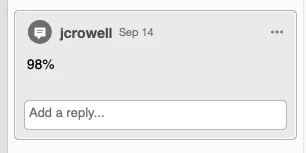
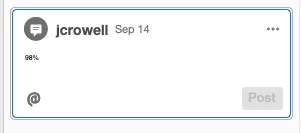
I get a PDF with comments, and sometimes I can't highlight the edit, but I can if I double-click. For a year now at least, if I double-click a Comment, the size of the text shrinks to nearly unreadable sizes.


Is this a setting I can change?? See images. I have been using Acrobat since the earth was flat and this is extra PITA.
 

This topic has been closed for replies.

2 replies

Document Geek
Braniac
September 15, 2021

Open the highly useful and sadly abandoned Properties Panel (Cmd/Ctrl + E). 

Open your pop up note and select your text. Click the fourth button in until it is the size you want.

While the comment text in the Comments pane appears to be set by the aforemention preference, you can manually change the font settings using the Properties panel. Then when you double click the text in the Cmmants pane, the font will go back to the size as set by any changes to in the Properties panel.

I think the best way to deal with it would be to have @try67 write a short script to change the font properties of each comment to whatever you want them to be. That way, you can set the overall font size using the Preference, but the font size when double clicked will be appropriate as well. 


You'd think they'd autoamtically match, but well...

Juan Cano
Juan CanoAuthor
Inspiring
September 15, 2021

Hmmm. I can't see the font size when I click on the Properties window. I can change colors, opacity, insert some funky icons which not sure what they do and see the author's name. 


try67
Braniac
September 15, 2021

This is a different kind of comment. We thought you were talking about a pop-up comment.

However, my code will still work, you just have to change it a bit. Use this version:


var newTextSize = 15;
this.syncAnnotScan();
var annots = this.getAnnots();
if (annots!=null) {
	for (var i in annots) {
		var annot = annots[i];
		if (annot.type!="Sound" && annot.type!="FileAttachment") {
			var annotContents = annot.richContents;
			for (var j in annotContents) annotContents[j].textSize = newTextSize;
			annot.setProps({richContents: annotContents});
		}
	}
}


To run it from the JS Console do the following (this is for Windows):

-Copy the code from above.

-In Acrobat, press Ctrl+J to open the Console window.

-In the lower part of that window there's a text area field with some default text in it.

Click into that field and select all the text. Paste the code over that text.

- Select the full code using the mouse or keyboard and press Ctrl+Enter to run it.

Juan Cano
Juan CanoAuthor
Inspiring
September 15, 2021

So in the Preferences, if I bump the Comments text size to a gaudy 18pts, when I double click the text is an adequate 10pts or so. So not fixed but not as horrible.


BTW, on a Macbook Pro, running OSX 11.5.2 with latest of Acrobat Pro DC 2021.005.20058


Amal.
Community Manager
Community Manager
September 15, 2021

Hi Juan Cano


Hope you are doing well and sorry for the trouble. As described the text in the comment box shrinks on double click.


Is this a behavior with a particular PDF file or with all the PDFs? Please try with a different PDF file and check.


Also, a new release for Adobe Acrobat/Reader DC is now available, version 21.07.20091. Please update the application from the Help menu > Check for updates and reboot the computer once.


You may also try to reset the Acrobat preferences as described here https://community.adobe.com/t5/acrobat-discussions/how-to-reset-acrobat-preference-settings-to-default/td-p/4792082 and see if that works.


Also try to create a new test user profile with full admin rights or enable the root account in Mac and try using the application there.


Regards

Amal

Juan Cano
Juan CanoAuthor
Inspiring
September 15, 2021

It happens with all PDFs and has been happening for close to a year. Will update to the latest version today but I do not think that will solve it.